A recruiting team does not always need separate CRM and ATS products. If your main pain is active hiring, a strong ATS may be enough; if you also need long-term candidate nurturing or agency client management, then CRM ATS integration becomes the real question. CVViZ fits both paths because it can work as a combined recruiting platform for agencies and growing teams, or as an intelligent layer on top of an existing ATS.
That is the right way to think about this decision. Do not start with the software label. Start with the work: screening too many resumes, re-engaging candidates, managing client requirements, and keeping hiring moving without drowning in spreadsheets and email. Once you map those workflows, it becomes clear whether you need one system, two connected systems, or CVViZ to cover both.
ATS vs recruitment CRM: what each one actually does
An ATS handles active hiring. A recruitment CRM handles candidate relationships over time. For agencies, CRM can also mean client and business-development management, which is a separate but related workflow. The difference matters because teams often buy “CRM” expecting one thing and get a tool that only covers part of the job.
| System | Main job | Typical records and workflows | Best fit |
|---|---|---|---|
| ATS | Manage active requisitions and hiring steps | Jobs, applications, stages, interviews, decisions | When you need clean application tracking |
| recruitment CRM | Nurture candidates over time | Talent pools, follow-ups, tags, outreach, rediscovery | When you want to re-engage passive or past candidates |
| agency CRM | Manage client growth and delivery | Companies, contacts, leads, requirements, communication | When recruiting and account management need shared context |
| Combined ATS + CRM | Connect hiring and relationship work | Candidate, job, and sometimes client workflows in one place | When one platform covers the full process well |
The key point is simple: an ATS keeps hiring organized, while a recruitment CRM keeps relationships alive. For staffing firms, the client-facing meaning of CRM is just as important as the candidate-facing one. If you ignore that distinction, you can end up with a system that tracks applicants but does not support the way your team actually works.
When should you use CRM ATS integration instead of separate tools?
Use CRM ATS integration when your hiring work is already spread across too many tools and the handoffs matter. If a recruiter has to copy data from email to spreadsheet to ATS and then back again, integration becomes a workflow fix, not just a tech project.
Here is the practical test. If your team mainly needs job posting, screening, interviews, and reporting, a single ATS may be enough. If you also need to nurture passive candidates, rediscover past applicants, or manage agency clients and requirements, then a true recruitment CRM becomes important. In that case, the question is not “Do we have a CRM?” It is “Does the CRM connect to the actual hiring work?”
A solid CRM ATS integration should help you:
- capture applications in the right candidate record
- search and rediscover talent without creating duplicates
- keep screening evidence attached to the job
- preserve follow-up and communication history
- coordinate interviews without re-entry
- report on pipeline movement and sourcing effectiveness
That is why we treat integration as a process question. If the records are not connected correctly, the tools are just sitting next to each other. If the records and actions flow cleanly, the system supports hiring instead of slowing it down.
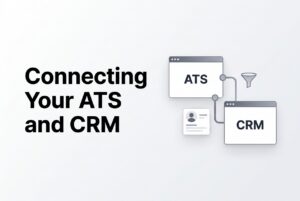
What workflows should a CRM ATS integration connect?
A useful CRM ATS integration connects the full recruiting sequence, not just the login screen. The best setups move data through the work recruiters actually do, from intake to decision.
First, the system should capture applications and attach them to the correct role. Next, it should help you find and rediscover candidates from the existing pool, including duplicates, without losing history. Then it should support screening by keeping job context, resume evidence, and prescreening answers visible to the recruiter.
After that, the system should make engagement easy. Email replies, follow-ups, reminders, and activity history should stay tied to the candidate record. Interview scheduling should also stay connected to the pipeline, including calendar events and status updates. Finally, the hiring manager or client should be able to see the right context without exposing more data than needed.
A strong integration should answer these questions:
- Which system owns candidate, job, company, and requirement records?
- Which fields and status changes sync?
- Is sync one-way or two-way?
- How are duplicates handled?
- What happens if a transfer fails?
- Who can view or edit each record?
If you cannot answer those questions, you do not really know how the integration works. And if you do not know how it works, it will not be dependable in daily hiring.
Why CVViZ works for agencies and growing teams
CVViZ works for recruiting teams because it supports both sides of the hiring problem: active hiring and relationship management. For growing in-house teams, that means jobs, applications, screening, communication, and scheduling in one place. For agencies, it also means client and requirement workflows alongside candidate delivery.
For agencies
CVViZ offers recruitment agency CRM functions for companies, contacts, leads, account managers, and communication. It also supports a client portal and collaboration features. That matters because agency work is not just about finding candidates. It is about managing the full chain from prospect to client requirement to candidate submission.
CVViZ also connects candidate work to recruiting workflows. Recruiters can manage sourcing, screening, communication, and interview coordination while keeping client activity in the CRM layer. That separation is useful. It lets the team keep account work and candidate work organized without forcing them into the same record model.
For growing teams
For an internal hiring team, CVViZ helps reduce the friction that builds up fast when hiring volume rises. It supports contextual AI resume screening, relative candidate ranking, job posting, workflow automation, email tools, candidate search, and recruitment analytics. In plain terms, that means less manual sorting and more time on real evaluation.
A growing team should still test it with real jobs and real candidates. That is the safest way to confirm fit. But the structure is already there: one system for the hiring workflow, plus CRM-style relationship handling where needed.
Can you use CVViZ with an existing ATS?
Yes. CVViZ also supports a route where you keep your existing ATS and add selected capabilities on top of it. That is useful when a team does not want to replace its current system but still needs smarter screening, ranking, parsing, or sourcing.
This is where buyers need to be careful. Integration depends on the current ATS, the fields you want to sync, and the exact workflow you want to support. Do not assume every ATS connects the same way or that every record updates automatically. Ask for a workflow-specific demo using your actual jobs, candidates, and handoff points.
CVViZ supports API-based access and can act as an intelligent layer over an existing ATS. It also supports email sync, calendar sync, Chrome-based importing, and communication tracking. That means the product can fit either as a full recruiting platform or as a selected-capability integration, depending on what your team needs.
The right choice is not “replace everything” versus “do nothing.” It is whether your current stack can handle the work cleanly or whether you need CVViZ to fill the gap.
What CVViZ includes that matters in CRM ATS integration
CVViZ includes the pieces that usually break down in recruiting: screening, ranking, communication, scheduling, and reporting. Those are the functions that make CRM ATS integration useful in the first place.
Here are the most relevant capabilities:
- AI resume screening using contextual matching
- relative resume ranking so recruiters can prioritize faster
- job posting to multiple boards
- automated candidate sourcing from the web and social platforms
- workflow automation for emails, notifications, and stage changes
- email templates, bulk emails, reminders, and campaigns
- candidate search with full-text, boolean search, and filters
- video interviewing and live code editor for developer hiring
- recruitment analytics and exportable reports
- recruitment CRM for agencies
- resume parsing API and duplicate detection
That mix matters because integration is not only about syncing data. It is about making sure the recruiter can actually act on the data once it arrives. A candidate record that lands in the system but does not help you screen, communicate, or schedule is not much help.
What should buyers verify before signing?
Before you sign, ask CVViZ to show the full workflow, not just the feature list. The demo should use a real job, a real candidate, and the actual handoff you care about. That is the fastest way to see whether the platform fits your process.
Use this checklist:
- Can you separate active applicants from nurtured candidates?
- For agencies, can you connect client companies and contacts to requirements, jobs, submissions, and communication history?
- Which system owns each record?
- What fields, replies, and status changes sync?
- Is sync one-way or two-way?
- How are duplicate profiles handled?
- Can recruiters rediscover past candidates without losing history?
- Are email, calendar, and interview updates visible in the right place?
- Which roles can edit candidate and client data?
- What implementation or usage charges apply to the exact workflow?
FAQ
Do I need a separate recruitment CRM if I already have an ATS?
Not necessarily. If your ATS already supports talent-pool search, follow-up, and candidate rediscovery, you may not need a separate tool. If it does not, then a recruitment CRM or a combined platform makes more sense.
Can an ATS also function as a recruitment CRM?
Sometimes, yes. But the label alone does not prove it. Test whether the product supports nurturing, segmentation, activity history, and rediscovery, not just application tracking.
Can CVViZ cover both ATS and CRM workflows?
Yes. CVViZ offers a combined recruiting platform for agencies and growing teams, and it also supports selected capabilities on top of an existing ATS. The right setup depends on the workflow you want to cover.
Can CVViZ work with an existing ATS?
Yes, but buyers should verify the exact data flow, sync behavior, and supported fields for their current system. The implementation depends on the existing stack and the capabilities you want to add.
What should an agency’s recruitment CRM track?
At minimum, it should track companies, contacts, leads, hiring requirements, communication history, and follow-up activity. It should also keep candidate delivery connected to the right job or requirement.
Does integration remove duplicate data entry?
It can, if the workflow is configured well. But you still need to confirm which fields sync, how duplicates are matched, and how failed transfers are handled.
Does CVViZ make hiring decisions automatically?
No. CVViZ supports screening and ranking, but recruiters still review the evidence and make hiring decisions.
What does CVViZ cost, and is Recruitment CRM included?
CVViZ publishes ATS plans from $99 to $499 per month, an Integrate option at $25 per job, and separate resume-parser pricing. The pricing page does not clearly show which plan includes Recruitment CRM, so confirm the current package before signing.