AI resume screening software

AI resume screening that ranks candidates by job relevance – not just keywords

CVViZ analyzes each resume in the context of your job description and screening criteria, then organizes applicants by relevance with evidence recruiters can review. Your team controls the shortlist and every hiring decision.

G24.5/5G2 rating SOC 2Type II GDPRCompliant

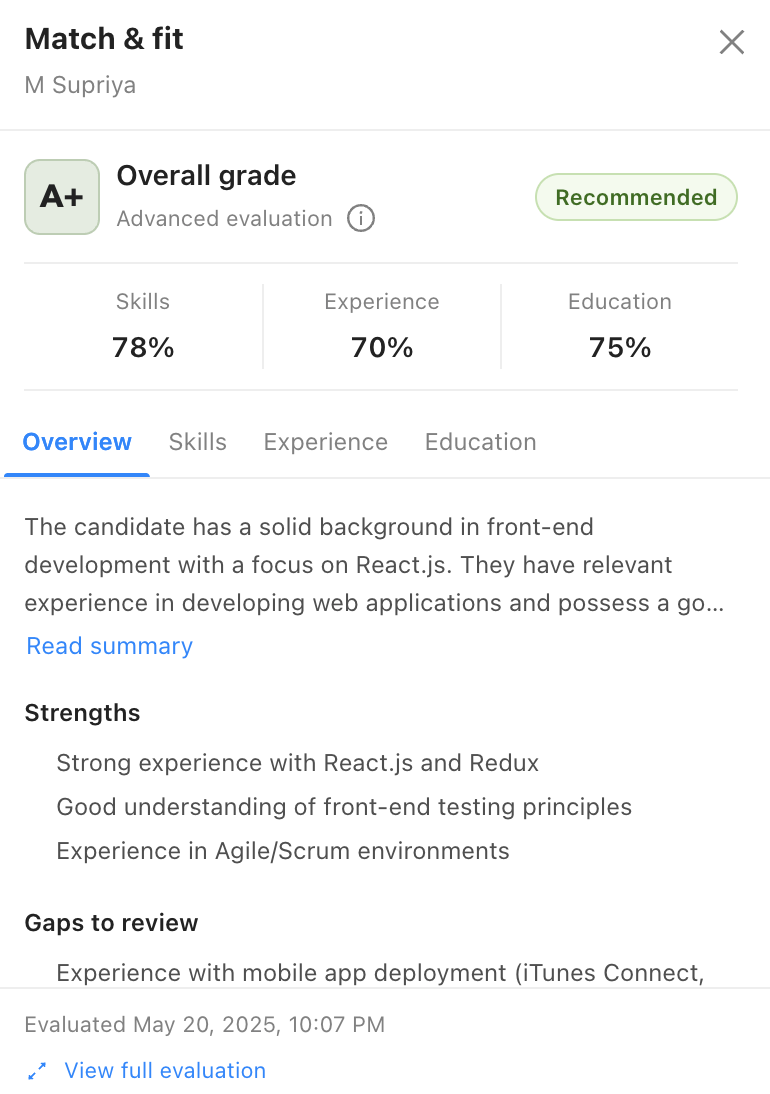
CVViZ AI resume screening interface showing contextual candidate ranking

TRUSTED BY 1,000+ COMPANIES FROM 35+ COUNTRIES

What is AI resume screening?

A faster way to prioritize applicants – with recruiters still in control

AI resume screening software compares resumes with the role, helps recruiters understand candidate relevance and organizes review. CVViZ assists with prioritization; it does not make the hiring decision.

01

Understand the role

Use the job description, experience expectations and configurable screening criteria as the basis for review.

02

Evaluate in context

Look beyond an exact term to related experience, role relevance, career history, education and transferable skills.

03

Review and decide

See ranked applicants and supporting resume evidence, then let recruiters confirm, adjust or reject recommendations.

Context over exact terms

Why keyword filtering can miss relevant candidates

Keyword search is useful for finding an exact term, but it can over-rank repeated words and under-rank equivalent titles, adjacent experience or transferable skills. CVViZ adds role context so recruiters can review a more useful order of candidates.

Keyword-only filteringCVViZ contextual screening
Looks for exact termsEvaluates terms in role context
Depends on static Boolean rulesSupports configurable criteria and AI ranking
Can miss related experienceSurfaces relevance for recruiter review
Returns a filter resultOrganizes candidates with supporting evidence

How it works

From job criteria to a recruiter-approved shortlist

Keep intake, screening evidence and ATS actions in one workflow instead of exporting resumes into another tool.

Step 1

Create or import the job

Start with a job description and the qualifications your team needs to evaluate.

Step 2

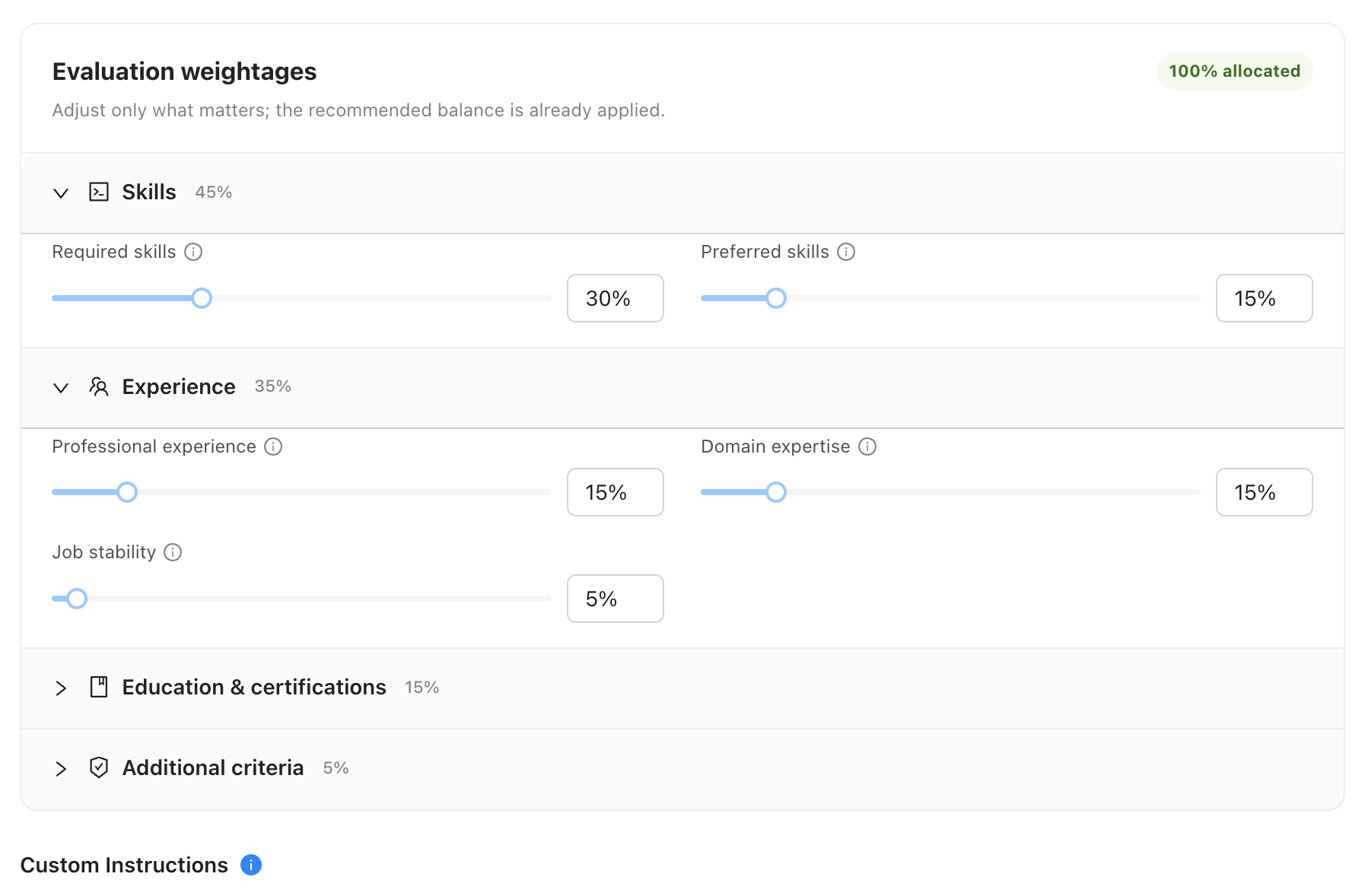
Set screening criteria

Add prescreening questions, must-have criteria or knockout conditions appropriate to the role.

Step 3

Collect candidate profiles

Bring applicants in through job boards, your career page, referrals, sourcing or an existing database.

Step 4

Match and rank

Compare resumes with the role context and prioritize candidates for recruiter attention.

Step 5

Review the evidence

Inspect the resume, screening answers and relevance signals before changing a candidate’s status.

Step 6

Shortlist and act

Move approved candidates through ATS stages, outreach and interview scheduling.

Product proof

See why a candidate is relevant before you shortlist

CVViZ brings the candidate profile, resume information, configurable screening inputs and role-relative ranking into the recruiter workflow. Reviewers can use that evidence as a starting point – not a substitute for judgment.

Recruiter customizing resume screening parameters in CVViZ

Candidate rediscovery

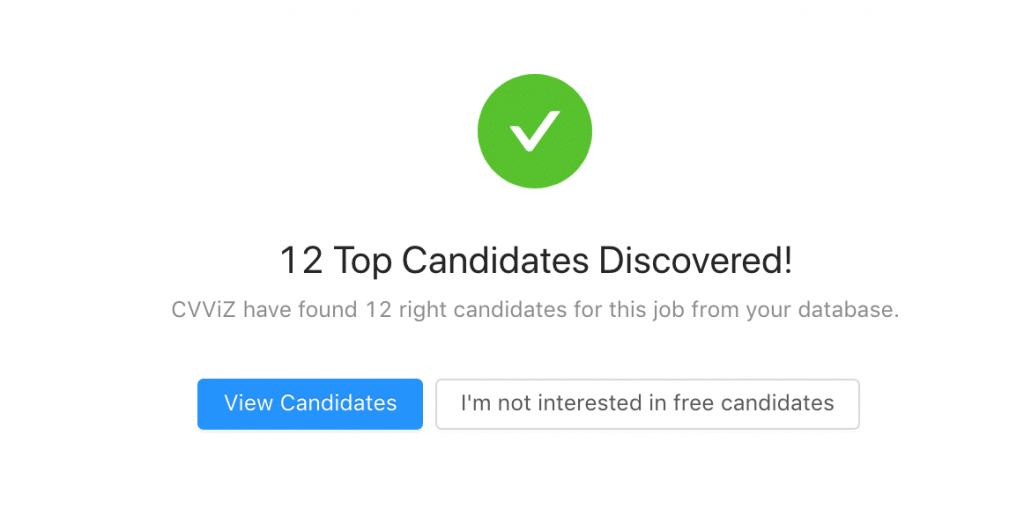
Screen the talent already in your database when a new role opens

CVViZ can surface relevant past applicants and existing candidate profiles against a new job. Recruiters can review known talent before rebuilding the pipeline from scratch.

CVViZ candidate rediscovery results from an existing database

Beyond screening

Connect applicant intake, screening, candidate conversations and interview scheduling

Resume screening creates more value when the next recruiter action is already connected. Keep the candidate record moving from application to outreach and a scheduled interview.

1

Publish and collect

Post eligible jobs to LinkedIn, Indeed, your career page and other job boards.

2

Screen and review

Rank applicants contextually and review resume evidence and prescreening responses.

3

Engage candidates

Use email sequences plus SMS or WhatsApp conversations to capture follow-up information.

4

Schedule interviews

Let qualified candidates move into automated interview scheduling and reminders.

Free or organic job-board visibility depends on each board’s policies, geography, employer eligibility and account configuration. Sponsored posting may be required.

Who uses it

Resume screening for staffing teams and in-house employers

Configure the same platform around client-driven recruiting or internal hiring while keeping people responsible for decisions.

Recruitment and staffing agencies

Prioritize applicants across multiple client roles

Give recruiters a consistent starting point across jobs without forcing every role into the same static filter.

Employers and high-volume hiring teams

Bring order to large applicant pools

Apply consistent role criteria and focus reviewer time on the candidates most relevant to each opening.

Customer evidence

Real recruiting teams using CVViZ

Customer outcomes are presented as specific published stories – not universal performance promises.

24 of 25

Open positions closed by Linq

Linq Consulting Solutions used CVViZ resume screening to streamline candidate review and reported closing 24 of 25 open positions.

Riah Gonzalez
Hiring Manager, Linq Consulting Solutions, USA

+40%

Increase in candidate applications

RED Recruitment Group reported a 40% increase in candidate applications after using CVViZ, followed by continued month-on-month growth.

Andrea Fonsmorti
CEO, RED Recruitment & Human Services Group, Hungary

Learn and compare

Go deeper on screening, parsing and recruiting workflows

Use these guides to evaluate the workflow around AI resume screening – not only the ranking feature.

Guide

AI resume screening guide

How screening approaches work, what to evaluate and where human review belongs.

Guide

Candidate screening automation

A practical look at automating intake and prioritization without losing oversight.

Product

AI resume parsing

See how structured resume data supports screening, search and candidate records.

Frequently asked questions

Straight answers about AI resume screening

Use these answers to understand how CVViZ supports screening while keeping recruiters in control.

AI resume screening uses artificial intelligence to compare resumes with job requirements and organize candidates by relevance. It helps recruiters prioritize review; recruiters remain responsible for shortlisting and hiring decisions.
Keyword filtering looks for exact terms. Contextual matching evaluates how skills, titles, experience and career history relate to the role, including relevant or transferable experience that may use different wording.
CVViZ provides screening and ranking assistance inside a recruiter-controlled workflow. Teams configure criteria, review the supporting candidate information and decide who moves forward.
Yes. Recruiters can use role-specific criteria and prescreening questions rather than applying one fixed filter across every position.
Yes. Candidates can enter CVViZ through supported job boards, an integrated career page, referrals, sourcing and other applicant-intake workflows, then move into screening and ATS stages.
Yes. When a new job is created, recruiters can find relevant profiles already stored in the candidate database and decide whether to re-engage them.
CVViZ is designed to help organize large applicant pools by applying consistent role criteria and prioritizing review. Actual workflow and results depend on job requirements, applicant quality and recruiter configuration.
Yes. Agencies can manage multiple jobs, candidate pipelines and a shared candidate database while configuring screening criteria for each client role.
Recruiters can move an approved candidate through ATS stages, outreach, AI-assisted conversations, interview scheduling and reminders without recreating the candidate record in another system.
Yes. CVViZ is designed as recruiter-assistance software: people review the resume, screening answers and relevance information, control the shortlist and make hiring decisions.


See it with one of your roles

Test contextual resume screening inside the complete recruiting workflow

Start a free trial or bring a representative job to a demo. Review how CVViZ handles criteria, ranking, evidence, recruiter control and the next candidate action.

Plans start at $99 per month. Rated 4.5 out of 5 on G2 from 48 reviews.