
How to choose the best AI ATS for a small or growing business
The right system should reduce coordination work, improve candidate review, and remain easy for hiring managers to use. This practical scorecard shows what to test, which questions to ask, how AI scores should be explained, and where people need to remain in control.


Rate every vendor on the work that matters.
Score 1–5 after testing each system with one real hiring scenario.
Trusted by 1,000+ companies from 35+ countries













The best AI ATS is the one your whole hiring team will use.
Look for fast setup, a complete workflow, contextual screening that explains its scores, low administration, practical integrations, and controls that keep people responsible for decisions.
Low administration matters as much as feature depth.
Small teams have less room for setup and maintenance. A product can have hundreds of features and still fail if managers avoid it or every change requires outside help. Prioritize time to value and a workflow that can grow without reimplementation.
Less system administration
Your team should be able to launch roles, adjust stages, add users, and update templates without a long support cycle.
More manager participation
Occasional users need a clear review and feedback experience, or the process returns to email.
Predictable ownership
Know who maintains the system, who reviews AI recommendations, and how candidate data is handled.
Evaluate the operating workflow, not the feature list.
Setup and administration
Can your team create a role, configure stages, add users, and launch a careers page without a long project?
Complete workflow
Check job publishing, applications, screening, communication, interviews, reporting, and rediscovery. Gaps become spreadsheets.
Contextual screening
Useful AI compares a candidate with the actual role, scores the match, and explains that score with evidence. Test realistic resumes, not a polished sample.
Human oversight
Recruiters and managers should review, override, and document decisions. Ask how exceptions are handled.
Collaboration
Invite a real manager during the trial. Can they review, leave feedback, and understand the next step?
Integrations
Confirm calendars, email, career site, job boards, HR systems, and communication channels you actually use.
Security and data
Ask about access, retention, auditability, data location, privacy commitments, and independent assurance.
Scalability
Confirm the workflow can support more roles, candidates, hiring managers, and locations without adding unnecessary administration.
Make every AI score explain itself.
CVViZ provides an explanation for every AI-assisted match score. Reviewers can inspect the overall assessment, category scores, written reasoning, and supporting strengths instead of accepting a number without context.
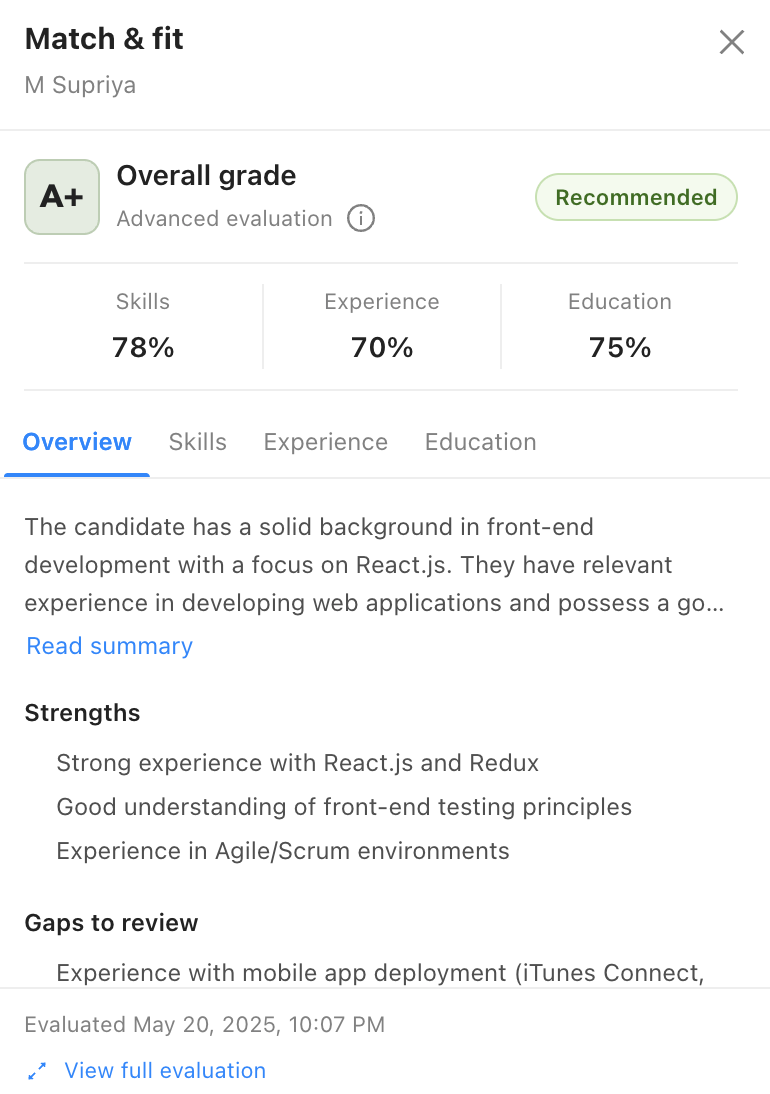
Use one real role from setup to decision.
A scripted demo hides the work your team will do every week. Run the same practical scenario in every shortlisted product.
Map the current process
Name the three biggest sources of delay and the owners involved.
Choose a representative role
Use one job and a realistic, approved set of applications.
Configure it yourself
Build the stages, application form, permissions, and messages without vendor intervention.
Compare AI with structured review
Review the score explanation, supporting evidence, differences, and unusual career paths instead of accepting a number without context.
Invite a hiring manager
Test whether feedback and handoffs are clear for an occasional user.
Run communication and scheduling
Complete the scenario through candidate updates and an interview.
Confirm rollout readiness
Review setup, migration, user access, support, security, and a clear data-export path.
Questions your team should answer before buying.
Choose the amount of structure your hiring needs.
Spreadsheets
Easy to start, but weak visibility, inconsistent follow-up, and no dependable candidate history.
Project tools
Flexible boards and tasks, but limited recruiting structure, communication history, and sourcing insight.
Basic ATS
Centralized records and pipelines, but screening, rediscovery, and automation may remain manual.
AI-assisted ATS
Can reduce review and coordination work when recommendations are explainable and people remain in control.
An end-to-end ATS with contextual AI and a connected hiring workflow.
CVViZ combines screening, candidate rediscovery, communication, scheduling, reporting, and team access. Use a trial or demo to verify the workflow, integrations, support, and limits against your requirements.
See how CVViZ connects sourcing, AI-assisted screening, collaboration, communication, and reporting.
Explore the AI ATS →Make the demo prove the claims.
Practical answers for an SMB shortlist.
What makes an ATS suitable for an SMB?
It should be easy to run with a lean team, cover the core workflow, support occasional hiring managers, and have predictable implementation effort.
Is AI screening accurate?
Its usefulness depends on role context, data, product design, and how the team validates recommendations. Treat it as decision support and compare it with a structured human review.
Should an AI ATS reject candidates automatically?
SMBs should be cautious with fully automated employment decisions. Keep people responsible for criteria, review, exceptions, interviews, and outcomes.
How many vendors should we evaluate?
A focused shortlist of three or four products is usually enough to compare workflow, AI transparency, security, and support without creating a long project.
What should we bring to a demo?
Bring a real job description, approved sample resumes, current stages, required integrations, security questions, and a realistic user count.
Can a basic ATS be enough?
It can be for light hiring, but check candidate and job limits, collaboration, support, export, security, automation, and reporting.
Evaluate the product your team will actually use.
See how CVViZ handles screening, collaboration, scheduling, and candidate management for a lean team.