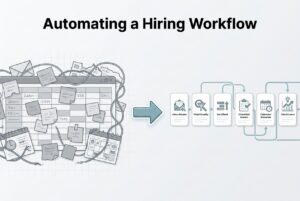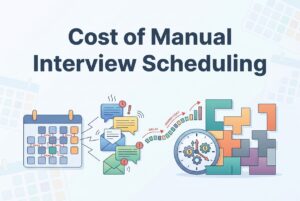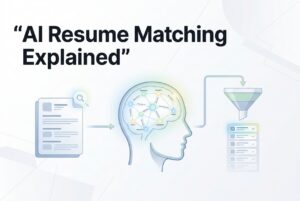
Let me tell you a story I’ve seen a hundred times. A strong candidate applies on Monday. By Wednesday, they haven’t heard a thing. By Friday, they’re interviewing somewhere else. By the following Tuesday, they’ve accepted an offer. And you still haven’t finished screening their resume.
That’s not a story about a bad recruiter. It’s a story about what happens when a good recruiter is stuck in a manual process that can’t keep up with a competitive talent market. Top candidates don’t wait. They have options, and they read silence as a signal.
Here’s the hard truth: most candidate drop-off isn’t caused by bad judgment or low effort. It’s caused by structural delays that no human, no matter how good, can outrun at scale. Screening backlogs, scheduling friction, and communication gaps are predictable failure points. They don’t announce themselves until the candidate is already gone.
This article will walk through the three biggest failure points, show you what candidates think when they experience them, and give you the practical automation handoffs to fix each one. We’ll also get to the question most articles dodge: what should humans keep doing, and what should the machines take over?
Where Manual Hiring Breaks Down: The Big Three
Top candidates don’t drop because your team isn’t trying. They drop because manual systems create the same three breakdowns, every time, at predictable stages.
Failure point #1: Slow screening and a slow first response. When resumes pile up, triage grinds to a halt. Teams can’t consistently prioritize who to contact first, so days pass. By the time a recruiter reaches out, the best candidates have either moved on or mentally checked out.
Failure point #2: Scheduling delays and rescheduling friction. The email ping-pong to find one open time slot. The panel coordination across three calendars. The last-minute reschedule with no one taking charge. Each of these adds friction right when a candidate’s interest is at its peak.
Failure point #3: Poor communication and long gaps of silence. Candidates are left in the dark about where they stand, what comes next, or when to expect an update. That uncertainty breeds disengagement, and disengagement leads to drop-off.
These problems are so damaging because they compound. A slow screening response creates a lukewarm candidate. A scheduling hassle cools them off further. Two weeks of silence finishes the job. Each delay makes the next stage harder to recover from, because top candidates are always evaluating multiple options. They don’t have the motivation to wait for a disorganized process to catch up.
Failure Point #1: The Resume Black Hole
Manual screening sounds simple on paper. Look at resumes, pick the good ones, move them on. In reality, it’s a compounding bottleneck the moment you get a spike in applications.
Think about what “manual screening” actually involves: opening each resume one-by-one, mentally comparing it to the role, checking for duplicates, deciding to advance or pass, then moving it to the right stage. Multiply that by 200 applications for a mid-level role, and you’re looking at hours of context-switching that just doesn’t scale, with inconsistent results.
Two core problems show up every time:
- Time cost. Humans can’t reliably process hundreds of resumes quickly without cutting corners. The result is a backlog that delays first contact and loses you candidates.
- Signal loss. Relying on keyword filters means you miss strong fits who just don’t use your exact terminology. And when recruiters are rushed, snap judgments replace real evaluation.
The practical fix is to separate eligibility from priority. Eligibility is a simple yes/no gate: does this candidate meet the baseline requirements? Priority is a ranked question: of those who qualify, who gets a call today? Manual processes mush these two steps together, and that’s where all the time goes.
This is where AI resume screening comes in. A system like CVViZ uses NLP and machine learning to screen contextually, matching candidates to role requirements beyond exact keywords. It then ranks them in real time based on your hiring patterns. It gives recruiters a prioritized shortlist instead of an endless pile. This doesn’t replace your judgment, but it compresses the time-to-shortlist and clears out the noise so your team can focus on qualified people.
Signs you have a screening bottleneck:
- First outreach consistently takes more than 48 hours.
- Hiring managers complain about a slow pipeline.
- You keep finding great candidates you “missed” days after they applied.
- Your primary sorting method is a keyword search.
Failure Point #2: Scheduling Friction That Screams “Disorganized”
Candidates are always reading the tea leaves, and your scheduling process is a giant flashing sign about how your company operates. The inferences they make are fast, and while they might be unfair, they feel true.
When a candidate runs into friction just trying to get on your calendar, here’s what they hear:
- Three emails to find one time slot: “These people don’t have their internal coordination figured out.”
- Rescheduled twice with no explanation: “This role might not even be a real priority.”
- No confirmation after the interview: “I’m probably not moving forward, and they just haven’t said it.”
- Two-week gap between rounds: “They’re not serious, or they already have their preferred candidate.”
None of these have to be true. But a candidate with two other active conversations won’t wait around to find out.
And the timing is what makes this so brutal. Scheduling problems pop up late in the game, when the candidate has already invested time and energy. It’s also when they’re most likely to have competing offers. A scheduling mess at this stage, especially after a great first call, torches all the goodwill you’ve built.
The internal cause is almost always a lack of clear ownership. Nobody owns the handoff between stages, so things fall through the cracks. The “fast path” principle is simple: reduce the number of touches it takes to confirm a meeting. Self-scheduling links, pre-cleared panel availability, and automated reminders eliminate most of that back-and-forth. The goal isn’t speed for speed’s sake; it’s to signal competence and respect for the candidate’s time.
What Does an “AI Recruiter” Actually Do (And What’s Left for You)?
The term “AI recruiter” gets tossed around a lot. Let’s cut through the buzz and talk about what it means on the ground. Think of it as an operations layer that handles the repetitive coordination, freeing up humans to do the work that requires judgment and relationship-building.
Fragmented tools are usually the culprit. When candidates are in spreadsheets and conversations are in personal inboxes, handoffs get dropped. There’s no visibility and no accountability.
A centralized ATS workflow fixes this infrastructure problem. A platform like CVViZ keeps candidate stages, communication history, and workflow automations in one place. Nothing gets lost in an email thread, and the right person gets notified at the right time. That isn’t magic; it’s just basic process discipline, enabled by the right tool.
Here’s the practical handoff:
| Task | Why it breaks manually | What automation does | Human oversight needed |
|---|---|---|---|
| Resume intake + parsing | Resumes arrive in different formats, across inboxes | Parses into a structured database; detects duplicates | Confirm parsed data on key roles |
| Screening + ranking | Volume creates backlogs; keyword filters miss good fits | AI ranks candidates by fit in real time | Recruiter reviews shortlist, makes final call |
| Stage routing + triggers | Manual advancement creates gaps and delays | Workflow rules move candidates and trigger next actions | Exception handling for non-standard profiles |
| Scheduling coordination | Email ping-pong, panel complexity | Automated prompts and self-scheduling patterns | Override for high-priority candidates |
| Status updates + reminders | Nobody sends them consistently | Template-based triggers at each stage | Personalization for late-stage candidates |
| Bottleneck reporting | No data means no visibility | Analytics surface where candidates are stalling | Recruiter interprets and acts on findings |
So what’s left for you? The important stuff. Making the final selection decision. Running a structured interview based on a scorecard. Building a real relationship with your top candidates, especially late in the process. Handling edge cases like nonstandard profiles, tricky negotiations, and re-leveling conversations. This is the work that requires nuance and a human touch.
And a quick pro-tip: be transparent with candidates. Tell them you’re using automation and how it works. It builds trust.
Failure Point #3: Using Automation to Fix Radio Silence
Radio silence is the fastest way to lose a good candidate. Most communication gaps in manual hiring aren’t malicious; they happen because no one owns the follow-up or because a stage transition triggers no action.
The fix isn’t sending more emails. It’s sending the right emails at the right moments, automatically, so a candidate is never left wondering.
Here’s your basic automation playbook:
- Application receipt: Confirm you got it within minutes, and set expectations for the timeline and next step.
- Interview confirmation: Send the confirmation, prep notes, and a reminder 24 hours before.
- Post-interview update: A quick “you’re in our review queue, expect to hear by [date]” message goes a long way.
- Rejection closure: Send it promptly and respectfully. Ghosting candidates damages your employer brand.
Workflow automation in CVViZ lets you set up these trigger-based rules and templates so messages go out on time, every time, and are logged in the candidate record. No one falls through the cracks because a recruiter got busy.
What not to automate: Offer conversations, sensitive feedback, or complex discussions. Those require a human who can read the room.
How to avoid sounding like a robot:
Use plain language, not vague corporate-speak. “We’ll be in touch” is useless and creates a false expectation. Be specific. And always, always include a way for candidates to reach a real person. Use the recruiter’s name in the signature, not a generic alias. Set realistic communication SLAs and then build your automation to meet them.
The Real Risks of AI Recruiting (And How to Manage Them)
Alright, let’s talk about the risks, because anyone who tells you AI recruiting is a magic bullet is selling something. If you don’t manage it, you can get into real trouble.
Hiring bias and fairness risks. The big one is bias. AI tools learn from your past hiring data. If that data is biased, the AI will just learn to be biased faster and at a bigger scale. Proxy variables (things correlated with protected characteristics, like zip codes or certain university names) can create disparate impact without anyone noticing.
Safeguards that work:
- Maintain human override and review loops. No AI output should ever be the final word.
- Audit your advancement rates periodically across demographic groups.
- Use structured scorecards and consistent interview questions for every candidate.
- Document how the AI screening is used so it can be scrutinized.
The “AI is replacing me” fear. Let’s tackle this one head-on. Automation replaces the boring parts of your job: intake, triage, reminders, routing. It doesn’t replace sourcing judgment, relationship-building, or the ability to close a candidate who’s deciding between two great offers. If anything, it raises the bar for what recruiters are expected to do well, because the admin floor is now handled by the system.
Candidate trust. Speed helps, but candidates care most about accuracy and clarity. A fast, automated rejection is always better than two weeks of silence. A clear, human-sounding message is better than a jargon-filled form letter. The candidate experience improves when automation handles the timing and humans handle the tone.
How to Know If It’s Actually Working: The Metrics That Matter
You can’t know if you’re getting better without a baseline. Before you automate anything, track your current state for a few weeks. Then compare.
Here are the core metrics I’d track:
- Time-to-first-response: How long from application to recruiter outreach? This measures screening health.
- Time-between-stages: Especially the gap from interview request to confirmed booking. This is where scheduling delays live.
- Stage conversion rates: What percentage of screened candidates advance? Where are you losing people?
- Offer acceptance rate: A good proxy for the overall candidate experience.
- Source effectiveness: Which channels produce candidates who actually get hired, not just a high volume of applicants?
Recruitment analytics in a platform like CVViZ can track these things for you, surfacing bottlenecks without you having to build a spreadsheet model. That said, analytics are a diagnostic tool, not a guarantee of quality. You’ll still need your own proxies for quality-of-hire, like 90-day retention or hiring manager satisfaction scores.
One last thing: don’t just stare at dashboards. A few candid notes from candidates can tell you more than a spreadsheet ever will. Set a monthly review cadence and treat the data as a conversation about your process, not a scorecard for individuals.
Where to Start? A Phased Approach (Don’t Boil the Ocean)
Don’t try to automate everything at once. Most teams that try this end up with a half-configured mess that nobody trusts or uses.
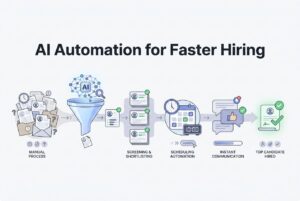
Start with the one bottleneck that’s actively bleeding you candidates right now. For most, that’s either screening triage or communication gaps. Here’s a simple hiring workflow sequence that works:
- Centralize candidates and stages. First, just stop losing track of who is where. Get everyone working from a single pipeline view.
- Automate screening triage. Use AI resume ranking to surface who to contact first. This immediately cuts down your backlog and compresses the time-to-shortlist.
- Add automated communications. Trigger confirmation emails, prep notes, and follow-ups so they happen without anyone having to remember to send them.
- Add structured reporting. Once the workflow is running, measure it. Find out where candidates are stalling and what your real time-between-stages looks like.
Change management tips for small teams:
- Assign one process owner. Someone has to own the configuration and the exceptions. Don’t let it become “everyone’s job.”
- Keep a manual lane. Not every candidate fits a standard workflow. Build in an override path or an escape hatch.
- Loop in hiring managers early. They need to know what to expect (like ranked shortlists) and what they’re responsible for (like timely feedback).
Automation isn’t about moving faster by cutting corners. It’s how you build consistency and speed at the same time, which is the only way to compete for great candidates.
FAQ
Will candidates dislike interacting with AI during recruiting?
Candidates care less about automation and more about speed, clarity, and respect. An automated confirmation that arrives in five minutes beats a personal email that arrives in four days. The keys are being transparent (tell them when automation is involved), sending accurate messages, and providing an accessible path to a human for questions.
Does AI recruiting automation increase or reduce bias?
It can do both, frankly. It all depends on how you use it. An AI that learns from biased historical data will only amplify those patterns. The safeguard is structured human oversight. Use AI screening as a tool to build a better shortlist, not as a robot making your hiring decisions. That means reviewing shortlists, auditing outcomes, and using consistent scoring criteria.
Can an AI recruiter work for small teams with no dedicated recruiter?
Yes, and it might even be more valuable for small teams. When hiring is just one part of your job, automation handles the follow-ups and tracking that would normally fall through the cracks. A central pipeline and triggered emails reduce the mental load of managing multiple candidates.
Do I need to replace my ATS to use AI recruiting automation?
Not necessarily. Some AI tools can layer on top of an existing ATS. That said, if your current system is just a digital file cabinet with no real workflow automation, you might be better off solving the root problem with a purpose-built platform instead of a patchwork of tools.
What’s the first role type where AI screening helps the most?
High-volume roles. That’s where you’ll see the biggest and fastest win. When you have hundreds of applications for similar positions, AI triage is a lifesaver. For super-specialized or senior roles, the challenge is usually finding candidates, not filtering them, so other tools are often more helpful.