You post a role on Monday. By Tuesday afternoon, 200 resumes are sitting in your inbox. Some from LinkedIn, some from Indeed, a few from referrals you’re tracking in a spreadsheet, and one candidate who emailed you directly. Now you need to screen, reach out, schedule, and get a shortlist to the hiring manager by Thursday, all while juggling two other open roles.
That’s not you being bad at your job. That’s a broken system.
“72 hours to shortlist” sounds like a fantasy, but it’s a real, achievable target. It means going from a live role to a vetted shortlist ready for hiring manager interviews. Not an offer. Not onboarding. Just a simple list of five credible candidates, ranked and ready, with the evidence to back them up.
What makes this possible isn’t just automating recruiting tasks. It’s automating the handoffs between stages, so candidates move forward (or get escalated) without a recruiter manually nudging each one.
This article is the playbook for the 72-Hour Shortlist Workflow. It’s a step-by-step implementation guide and a checklist to see if your tools can actually support it.
What’s Broken in Hiring When Applications Scale?
The problem isn’t effort. Most recruiters aren’t slacking; they’re drowning. The failure is a disconnected system that creates three compounding bottlenecks as volume grows.
Sourcing and intake sprawl. Candidates arrive from five channels and get logged in three places. The first thing a recruiter does each morning is manually consolidate everything. That’s not screening. That’s data entry.
Screening overload. Manual keyword filtering seems fast until you realize it’s both slow and inaccurate. You spend hours sifting through resumes and still miss great candidates whose experience is real but whose job titles don’t match your description.
Scheduling and coordination drag. Once someone looks promising, the process grinds to a halt. Getting a 30-minute call on the calendar turns into a three-day email chain. Multiply that by 20 candidates, and you’ve just burned a week on logistics.
Here’s where it gets ugly: each bottleneck makes the others worse. Screening overload means you can’t respond quickly. Slow responses mean strong candidates, the ones with options, drop out of the funnel. Hiring managers see unpredictable timelines and weak shortlists, and they lose faith in the whole process.
The real cost isn’t just speed; it’s candidate experience. Poor candidate experience can cost you. Candidates who don’t hear back within 48 to 72 hours are already talking to other companies. “Fast filtering” doesn’t solve this. It just creates a noisy shortlist with serious gaps.
Why Do Most “Automation” Attempts Still Leave Recruiters Doing Manual Work?
Because they automate tasks, not processes. There’s a critical difference.
Task automation makes one stage faster in isolation. You get a shiny new scheduling tool. Or you run resumes through an AI screener. Each tool does its job, but the recruiter is still the human glue, manually carrying context from one stage to the next and handling every exception themselves.
Process automation means each stage has a defined output that automatically triggers the next action. Exceptions have a clear escalation path. No recruiter orchestration is needed between steps.
Here’s what that looks like in practice:
| Dimension | Task Automation | Process Automation |
|---|---|---|
| Handoff mechanism | Manual (recruiter decides and acts) | Trigger-based (rule fires next step) |
| Context preservation | Lost between tools | Single candidate record across stages |
| Exception handling | Piles up in inbox | Routed to defined owner |
| Measurability | “We screen faster” | Time-in-stage, conversion rate, touches per hire |
Most teams fail because their tools don’t share a single candidate record. Candidate A gets screened in Tool 1, manually logged in Tool 2, and scheduled in Tool 3. Somewhere in that chain, the reason they passed screening gets lost, so the hiring manager is starting from scratch.
A system connecting workflow rules with AI resume screening and ranking reduces this manual work. When a candidate passes a gate, the next action fires automatically. That’s what separates a real workflow from a collection of faster tasks.
To be clear, this doesn’t eliminate recruiters. It eliminates the coordination tax between stages, freeing up recruiters to focus on judgment calls instead of logistics.
What Is the 72-Hour Shortlist Workflow?
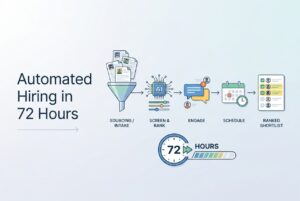
The framework has five steps. What makes it work isn’t the steps themselves. It’s that each step has a defined output and an automatic trigger to move qualified candidates forward or route exceptions to a human.
The 72-Hour Shortlist Workflow:
- Automated Candidate Sourcing & Intake
- AI Resume Screening & Candidate Scoring
- Automated Candidate Engagement + Level 1 Screening
- Automated Interview Scheduling & Coordination
- Shortlist + Human Validation
The handoff outputs that make this function:
- Step 1 → Step 2: Candidates are centralized, deduplicated, and have minimum data captured. Nothing moves forward as a spreadsheet row.
- Step 2 → Step 3: A ranked set with pass/fail gates applied and explainable reasons on record. Not “these look good,” but actual, documented criteria.
- Step 3 → Step 4: Qualified, responsive candidates who’ve completed Level 1 screening and are ready to book time. Unresponsive candidates trigger a follow-up, not a manual nudge.
- Step 4 → Step 5: Interview evidence is captured and a decision packet is assembled, so human validation is targeted, not a full do-over.
Visual Model: The 72-Hour Shortlist Workflow
┌─────────────┐    Gate passed     ┌─────────────┐    Ranked + gates    ┌─────────────┐
│  1. INTAKE  │ ─────────────────► │ 2. SCREEN   │ ──────────────────► │  3. ENGAGE  │
│  & SOURCING │                    │  & RANK     │                      │  + L1 SCREEN│
└─────────────┘                    └─────────────┘                      └─────────────┘
       │                                  │                                     │
       ▼                                  ▼                                     ▼
 [Incomplete       [Missing must-have /               [Non-responsive /
  profiles /        ambiguous experience /             accommodation request /
  duplicates]       compliance flags]                  conflicting info]
       │                                  │                                     │
       └──────────────────────────────────┴─────────────────────────────────────┘
                                          │
                                  EXCEPTION LANE
                                  (Human Review)
                                          │
                          ┌───────────────┴──────────────┐
                          ▼                              ▼
               ┌─────────────────┐           ┌──────────────────┐
               │  4. SCHEDULE    │ ────────► │  5. SHORTLIST +  │
               │  & INTERVIEW    │ Interview  │  HUMAN VALIDATION│
               └─────────────────┘ complete  └──────────────────┘
                          │
                   [Last-minute changes /
                    timezone issues /
                    panel complexity]
                          │
                   EXCEPTION LANE
Every exception has a human owner and a resolution path. The main pipeline keeps moving.
Step 1: How Do You Automate Sourcing and Intake Without Creating Duplicate, Messy Pipelines?
The goal of intake is one thing: one system of record for every candidate, regardless of where they came from. (Seriously, tattoo this on the inside of your eyelids.)
This sounds obvious. It almost never happens by default.
Speed at this stage comes from eliminating the manual consolidation that happens before screening even starts. Practical tactics:
Post once, distribute everywhere. Manually managing five job board portals is a waste of time. A single posting that distributes to multiple boards keeps your source-of-record clean. For hard-to-fill roles, sourcing from platforms like LinkedIn or GitHub and importing directly into a central pool compresses the time to your first viable batch.
Standardize minimum intake data. Every candidate needs the same core fields: role, location, source, and the skills data your screener needs to run. If the data structure varies, your screening is working with incomplete information.
Deduplicate before anything else. A candidate who applied through two boards and got a referral needs to appear once. Duplicate records don’t just inflate your metrics; they cause double outreach, which is a fast way to erode candidate experience.
Common exceptions at intake:
- Incomplete profiles (no resume, just a LinkedIn URL)
- Referral candidates who haven’t formally applied
- Candidates who submitted for multiple open roles
These need a defined path (like prompting for missing info and routing to a human if unresolved), not a manual queue that sits until someone notices.
Step 2: How Do AI Screening and Ranking Turn 300 Resumes Into a Credible Shortlist in Days?
This is the engine of the 72-hour workflow. Done well, it compresses a week of recruiter time into a single day.
This is also where teams get tripped up by old-school keyword matching. It sounds good in theory but fails in practice. A candidate with five years of relevant backend experience who called themselves a “Software Developer” instead of a “Backend Engineer” won’t even surface. Keyword matching finds candidates who describe themselves the way your job description is written, which isn’t the same as finding the best candidates.
The screening model that actually works:
Hard gates are non-negotiable: work authorization, required certifications, minimum years in a specific domain. A candidate who fails a hard gate isn’t auto-rejected, but they are separated from the main pipeline with a documented reason.
Soft gates are preferences: similar tech stack, relevant industry background, career progression signals. These influence ranking, not elimination. A candidate who misses one soft preference but clears everything else should rank in the mid-band, not get dropped.
How ranking should work: The system should rank candidates in real time as they enter. The recruiter reviews the top band first, then sample-checks the mid-band to validate that the model isn’t missing a certain type of candidate. That check is crucial for catching model drift.
A tool like CVViZ uses NLP and machine learning to screen contextually and Resume parsing structures the raw data so screening criteria apply consistently across all 300 applicants.
The 72-hour flow:
- Day 1: Parse all resumes, apply hard gates, generate initial ranking.
- Day 2: Recruiter reviews top cohort, validates the mid-band sample, and starts outreach.
- Day 3: Finalize the interview-ready set based on who is responsive and qualified.
One explicit guardrail: keep pass/fail reasons visible and logged. This builds internal trust (so hiring managers can see the logic) and provides an audit trail.
Step 3: How Do You Automate Candidate Engagement Without Making It Feel Robotic?
If your automation makes good candidates feel like a number, you’ve already lost. The goal here is responsiveness at scale (consistent, timely, and relevant), not impersonal.
What to automate:
Instant acknowledgment with a real timeline. Something like, “Your application is under review. Here’s what happens next, and you’ll hear from us by [date].” That one message reduces candidate anxiety and your volume of “just checking in” emails more than almost anything else.
Knockout questions at the point of application for critical factors. Keep them short, two or three max. You can also use structured Level 1 prompts (text, audio, or video) to cover standard phone screen questions. Automated follow-up nudges for anyone who drops off are also key. If they don’t respond after two nudges, they route to a “low priority” bucket, not a manual pile.
Personalization that matters: Use role-specific templates, not generic ones. Reference their source if it’s relevant (“We noticed your GitHub profile before you applied”). Small signals tell a candidate this isn’t a blind bulk email.
When to escalate to a human:
- A candidate requests accommodations.
- Resume and questionnaire responses conflict.
- A high-potential candidate fails one soft preference. These are the cases where automated rejection does the most damage.
Stage output: Qualified, responsive candidates with Level 1 evidence captured. If someone hasn’t met that bar, they are either in a follow-up sequence or escalated, not sitting in a queue.
Step 4: How Do You Remove Interview Scheduling as the #1 Bottleneck?
Scheduling is where automated workflows die. Your screening was lightning-fast, the candidate is a perfect fit, and then… a five-day email chain just to find 30 minutes on the calendar. This isn’t a personal failing; it’s a structural problem.
What good scheduling automation looks like:
- Calendar integration that pulls availability in real time.
- Candidate self-booking within defined windows (this removes a full round-trip).
- Automated reminders and a reschedule flow that don’t require recruiter involvement.
For video interviews, removing the “where do we meet?” question is a small but important detail. For developer roles, embedding a live coding environment in the interview removes a whole setup step that slows down the technical assessment.
CVViZ supports interview scheduling, video interviews, and a live code editor, covering the entire coordination layer in one system.
Common edge cases to build rules for:
- Hiring manager changes availability (define a fallback window or backup interviewer).
- Candidate in a different time zone (present availability in their local time).
- Panel interviews (set availability blocks in advance instead of letting them happen ad-hoc).
Stage output: The interview is completed or firmly booked with reminders set. The candidate knows what happens next without having to ask.
Step 5: How Do You Validate the Shortlist Without Redoing All the Work?
Let me repeat this: human validation at this stage is not re-screening. If it feels like a do-over, something earlier in your workflow is broken.
Your job here is to validate three things:
Nuanced experience relevance. Not “does this candidate have five years of experience?” but “is their five years of experience the right kind for this role?” That’s a judgment call an automated gate can’t make.
Communication and motivation. You can spot these signals in the recorded Level 1 screening responses without needing a new call.
Risk flags. Things like career gaps, short tenures, or mismatched claims between their resume and responses. These don’t disqualify anyone, but a human needs to interpret the context.
How to keep validation fast:
Require structured scorecards for the top band. Reviewers should score against pre-defined criteria, not “vibes.” Also, require “reason codes” for yes/no decisions. This sounds bureaucratic, but it’s the data that lets you tune your gates over time.
The shortlist package for the hiring manager:
- Top candidates, ranked.
- A one or two-sentence rationale for each candidate.
- Evidence attached: Level 1 responses, interview notes, scores.
This package should take 15 minutes to review, not an hour. If it’s taking longer, the earlier stages aren’t capturing enough structured evidence.
What Metrics Prove Your Automated Workflow Is Working—and Where It’s Breaking?
Speed without measurement is just a story you tell yourself. The metrics that prove this workflow is real are specific and diagnostic.
Core KPIs:
- Time-to-shortlist: The main metric. Tracks from role-live to shortlist-delivered.
- Time-in-stage per step: The diagnostic metric. A spike tells you exactly where the bottleneck is.
- Stage conversion rates: Intake → qualified → scheduled → completed. A low rate at any gate means you need to adjust your criteria or engagement.
- Candidate drop-off rate: High drop-off, especially before scheduling, usually means slow response times or a clunky experience.
- Recruiter touches per hire: The automation effectiveness metric. If this number isn’t falling, your automation isn’t working.
- Source quality: Which channels produce candidates who actually make the shortlist? This shows you where to focus.
What to do when the numbers look bad:
High drop-off? Tighten your acknowledgment speed. Too few candidates passing gates? Revisit your hard gates. Are they based on real requirements or legacy assumptions?
CVViZ’s recruitment analytics provide exportable reports to track all of this. This means your weekly tuning is based on actual data, not gut feel.
Run this review weekly. Not quarterly. I’m serious. This workflow degrades fast if exceptions pile up or gate criteria drift out of alignment.
Frequently Asked Questions
What roles and hiring types can realistically hit a 72-hour shortlist?
High-volume roles with well-defined criteria (engineers, sales reps, support) hit this timeline most reliably. Niche executive roles may need longer intake windows, but the workflow structure still applies; only the timeline changes.
Does AI screening mean we should auto-reject candidates?
Absolutely not. AI screening should rank and gate, not silently reject. Candidates who fail hard gates should be notified, and those in the mid-band should be reviewable. Auto-rejection without human oversight is how you lose good candidates and create compliance risks.
How do we handle exceptions without slowing everything down?
Assign a clear owner to the exception queue and set a 24-hour resolution SLA. Most exceptions are small. A daily 15-minute review keeps the lane clear without stalling the main pipeline.
What’s the minimum tooling needed to start?
At minimum, you need a centralized ATS with AI screening, workflow triggers, and scheduling integration. The extras (like video interviews and source analytics) add speed but aren’t critical on day one. Start with the handoff structure first.
How do we stay compliant and transparent when using AI in hiring?
Keep pass/fail reasons documented for every candidate. Audit your gate criteria periodically to check for unintended bias. Ensure candidates have a way to flag errors. If your tool supports GDPR data subject rights (access, rectification, erasure, portability), that’s the compliance baseline to verify.
How long does it take to implement an automated workflow like this?
A functional version (intake, AI screening, basic engagement, and scheduling) can be running in one to two weeks for most teams. The first few hiring cycles are for calibration. Expect to adjust criteria and rules after seeing real data. Reaching full maturity, with stable gates and low exception rates, typically takes four to six weeks of active use.