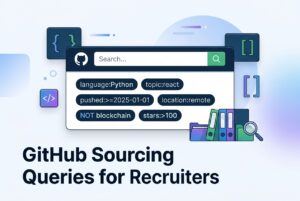
GitHub sourcing works best when you treat it as a three-step workflow, not a single search. Start with repository discovery, move into code evidence, then enrich the people attached to the strongest results. That is the practical answer for recruiters asking what searches should I run to find developers automatically? A small query library is more reliable than one broad search because it lets you separate technology signals, recency, and actual evidence of work.
The point is simple: use GitHub to find developer leads from public technical work, not to pretend you have a verified hire-ready profile. A repository, code match, or contributor record can suggest relevance, but it does not prove current employment, seniority, availability, or consent to outreach. CVViZ takes the same teach-first approach: find the signal first, then review the person behind it.
The core GitHub sourcing pattern
The most reusable pattern is:
[technology or project signal] [documented qualifier] [date/activity qualifier] [negative qualifier]
This structure keeps search broad enough to surface leads, but narrow enough to stay readable. For example, you can combine a framework token, a path or repository qualifier, a recency filter, and an exclusion for tests or generated files.
In practice, the best GitHub sourcing workflows use three layers:
- repository discovery
- code evidence
- identity and activity enrichment
That order matters. Repository search tells you where to look. Code search tells you what was actually implemented. Then user and contributor inspection tells you who may be worth reviewing. Do not reverse the order and do not overread any single signal.
What the main GitHub signals mean
| Signal | What it indicates | What it does not prove |
|---|---|---|
language: |
GitHub’s detected language classification | Professional level or primary job language |
topic: |
A repository topic attached to the project | That the owner personally built the topic area |
stars: / forks: |
Community attention or reuse | Quality, authorship depth, or seniority |
pushed: / updated: |
Repository recency | Current availability or active job search |
path: |
A matching file or directory path | System ownership or architecture design |
symbol: |
A symbol definition such as a class or function | Ownership of the full system |
content: |
File content rather than path text | That the code is original or maintained |
repo: / org: / user: |
Scope and account attribution | Employment relationship |
| commit author | The author metadata on a commit | That the account owner wrote all code |
Use multiple signals together. One signal alone is too weak for serious developer sourcing.
How to build GitHub sourcing queries that actually work
The best searches are narrow, explainable, and easy to rerun. Separate keywords and qualifiers with spaces. Use exact phrases when wording matters. Prefer two or three focused queries over one overloaded query. That makes it easier to debug noise later.
Good starter query shapes
backend api in:name,description,readme language:Go pushed:>=2025-01-01 archived:false
machine-learning topic:machine-learning language:Python pushed:>=2025-01-01 archived:false
frontend in:name,description,readme language:TypeScript pushed:>=2025-01-01 archived:false
These are starter patterns, not benchmarks. They help you find recent repositories that look relevant before you inspect code. However, they are only a first pass.
Good implementation query shapes
"gin.Default" language:Go path:/cmd/ NOT is:fork
"FastAPI" language:Python path:/app/ OR path:/src/
"express.Router" language:JavaScript path:/src/ NOT path:/node_modules/
"@RestController" language:Java path:/src/main/
These are stronger because they target implementation evidence, not just a README keyword. For example, a router symbol in a service path is more useful than a generic “backend” string in repository text. Still, inspect the matched file and surrounding code. A copied tutorial or sample project can look convincing at first glance.
Query tuning rules
- add
path:to separate app code from tests, docs, or dependencies - add
NOT is:forkwhen you want less duplicate noise - use
archived:falseto remove obvious stale projects - split date windows when result volume gets too broad
- search one capability at a time instead of mixing everything into one query
In other words, the search should tell you why a repository surfaced. If you cannot explain the match, the query is too loose.
Backend developer queries: what to run and how to read them
Backend searches should expose service implementation, not just generic language usage. For recruiters, the goal is to find repositories that show actual API or service work.
Starter backend queries
backend api in:name,description,readme language:Go pushed:>=2025-01-01 archived:false
microservices topic:microservices language:Java stars:>=10 fork:false
REST API in:readme language:Python pushed:>=2025-01-01
These queries help you find repositories that likely contain service code. The language filter is only a narrowing step. It does not prove skill level.
Stronger backend evidence
"gin.Default" language:Go path:/cmd/ NOT is:fork
"@RestController" language:Java path:/src/main/
"FastAPI" language:Python path:/app/ OR path:/src/
"express.Router" language:JavaScript path:/src/ NOT path:/node_modules/
These searches are better because they point to implementation detail. A router or controller token in a service path is a stronger lead than a repository named “backend-demo.”
When backend queries break
Backend GitHub sourcing breaks when the result set is filled with tutorials, generated clients, lockfiles, or sample projects. It also breaks when the real work lives in a monorepo with unusual paths or private repositories. Therefore, use a strict query and a broader version, then compare the results. If the strict version returns little, relax one qualifier at a time.
A useful rule: inspect tests, error handling, observability, and deployment code before you assign value to a repository. A single API token is evidence, not proof.
Machine-learning developer queries: what to run and how to read them
ML sourcing has a different noise problem. Notebook-heavy projects, coursework, and benchmark repos can look impressive without proving production depth. So, search for model and training signals, then inspect how the repository is structured.
Starter ML queries
machine-learning topic:machine-learning language:Python pushed:>=2025-01-01 archived:false
pytorch in:name,description,readme language:Python stars:>=10
computer-vision topic:computer-vision language:Python fork:false
These are discovery queries. They help you find public repositories that likely touch applied ML work.
Stronger ML implementation queries
"torch.nn.Module" language:Python NOT path:/tests/
"torch.utils.data" language:Python path:/src/ OR path:/train/
"sklearn.pipeline" language:Python content:sklearn
"tf.data.Dataset" language:Python
These are more useful because they point to model class usage or training pipeline code. That is better than a simple keyword in a README. However, it still does not prove model quality, statistical rigor, data governance, or production deployment.
When ML queries break
ML repositories often contain copied notebooks, one-off experiments, generated artifacts, and teaching code. That means stars, a paper-like README, or a framework token can be misleading. Instead, inspect commit history, tests, reproducibility, evaluation code, and deployment clues. If you only see notebooks and no structure, treat it as a weak lead.
DevOps and platform queries: what to run and how to read them
DevOps and platform searches should focus on infrastructure implementation. The strongest signals are Terraform resources, Kubernetes manifests, Helm charts, and CI workflow files.
Starter DevOps queries
kubernetes topic:kubernetes language:Go pushed:>=2025-01-01 archived:false
terraform in:name,description,readme language:HCL fork:false
helm topic:helm language:Go OR language:YAML
These queries surface public infrastructure repositories, but they do not prove operational ownership.
Stronger DevOps implementation queries
"resource "aws_" language:HCL path:/terraform/
"apiVersion:" path:/k8s/ language:YAML
"helm upgrade" path:.github/workflows/ language:YAML
"docker build" path:.github/workflows/ language:YAML
These are useful because they point to real delivery or configuration code. A workflow file is often stronger than a README claim.
When DevOps queries break
Infrastructure repositories can include templates, vendor examples, or organization-wide code written by many people. Also, pushed: can reflect automation rather than human work. Therefore, inspect commit authorship and pull requests before you infer ownership. Public GitHub evidence also misses private cloud, incident, and security context, so keep the conclusion modest.
Frontend developer queries: what to run and how to read them
Frontend sourcing is noisy because starter templates and copied components are everywhere. The best queries look for component or routing code in application paths.
Starter frontend queries
frontend in:name,description,readme language:TypeScript pushed:>=2025-01-01 archived:false
react topic:react language:TypeScript stars:>=10 fork:false
nextjs in:name,description,readme language:TypeScript
These help you find recent frontend repositories quickly. TypeScript is a useful filter, but it may also surface tooling or full-stack repos.
Stronger frontend implementation queries
"useState" language:TypeScript path:/src/ NOT path:/node_modules/
"createBrowserRouter" language:TypeScript
"next/image" language:TypeScript path:/app/ OR path:/pages/
"<Suspense" language:TypeScript path:/src/
These searches target framework usage inside source paths. That is a better signal than a package manifest alone.
When frontend queries break
Frontend repositories often include starter templates, generated bundles, documentation sites, and copied UI. Therefore, do not treat one hook or one import as a skill test. Check accessible components, tests, release history, and whether the code is actually an application instead of a demo.
From repository leads to people: the practical sequence
Once a repository looks promising, move carefully from code to people. That sequence matters more than recruiters usually admit.
Step 1: inspect the repository evidence
Look at the matched file, path, and date. Save the repository URL, match type, and confidence level. Then ask: does this look like meaningful code, or just noise?
Step 2: inspect contributors and commit authors
The repository contributor endpoint can help, but it sorts by commit count and may include anonymous contributors. Commit count is not line quality, design ownership, or seniority. A top contributor may be a bot, maintainer, or someone who merged often. Therefore, inspect matched pull requests, issue discussion, and release notes too.
Step 3: inspect user profiles and public activity
Search users by available fields such as name, login, location, repositories, followers, creation date, and language. Public profile context can help with triage, but it does not verify employment or recency. A visible contribution graph shows visible activity only. It is not a complete work history.
Step 4: deduplicate by account identity
This is where a candidate pool matters. Merge by stable account identity, not display name. People can use multiple accounts, and one repository can have many contributors. This is where a candidate pool matters. CVViZ supports importing leads into a centralized pool so you can deduplicate, screen, and route them through a human-reviewed workflow.
What to search and what not to trust
Do not use these assumptions
in:biois not documented as a supported user-search qualifier in the reviewed documentationis:hireableis not listed as a supported user-search qualifier for search, even if profile data may expose a hireable field elsewhere- a public email does not mean you have permission to contact the person
- a commit email does not mean it is a recruiting contact channel
- stars do not measure developer skill
- commit count does not equal seniority
That list saves time. It also saves recruiters from bad conclusions.
What to trust instead
Trust public technical evidence, matched file paths, recent repository activity, commit or PR context, and a careful human review step. Trust a shortlist that records exactly why each lead surfaced. Do not trust one weak signal on its own.
A simple search library you can reuse
Here is a practical library you can adapt by stack.
Backend library
backend api in:name,description,readme language:Go pushed:>=2025-01-01 archived:false
"gin.Default" language:Go path:/cmd/ NOT is:fork
"express.Router" language:JavaScript path:/src/ NOT path:/node_modules/
ML library
machine-learning topic:machine-learning language:Python pushed:>=2025-01-01 archived:false
"torch.nn.Module" language:Python NOT path:/tests/
"tf.data.Dataset" language:Python
DevOps library
kubernetes topic:kubernetes language:Go pushed:>=2025-01-01 archived:false
"resource "aws_" language:HCL path:/terraform/
"helm upgrade" path:.github/workflows/ language:YAML
Frontend library
frontend in:name,description,readme language:TypeScript pushed:>=2025-01-01 archived:false
"useState" language:TypeScript path:/src/ NOT path:/node_modules/
"next/image" language:TypeScript path:/app/ OR path:/pages/
These are examples, not universal benchmarks. Adjust them to the stack in the job description and the noise level in your search results.
How CVViZ fits into GitHub sourcing
CVViZ uses GitHub as one sourcing input, not the whole answer. GitHub can uncover public technical work, but it does not give you verified resumes, complete employment history, or consent to outreach. CVViZ offers automated candidate sourcing from platforms like GitHub and StackOverflow, then imports profiles or resumes into a centralized pool. From there, recruiters can deduplicate, screen, rank, and manage communication in one place. CVViZ also provides AI resume screening, relative resume ranking, workflow automation, email tools, recruitment analytics, and a live code editor for developer interviews. For developer hiring, that means GitHub becomes an evidence source inside a broader hiring workflow, not a disconnected spreadsheet exercise. CVViZ also provides AI resume screening, relative resume ranking, workflow automation, email tools, recruitment analytics, and a live code editor for developer interviews.
Final review checklist before you contact anyone
Use this before moving a GitHub lead into outreach.
- confirm the repository evidence is meaningful and recent
- inspect the matched file or symbol, not just the repository title
- verify the account identity behind contributors or commits
- check whether the user profile is actually relevant
- record the query, date, repository URL, and confidence level
- deduplicate the lead in your candidate pool
- keep a human review step before outreach
- respect privacy, consent, and opt-out rules
- do not guess email addresses from commit metadata
If you follow that checklist, GitHub sourcing becomes a repeatable developer sourcing workflow instead of a scavenger hunt.
FAQ
Can recruiters search GitHub users by programming language?
Yes. User search supports a language: qualifier based on the language of the user’s repositories. However, it does not prove the person uses that language professionally or currently.
Can I search a GitHub user’s bio with in:bio?
No. The reviewed documentation does not document in:bio as a supported user-search qualifier, so do not publish it as one.
Does GitHub support is:hireable user sourcing?
Not as a documented user-search qualifier in the reviewed documentation. Treat hireable information, if available through an authorized workflow, as a post-search signal only.
Can GitHub give recruiter email addresses automatically?
Not reliably. Public profile email may be absent, commit email may be a no-reply address, and you should never convert commit metadata into unsolicited outreach.
Are stars a measure of developer skill?
No. Stars measure attention and reuse, not code quality, seniority, or production reliability.