Moving off spreadsheets or a legacy ATS is not just a file transfer. It is a data migration problem, and the hard part is keeping candidate history, application history, and reporting intact while the team keeps hiring.
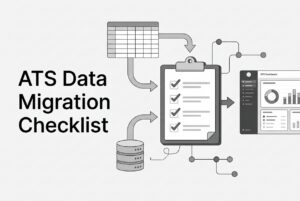
If you are planning an ATS implementation, the checklist is straightforward: inventory every source, decide what should move, profile and clean the data, map fields and relationships, resolve duplicates carefully, test a representative import, and agree on cutover, reconciliation, ownership, and rollback. A clean upload is not proof the hiring history survived.
The real problem: moving recruiting data without breaking the hiring record
Most migration pain comes from treating recruiting data like flat rows. Recruiting data is relational. A candidate profile is not the same thing as an application, and one person can have multiple applications, each with its own stage, notes, dates, owner, and outcome.
That matters because a migration can “work” and still damage the record. The candidate may import. The resume may attach. But the application might land under the wrong requisition, stage history may disappear, or notes may not travel at all.
For lean TA teams, the risk is bigger than clean-up effort. If the new ATS starts with broken relationships, you lose trust in reporting, recruiter adoption drops, and every future workflow gets harder. So the goal is not to move everything. The goal is to move the right records with enough structure intact that the new system becomes the system of record on day one.
Why spreadsheet and legacy ATS migrations fail
The failure pattern is usually predictable.
First, the source data is inconsistent. Spreadsheets and older systems often use different stage labels, date formats, tags, and field names across teams or years. Second, the import can look complete while the meaning is gone. A candidate profile might transfer, but the notes, ownership, attachment links, or application history do not.
Duplicate handling causes another layer of damage. If you merge by name alone, you can collapse two different people. If you skip cleanup entirely, you fragment the history and make the new ATS harder to search. And if the target system is not configured for the source data, fields, relationships, and allowed values may not line up.
Cutover is where teams get surprised. Recruiters keep editing the old system, new applications arrive mid-transfer, and automations in the new ATS can trigger at the wrong time. That is why a migration plan needs scope, quality rules, test criteria, ownership, risks, and contingencies before the final load. Otherwise you are not managing migration. You are hoping the upload behaves.
CLEAR ATS Migration: the framework that keeps the move sane
At CVViZ, we recommend using CLEAR ATS Migration as the planning framework. It is a simple way to structure a data migration so the team does not miss the pieces that matter.
CLEAR stands for:
C — Catalog sources and records
L — Limit scope and set retention rules
E — Examine, profile, and clean the data
A — Align fields, identities, and relationships
R — Rehearse, release, reconcile, and review
That sequence reflects how recruiting data should be handled in an ATS implementation. First understand what exists. Then decide what should move. Then clean and map it. Finally, test and validate it before you switch over.
Visual model
Source inventory
      ↓
Scope and retention
      ↓
Data profiling and cleanup
      ↓
Field and relationship mapping
      ↓
Test import and validation
      ↓
Cutover and reconciliation
If you want one practical takeaway from this whole article, it is this: do not move first and decide later. Decide first, then migrate with control.
C — Catalog sources and records
Start by identifying every source of recruiting data. That includes your current ATS, spreadsheets, shared drives, email archives, and any separately maintained job or candidate lists. If the team has been keeping hiring history in multiple places, assume the “real” record is split across more than one source.
Then inventory the record types you may need to move. In recruiting, that often includes candidates, requisitions, applications, stage history, notes, resumes and other attachments, interview or evaluation records, tags, sources, recruiters, hiring managers, and outcomes.
For each source, document the owner, export method, format, approximate record volume, date range, known quality issues, and access constraints. Also identify open requisitions and active applications that must keep running during the transition. This is the part teams skip when they are eager to get to the new system. It is also the part that saves them later.
One more point matters here: assign a migration owner and named reviewers. Include recruiting, IT or integration support, and the privacy or records owner where needed. If nobody owns a source, nobody can explain what a field means when the import breaks.
L — Limit scope and set retention rules
Do not migrate every record just because it can be exported. Move the records the organization needs and is entitled to retain.
That means deciding which active records must be available in the new ATS on day one, which historical records are needed for recruiting or reporting, and which records belong in secure archive, read-only storage, or deletion under retention policy. A migration is not a reason to extend the life of data that no longer has a business or legal purpose.
This step also needs privacy review. Recruiting records can include sensitive information such as health, diversity, or criminal-conviction details. Your privacy or records owner should review how candidate records and attachments are handled, including rights such as access, correction, erasure, or portability where they apply.
Retention also varies by jurisdiction. UK guidance says recruitment information should not be kept longer than needed, but it does not set a single universal retention period. In practice, that means you need an internal rule, not a guess. If your company recruits across multiple regions, confirm the requirements for each one.
E — Examine, profile, and clean the data
This is where the migration becomes real. Profile the data before you clean it.
Review both metadata and content. Metadata tells you what fields exist, how they are structured, and what type of values they hold. Content tells you what is actually inside those fields. You need both, because a spreadsheet can look tidy until you find inconsistent date formats, broken emails, or placeholder values hiding in plain sight.
A practical review should flag missing or invalid values in target-required fields, leading or trailing spaces, inconsistent capitalization, malformed phone numbers, inconsistent stage or outcome labels, test records, blank rows, duplicate candidate profiles, and stale records that are outside scope. Also look for missing owners, missing source attribution, applications with no identifiable candidate or requisition, requisitions with no clear status, and broken or incorrectly linked attachments.
Cleaning should happen in a preserved, access-controlled export. Work in a copy or controlled staging area, not the original file. Keep a log of material transformations, exclusions, and unresolved exceptions. If a value cannot be corrected reliably, do not quietly invent one. Decide whether to retain it, map it to an approved fallback, archive it, or exclude it.
A — Align fields, identities, and relationships
Field mapping is where many migrations go wrong, because the labels may look similar while the meaning is different. Build a source-to-target field map and a data dictionary before final import files are created.
| Mapping item | What to specify |
|---|---|
| Source | Source system, entity, and field name |
| Target | Target ATS entity and field name |
| Meaning | Business definition of the field |
| Transformation | Format conversion, normalization, or value translation |
| Requiredness | Whether the target requires a value and what happens if it is missing |
| Valid values | Target picklist, stage, or status values and approved mapping |
| Ownership | Person who approves the mapping or resolves exceptions |
| Test | Example input and expected target result |
The same discipline applies to identities and relationships. A candidate attached to multiple jobs should remain one candidate profile with separate application relationships, stages, and outcomes for each job. Do not collapse application history just to make the import cleaner.
Duplicate handling should also happen at the person level, not by flattening everything into one record. Use stable source IDs where available, then compare contact identifiers and other corroborating data. Exact identifier matches can go into automated review. Ambiguous matches should go to a human. Do not merge people on name alone.
One more rule matters: confirm the target system’s actual import constraints before finalizing the map. Supported objects, required fields, allowed values, file formats, attachment handling, and whether the import can update or delete records are all product-specific. For example, SAP SuccessFactors supports certain requisition, candidate, and application records with dependencies between them, and its described migration import creates records but does not update or delete them. That is a product example, not a universal ATS rule.
R — Rehearse, release, reconcile, and review
A migration is not complete when the file uploads. It is complete when the business verifies the result.
Rehearse
Run a small, representative test import first. Include active and withdrawn applications, a candidate with multiple jobs, a note or activity history record, and an attachment with a non-English filename if that exists in the source. Then test whether recruiters can find the right candidate under the right application and job, whether stages and dates are accurate, and whether the correct attachments open for the correct users.
Also test required fields, search, filters, dashboards, reports, permissions, and relevant integrations. [Check whether importing historical stages triggers hiring automations or candidate emails.](https://cvviz.com/blog/ats-workflow-automation-essentials)
Also test required fields, search, filters, dashboards, reports, permissions, and relevant integrations. Check whether importing historical stages triggers automations or candidate emails. If it does, keep those workflows under deliberate control until you know exactly how they behave.
Release and cut over
Choose the cutover window using your own hiring and application patterns. There is no universal best time. Agree on an edit cutoff for the old ATS and define how applications, emails, and recruiter updates will be handled while the transfer is happening.
Decide in advance whether the old system will stay available in read-only or parallel operation while active jobs and applications are verified. Set the owner, access rules, and end condition for that setup. Then take the final export or delta, perform the import, validate the target, and only then direct the team to use it as the system of record.
A named decision-maker should approve go/no-go against acceptance criteria. That person also needs a rollback or contingency plan if the cutover is delayed or reversed. After go-live, verify user access, careers-site application flow, reporting configuration, and any email, calendar, job-board, HRIS, or custom integrations. Then train recruiters and hiring managers and tell them where support lives.
Reconcile and review
Reconcile source and target by entity, not by one overall total. Compare candidates, requisitions, applications, attachments, and other in-scope record types separately. For every source record in scope, the migration log should show one of three outcomes: imported, intentionally excluded under an approved rule, or unresolved exception.
Validate selected source and target records, relationships, and reports. If there is a mismatch, investigate it. Do not accept a nearly matching total and call it done. Close the migration only when the owner has reviewed records, access, exports, and remaining exceptions. Keep the old environment only as long as operational, contractual, security, and retention rules allow.
What to measure before you call the migration done
Teams often ask for a simple pass/fail answer. Migration does not work that way. The right measure is whether the target system holds the records and relationships you actually need.
| Measure | Practical definition or check | Why it matters |
|---|---|---|
| Record reconciliation | Count in-scope source records by entity and show the target count and disposition of every excluded or unresolved record | Catches missing or unexpected records |
| Required-field completeness | Count or share of in-scope target records with required fields populated and valid | Finds records that imported but cannot be used |
| Relationship integrity | Count applications linked to the correct candidate and requisition | Protects candidate history and job-level outcomes |
| Duplicate resolution | Count potential duplicates reviewed, merged, retained separately, or unresolved | Shows whether profiles were consolidated safely |
| Attachment verification | Check that expected attachments open and are linked to the correct record | Detects missing files and broken links |
| Import exceptions | Count rejected or failed records with reason, owner, and disposition | Prevents silent data loss |
| Permissions and integration checks | Pass/fail for intended user access and end-to-end data flow | Confirms the workflow still works |
| Reporting continuity | Compare selected reports or pipeline totals using the agreed field and stage mappings | Prevents misleading trend comparisons |
| Project duration and effort | Record actual extraction, cleanup, test, load, validation, and cutover time against the plan | Improves future planning |
A useful rule here is simple: if the totals are close but the relationships are wrong, the migration is not successful. And if the totals match but the acceptance criteria were never defined, the project is not really finished either.
Practical checklist: what to prepare before migrating recruiting data
If you want the shortest possible answer to the planning question, use this checklist:
- Inventory every recruiting-data source
- Identify open requisitions and active applications
- Decide what must move, what should be archived, and what should be excluded
- Review retention and privacy requirements
- Profile the data for structure and content issues
- Clean the source in a controlled copy
- Build a source-to-target field map and data dictionary
- Define identity and duplicate-resolution rules
- Preserve candidate-to-application-to-requisition relationships
- Run a representative test import
- Validate search, reporting, permissions, and integrations
- Define cutover, ownership, go/no-go, and rollback procedures
- Reconcile source and target by entity
- Document every exception
That is the playbook. It is not glamorous, but it is how you avoid a migration that looks successful and still breaks the hiring record.
FAQ
Should every historical candidate record be moved into the new ATS?
No. Move the records needed for active recruiting, reporting, documented business purposes, or legal obligations. Archive or exclude the rest under retention and privacy rules. A system change alone does not justify keeping everything forever.
How should teams handle duplicate candidate profiles?
Use source IDs and corroborating identity data, document the matching rules, and send uncertain cases to a person. Do not merge on name alone. Preserve separate applications and their job-specific stages and outcomes.
Is a candidate the same record as an application?
No. A candidate profile describes the person. An application represents that person’s candidacy for a specific requisition. One candidate can have multiple applications, and those relationships should be preserved.
Should the old ATS be shut down immediately after import?
Not automatically. Some teams need read-only or parallel access while active jobs and applications are verified. Define that arrangement in advance, including access rules and an end condition.
How long does ATS data migration take?
There is no universal duration. One implementation toolkit gives an indicative total of 4 to 7 weeks, but it also says complexity, historical data, workflow design, and team availability affect the schedule. Treat that as a planning estimate, not a guarantee.
What should teams prepare before migrating recruiting data?
They should prepare a source inventory, scope and retention decisions, a field map, cleanup and duplicate rules, a representative test import, acceptance criteria, and a cutover and rollback plan with named owners.
The bottom line
A solid ATS move is not about importing as much as possible. It is about preserving meaning. If your data migration plan protects relationships, controls duplicates, validates the target, and defines cutover clearly, the new ATS can become reliable fast. If it does not, the team will spend the next six months cleaning up a problem that should have been handled before the first file was loaded.
That is why a disciplined ATS implementation starts with the data, not the demo.