Bulk resume screening is not about reading every resume. It is about building a resume workflow that separates machine-scale work from human judgment so a lean recruiting team can process the first pass of a large applicant pool without losing strong candidates or spraying uncontrolled outreach everywhere.
That matters because manual review does not scale cleanly, and keyword-only filtering misses too much. If you are screening 1000 resumes in one day, the goal is to reconcile the pool, rank it contextually, review a controlled shortlist, and close the loop with reporting. Not to make 1000 final hiring decisions before lunch. Nice try, inbox.
What is bulk resume screening and what does “screening 1000 resumes in one day” actually mean?
The short answer: it means completing first-pass screening, shortlist decisions, outreach, and reporting for the day’s pool. It does not mean interviewing, offering, or onboarding anyone. It also does not mean one recruiter personally reads 1000 resumes line by line.
For a mid-market TA team, the real job is to build a repeatable operating system. That system should handle raw volume, preserve quality, and produce a defensible funnel report. In practice, that means you define the role, clean the intake, remove duplicates, ask a few objective knockout questions, rank unique candidates with contextual AI, review the shortlist, send approved outreach, and measure what happened.
The reason this matters is simple. A team that only looks at the first 50 applicants is not being selective. It is just rewarding arrival order. And an ATS that acts like a filing cabinet does not fix that problem by itself.
Key takeaway: If you want screening 1000 resumes to be realistic, define “screening” as a controlled first-pass workflow, not a promise to fully adjudicate every candidate in one day.
Why do manual and keyword-only resume workflows fail at high volume?
Manual review and exact keyword filtering both break down once the pool gets large. Manual screening is slow, inconsistent, and vulnerable to fatigue. Keyword-only filtering is fast, but brittle. It can miss a relevant skill expressed through a synonym, a different job title, or adjacent experience.
Here is the bigger operational problem: bad sequence. If you rank before deduplicating, you may rank the same candidate twice. If you use knockout questions for preferences instead of true deal-breakers, you reject viable people for no good reason. If you automate outreach before human review, you can send the wrong message to the wrong person. That is how a resume workflow turns into a mess with better branding.
| Approach | What it does well | Failure mode at 1,000 resumes | Safe role in the workflow |
|---|---|---|---|
| Manual review | Preserves human nuance | Too slow, inconsistent, arrival-order bias | Final review and audit samples |
| Exact keyword filtering | Simple and fast | Misses context and synonyms | Narrow discovery search only |
| Unconfigured ATS inbox | Centralizes files | Becomes a digital filing cabinet | System of record after setup |
| Contextual AI with no QA | Processes the full pool quickly | Can misread unusual resumes | First-pass prioritization plus human sampling |
| Uncontrolled bulk email | Creates immediate activity | Damages candidate experience | Approved outreach only |
A useful benchmark for the pressure here: applications per hire were reported above 300 throughout 2025 in a large recruiter-productivity dataset. That is not a day-to-day quota, but it does explain why teams need machine-scale intake and human judgment in the same process.
Key takeaway: The problem is usually not one bad tool. It is a broken order of operations.
What is the Seven-Gate One-Day Screening Workflow?
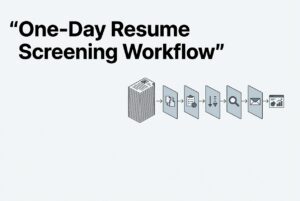
The Seven-Gate One-Day Screening Workflow is a practical framework for bulk resume screening:
- Intake
- Identity
- Eligibility
- Relevance
- Judgment
- Engagement
- Measurement
The name matters less than the logic. Each gate protects the next one. Intake defines the job. Identity removes duplicates and parse noise. Eligibility handles true knockouts. Relevance ranks candidates. Judgment applies human review. Engagement sends only approved communication. Measurement closes the loop.
RAW INTAKE: 1,000 applications
          |
          v
[1 Intake] --> [2 Identity: parse + deduplicate]
                         |
                         v
              [3 Eligibility: knockout questions]
                         |
                         v
              [4 Relevance: contextual AI rank]
                         |
                         v
              [5 Judgment: human shortlist + QA]
                         |
                         v
              [6 Engagement: outreach + booking]
                         |
                         v
              [7 Measurement: reconcile funnel + report]

Every record ends with a status:
Advance | Hold/Review | Reject with reason | Talent pool | Parse/duplicate exception
This is the core idea behind a modern resume workflow. Automate the repeatable parts, keep humans on judgment, and make every status traceable.
Key takeaway: The seven gates create an irreversible-loss prevention sequence. That is what makes high-volume screening defensible.
Step 1: How do you define the role before screening?
You define the role by freezing the evaluation brief before the pool is opened. That brief should separate must-haves from preferences and define what counts as evidence.
A solid preflight includes the job title, location or work arrangement, schedule, employment type, compensation range if used, and the business outcome. Then list three to five genuine must-haves, written so they can be observed in a resume or application answer. After that, list preferences separately. Do not turn a nice-to-have into a rejection rule.
This is where a lot of teams go sideways. “Strong communication” is not a must-have unless you define what evidence proves it. “Culture fit” is not a screening criterion. “Top-tier company” is not a job-related signal. Those phrases feel tidy and mean very little.
If you are using CVViZ, the documented flow is to create or import the job description, configure screening criteria, assign weights, and then let the system analyze and rank candidates against that role. Recruiters can control screening parameters and weight items such as qualifications, work experience, domain knowledge, skills, job stability, and related criteria. The public material does not specify default weights, so treat any starting mix as an operating hypothesis, not gospel.
Example: For a sales operations role, “has worked with CRM data in a live environment” is evidence. “Seems analytical” is an opinion.
Key takeaway: Good intake makes the rest of the workflow auditable. Bad intake turns every later step into guesswork.
Step 2: How do you remove duplicate resumes?
You remove duplicates before ranking. A duplicate is a data identity problem, not a suitability problem, and it should never consume two ranking slots.
The operating sequence is straightforward: import all sources into one pool, let the automatic duplicate check run, inspect the duplicate panel before ranking, and preserve the most complete or most recent record when the comparison supports that choice. Same-name, shared-email, shared-phone, or incomplete-profile cases should go to manual review rather than automatic merging.
CVViZ documents automatic duplicate checking during resume parsing and bulk import, plus side-by-side comparison of duplicate files. Email and phone similarity also contribute after parsing. For CSV imports, matching email addresses can update existing contacts instead of creating new ones.
That matters because bulk resume screening depends on clean counts. You need raw applications, unique candidates, duplicates, and parse exceptions separated before you decide anything. Otherwise, your shortlist math is fiction.
Good practice: N_raw = 1000, then reconcile duplicates and parse exceptions before ranking.
Bad practice: ranking a candidate twice because they applied twice.
Key takeaway: Deduplication is a data hygiene gate, not a hiring judgment.
Step 3: How many knockout questions should you ask?
Start with three to five objective knockout questions. That is enough for most roles. More than that, and you usually start leaking candidate completion and creating confusion.
Use knockout questions only for true deal-breakers that are job-related and explainable. That could be a required license, a published shift, a defined travel requirement, or a legal authorization condition the employer actually needs. Do not use questions that are vague, proxy-based, or sensitive in ways the law would not like.
CVViZ’s help guidance recommends keeping the form short and not asking for information already on the resume. It also supports reusable screening questions, mandatory flags, and automatic filtering based on answers. Supported answer types include single-choice, multi-choice, text, numeric, date, and file upload, with exact availability depending on workspace configuration.
| Use a knockout when the answer is… | Example wording to adapt and legally review | Do not use it as a knockout when… |
|---|---|---|
| A required credential or license | “Do you hold the license required for this role in the stated jurisdiction?” | The credential is just preferred |
| A true schedule or location requirement | “Can you work the published shift and location requirements?” | The team has not decided if it is essential |
| A required technical or language capability | “Can you demonstrate the required capability described in the job brief?” | The question is really a pedigree filter |
| A documented travel or availability requirement | “Can you meet the published travel requirement?” | The percentage is undefined |
| A legal or work authorization condition | Ask only what the employer needs and local law permits | It touches protected traits or sensitive data |
A good rule: if a candidate can answer the question honestly and still be a strong fit, it should not be a knockout.
Key takeaway: Knockout questions are for hard gates, not convenience filters.
Step 4: How does contextual AI rank candidates?
Contextual AI ranks the full unique pool against the job, but it should not be the final decision-maker. Its job is to prioritize attention.
CVViZ describes contextual matching and relative ranking across dimensions like skills, job titles, experience, industry background, career progression, education and certifications, transferable skills, and contextual relevance. The important word there is relative. The same person can rank differently for a different job because the comparison set changes.
Use the output like a queue. A practical starting point is to review the top 10% of the unique pool first, then keep a reserve bucket for a second look if needed. That is not a universal benchmark. It is a capacity choice. If the team cannot review the chosen bucket carefully, shrink it. Do not pretend a larger auto-shortlist was truly reviewed.
| Ranking output | How to use it | How not to use it |
|---|---|---|
| High rank | Queue for first-pass review | Treat as guaranteed hire material |
| Mid rank | Reserve bucket or second review | Ignore without sampling |
| Low rank | Audit sample for false negatives | Declare the person unqualified automatically |
A small but important warning: contextual AI can reduce dependence on exact keywords, but it does not remove bias or judgment. It is a prioritization layer, not a hiring verdict.
Key takeaway: Relative ranking helps you see the right people sooner. It does not replace human review.
Step 5: How should recruiters review the shortlist?
Recruiters should review the evidence behind the first-pass shortlist, check ambiguous cases, and sample lower-ranked candidates before anything goes out the door. That is the human gate.
A clean protocol looks like this: calibrate two reviewers on the same 10 resumes, then split the shortlist. Review in descending priority, but do not stop after the obvious wins. Record a status for every candidate: Advance, Hold/Review, Reject with reason, Talent pool, or Exception. Then inspect a random sample of lower-ranked records and all manual overrides.
This is also where you protect against false negatives. A strong candidate with a different title, a nontraditional path, or unusual terminology can get buried if nobody looks below the top bucket. That is why the reserve bucket and the lower-rank audit exist.
The checklist should include required skill demonstrated, role context, relevant scope or recency, transferable evidence, credential or work-condition status, unexplained gap or ambiguity, source and duplicate status, reviewer decision, and reason code. That makes the decision auditable without pretending a resume answers everything.
Example: A developer candidate may not list the exact stack from the job description, but the resume may show adjacent tooling, relevant projects, and scope that make the fit obvious. That is a human judgment call, not a checkbox exercise.
Key takeaway: Human review should verify evidence, not rubber-stamp AI output.
Step 6: How do you contact candidates without losing quality?
Outreach should begin only after the shortlist is locked. Segment the approved candidates, use a role-specific template, and personalize the reason for contact. Do not blast everyone with the same generic note just because the system can.
CVViZ supports workflow triggers, email templates, sender details, scheduling links, reminders, candidate history, and stage-based actions like invitation, assessment link, rejection email, or talent-pool movement. Those are workflow options, not a license to automate recklessly.
A good same-day outreach sequence is simple:
- Send the first approved message to the high-confidence shortlist.
- Use a different template for candidates who need clarification.
- Include role, location or schedule, why the profile looks relevant, and the next action.
- Offer a scheduling link only after human approval.
- Log delivery, response, decline, no response, and booked status.
- Use one policy-approved follow-up, not repeated nudges.
Here is the practical test: if a candidate replies, can you trace exactly why they were contacted? If the answer is no, your outreach process is too loose.
Example message structure:
“We reviewed your experience with [specific relevant work] for [role]. The role involves [one concrete requirement]. If that matches your interest and availability, choose a time or reply with a question.”
That is much better than saying the AI selected them. Humans still own the decision.
Key takeaway: Approved outreach should be controlled, traceable, and tied to a human-checked shortlist.
Step 7: Which metrics prove the workflow worked?
The workflow worked if the end-of-day report reconciles the whole funnel, not just how many resumes got ranked. Leadership needs a clean view of raw volume, duplicates, eligibility, shortlist, outreach, and response.
A strong report should include raw applications, unique candidates, parse success rate, duplicate rate, knockout pass rate, AI first-pass coverage, human review rate, shortlist rate, outreach rate, response rate, booking rate, source yield, time to first review, time to shortlist, time to fill, time to hire, and cost per hire.
| Metric | Definition or calculation | Why it matters |
|---|---|---|
| Raw applications | Count received in the window | Establishes volume |
| Unique candidates | Raw applications minus duplicates, with exceptions shown separately | Prevents double counting |
| Parse success rate | Parsed records divided by raw files | Reveals data-quality loss |
| Duplicate rate | Confirmed duplicates divided by raw applications | Shows source overlap |
| Knockout pass rate | Candidates passing hard questions divided by unique applicants who answered | Tests gate quality |
| AI first-pass coverage | Unique records scored or ranked divided by unique records | Shows full-pool coverage |
| Human review rate | Human-reviewed records divided by unique records | Makes judgment visible |
| Shortlist rate | Approved shortlist divided by unique records | Shows role calibration |
| Outreach rate | Outreach sent divided by approved shortlist | Shows follow-through |
| Response rate | Replies divided by delivered outreach | Measures message fit |
| Booking rate | Confirmed bookings divided by delivered outreach or replies | Separates interest from action |
CVViZ’s analytics material supports reporting on time to fill, time to hire, cost per hire, source of hire, and sourcing-channel effectiveness. It also supports exportable reports. The point is not to create prettier dashboards. The point is to tie every raw application back to a final status.
Key takeaway: If the funnel does not reconcile, the day is not actually done.
How do you audit AI screening for false negatives and bias?
You audit AI screening by freezing the job brief, testing the rules on known resumes, comparing AI routing with recruiter judgment, and sampling lower-ranked candidates and automatic rejection categories. That is the safest way to keep bulk resume screening defensible.
AI screening is a socio-technical process. The model, the job description, recruiter behavior, and organizational incentives all affect the outcome. So do not assume contextual ranking removes bias just because it is smarter than keyword matching. It does not.
Use a lightweight validation loop:
- Freeze the job brief, questions, criteria, and settings version.
- Test the rules on clearly qualified, clearly unqualified, and ambiguous resumes.
- Compare AI routing with trained recruiter judgments.
- Sample lower-ranked records and all automatic rejection categories.
- Track pass, shortlist, rejection, override, and outreach rates by source and stage.
- Keep an audit log of changes, overrides, reviewer identity, and timestamps.
- Provide a human path for ambiguous cases.
There is also a legal angle. Employment-discrimination protections still apply when AI is in the loop. Jurisdiction-specific obligations may also apply, including local AEDT rules. The employer owns the lawful configuration, not the software vendor.
Key takeaway: The defensible claim is narrow: contextual ranking can reduce keyword dependence, but human review and audit controls still matter.
FAQ: Can one recruiter process 1,000 resumes in one day?
Yes, if “process” means automated parsing and prioritization for the full pool, plus human review of a controlled shortlist, exception handling, outreach, and reporting. No, if it means one person reads 1000 resumes carefully and makes 1000 final decisions.
A better way to think about it is this: one recruiter can manage the workflow if the machine handles intake, deduplication, and ranking, and the human handles judgment on a smaller, well-defined set. If the team is lean, keep the first-pass bucket small enough to review carefully. If the role is especially scarce or sensitive, shrink it further.
Can you do this with any ATS? In theory, yes, if the system supports parsing, deduplication, screening questions, ranking, workflow automation, and analytics. CVViZ is one implementation example because it documents those capabilities. But the framework itself is the point.
What should you not do? Do not auto-reject the entire lower-ranked pool without audit sampling. Do not send outreach before shortlist approval. Do not confuse screening with hiring.
Key takeaway: One-day bulk resume screening is a workflow problem, not a heroics problem.