You posted a role two weeks ago. Now you have 180 resumes in your inbox. Half of them are from people who clearly didn’t read the job description, and your best candidates are already talking to three other companies. You’re spending Sunday afternoon triaging a spreadsheet instead of thinking about the quarter.
For years, I called this a volume problem. I was wrong. It’s a systems problem.
Resume screening, when it’s done right, isn’t about reading faster. It’s about building a repeatable, auditable triage system that turns a messy inbound pile into a prioritized shortlist. One that your team can run consistently, no matter who’s on desk that week.
This article is the playbook. I’m going to walk you through a framework for structured screening, show you how CVViZ, an AI recruiting software, automates the grunt work, clarify where humans must stay in the loop, and tell you what to measure to prove it’s working.
What’s Broken About Resume Screening in Fast-Growing Teams?
The problem isn’t that you have too many resumes. The problem is you have no consistent way to sort them.
Sound familiar? In fast-growing teams, the chaos usually looks like this:
- Resume pileups from everywhere. You have job boards, referrals, LinkedIn DMs, and agency submissions all landing in different places, with no single view.
- Endless screening calls. Your first pass wasn’t structured enough, so you keep having the same conversation to filter out obvious mismatches.
- Spreadsheet chaos. Candidate status lives in a column somebody else owns, and you’re never quite sure if it’s up to date.
- Clueless hiring managers. They can’t see the pipeline, so they keep pinging you: “Where are we on this?”
The hidden cost is always worse than the visible one. When candidates wait four days for a response, the strong ones take other offers. When you rush screening to catch up, you make worse decisions. I’ve seen teams “just work harder” right up until the moment their application volume doubles. The system doesn’t break gradually; it collapses all at once.
The real problem is inconsistent triage, slow decisions, and scattered context. That’s what makes good candidates so easy to miss. You don’t need to fix the number of resumes. You need to fix the system.
Why Do Common “Fixes” Fail at Scale?
Most teams try three things to solve this. None of them hold up past the first real spike in applications.
Keyword filtering feels like a system, but it’s not. A “React developer” who titles their resume “Frontend Engineer” gets filtered out. Someone who keyword-stuffed “Python” ten times gets through. Keyword matching is blind to context. It can’t tell the difference between someone who used a tool for a week and someone who built production systems with it. It will also consistently miss great candidates with non-traditional backgrounds.
Manual-only screening works fine when you have thirty applicants. At three hundred, it breaks. The main issue is criteria drift. The standard a recruiter applies on Monday morning is different from the one they use on Friday afternoon. Different reviewers weigh experience differently. Fatigue sets in, and suddenly the last person they reviewed shapes how they see the next person. The result is a shortlist that reflects the reviewer’s mood as much as the candidate’s actual qualifications.
Generic AI tools like ChatGPT create a whole different set of problems. Without structured input, consistent prompts, and a real process around them, you get wildly different outputs every time. There’s no audit trail, no integration with your candidate data, and no feedback loop to make it smarter. You also take on all the responsibility for bias and accuracy without any of the guardrails you need to manage it.
What actually works is a systemized workflow with measurable outputs. One where you define the screening logic upfront, apply it consistently, and improve it over time with feedback.
What Is the “Rank-Ready Screening System”?
A reliable screening system isn’t just a software feature. It’s a series of defined stages, each producing a specific output. Together, they convert a pile of raw applications into a prioritized shortlist your team can act on.
I call this framework the Rank-Ready Screening System.
It’s built to deliver four measurable outcomes:
- Faster shortlist creation (less time from posting to first review)
- More consistent evaluation (same criteria applied to every candidate)
- Clear prioritization (everyone knows who to look at first)
- Reduced admin (fewer emails, status updates, and manual routing)
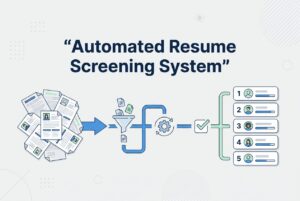
Here are the six stages:
- Intake: Define the role with must-have skills, nice-to-haves, and absolute disqualifiers. This is where your screening intent lives.
- Parse & Normalize: Convert all resumes into structured, comparable data. No more apples-to-oranges comparisons.
- Contextual Match: Evaluate candidates against your requirements based on relevance and context, not just keyword overlap.
- Relative Ranking: Order candidates by fit so your team knows exactly who to review first, second, and third.
- Workflow Handoff: Move candidates through stages consistently, with automated notifications and routing.
- Feedback Loop: Use hiring decisions (who advanced, who was rejected, who got the job) to improve the accuracy of future rankings.
Speed comes from ranking. Quality comes from consistent criteria plus a human review at the right stage. The feedback loop is what turns a one-time process into a system that gets smarter.
How Does CVViZ Automate Resume Screening Step-by-Step?
Here’s what the Rank-Ready Screening System looks like when you run it in CVViZ.
Step 1: Define job requirements. Before you touch a single resume, you set your must-haves and nice-to-haves inside CVViZ. This isn’t just busywork; it’s the signal the AI uses to match and rank candidates. Garbage in, garbage out. Specific requirements produce better shortlists.
Step 2: Get resumes into one place. CVViZ pulls in applications from over 20 free job boards and 2,000+ other channels with a single post. Resumes from email imports, sourcing, and agencies all land in one centralized pool, not scattered across inboxes and folders.
Step 3: AI resume screening. This is where the CVViZ screen resumes using AI. It uses its natural language processing and machine learning. It’s not a simple keyword scan. It’s contextual screening that reads a resume like a subject matter expert, looking at relevance and experience patterns instead of just surface-level terms. The system also learns from your hiring decisions over time.
Step 4: Relative resume ranking. Candidates get ranked in real time against your job requirements and your past hiring patterns. “Top of the list” means the AI has assessed these profiles as the most relevant, based on what you said you need and what your past decisions show you value. Think of it as a prioritization tool, not a final verdict.
Step 5: Sanity-check with search. CVViZ’s semantic resume search lets you run boolean queries and filter the database. This is great for spot-checking edge cases, like candidates who might be ranked lower but have important context the AI couldn’t fully capture.
Step 6: Deduplication and standardized data. The platform automatically detects duplicates, so you don’t review the same person twice. Standardized parsing means you’re not trying to compare a clean resume against a blurry scanned PDF on uneven footing.
The output is a prioritized set of candidates for you to review. The system gives you a shortlist; it doesn’t make the final call.
What “Contextual Matching” Means in Plain English
A keyword filter just sees the word “React.” Contextual matching sees “Frontend Engineer with three years of component-based development in a production environment who also worked with TypeScript and GraphQL.” It recognizes that this is a strong match for your React role, even if the word “React” only appears twice.
It also catches transferable patterns, like someone moving from mobile to web, or a backend engineer with documented full-stack exposure. That said, contextual matching still can’t judge a person’s intent, communication style, or career goals. That’s what the human review is for.
What to Review Manually Before Moving Someone Forward
The ranking tells you the order of review. It does not decide for you. Before advancing anyone, a human needs to check for:
- Work authorization: Especially for roles with location or visa constraints.
- Employment gaps: Look for them, but try to understand the context instead of just flagging them.
- Domain fit: Does their industry background actually translate to yours?
- Communication clarity: You can see this in cover letters, portfolios, or written samples.
- Leadership signals: For senior roles, are they just described as a leader, or does their experience show it?
Use the ranking to decide who to review first. But always keep the final pass human.
Where Does Automation Save Time After Ranking?
Once candidates are ranked, the bottleneck shifts to admin work: routing emails, updating stages, chasing interview availability, sending rejection notes. This is where CVViZ’s workflow automation earns its keep.
| Task | Why It’s Automatable | Human Check to Keep |
|---|---|---|
| Notifications when resumes arrive | Consistent, rule-based trigger | None needed |
| Stage-change emails to candidates | Templated, timing-driven | Review the tone for tricky cases |
| Pre-screening questions | Standardized for all applicants | Review the answers; don’t auto-advance |
| Bulk outreach / reminders | Identical content, large volume | Monitor reply quality |
| Calendar/email sync | Scheduling logic is deterministic | Confirm manually for senior interviews |
| Final shortlist selection | Requires judgment | Always human |
| Soft skills / culture fit | Can’t be reliably inferred | Always human |
| Fairness / exception review | Requires context and ethics | Always human |
To automate the recruitment process in CVViZ, you can set rules and triggers to run workflows when a resume arrives, a stage changes, or a job is added. Routine actions happen automatically. Pre-screening questions can filter obvious mismatches before a human spends any time on them. Email campaigns and reminders go out on schedule.
What you don’t automate are judgment calls, nuanced candidate situations, and anything where being wrong has a real human cost.
How Do You Stop Re-Sourcing Every Time?
When a new role opens, most teams go right back to the job boards and start from zero. Meanwhile, they’re sitting on a database of candidates who applied six months ago, and some of them would be perfect for the new role.
Talent rediscovery is a repeatable process, not a one-off database search.
Here’s how to run it:
Step 1: Consolidate past candidates. CVViZ’s Chrome extension pulls profiles from job boards like LinkedIn, Dice, and Monster directly into your centralized talent pool. Other tools let you source from GitHub, StackOverflow, and across the web. Everything lands in one database with history attached.
Step 2: Search smartly. Use CVViZ’s boolean search and filters to find close matches fast. You can search by skill, experience level, last role, location, or any combination. You’re not scrolling; you’re querying.
Step 3: Run AI matching against the new role. Take your existing pool and rank it against the new job requirements. CVViZ will surface the most relevant past candidates, so you can prioritize your outreach instead of just guessing.
Step 4: Re-engage with targeted campaigns. Send a focused email campaign to the shortlisted past candidates. Track opens and replies. CVViZ doesn’t tell you who’s available (that’s a human conversation), but it helps you reach the right people first.
Step 5: Prevent duplicate outreach. Automatic duplicate detection means you don’t accidentally contact the same person twice. Candidate history shows you what’s been communicated before.
Here’s a practical scenario: A new backend role opens Monday morning. CVViZ will instantly tell you whether you have the top-matching candidates in your database. Or you can query your existing database, rank past candidates against the new requirements, and have a list of twenty people worth contacting before you’ve even posted the job. We call it candidate rediscovery.
What Should You Measure in the First Month?
If you’re making a decision, you need more than a demo. You need a measurement framework you can run yourself to confirm the system is working, and to fix it when it isn’t.
Before you flip any switches, get a baseline. Write down how many hours you currently spend screening per role each week, how long it takes from application to first response, and how long it takes to produce a shortlist.
Speed metrics to track weekly:
- Time-to-shortlist (from job post to ranked candidate list)
- Time-to-first-touch (first communication with a candidate after applying)
- Screening hours per role per week
Quality metrics (early indicators):
- Interview-to-offer ratio trend. Are your interviews producing offers more often?
- Hiring manager shortlist rating. A simple weekly 1–5 on “how relevant was this batch?”
- Pass-through rates by stage. Where are candidates dropping off, and why?
Sourcing metrics:
- Which channels (job boards, sourcing tools) are producing candidates who actually reach the interview stage?
CVViZ’s recruitment analytics can track time-to-fill and sourcing effectiveness, and the reports are exportable. You can pull a clean view each week without building it from scratch.
Set up a weekly review. Every Friday, look at three things: Did the shortlist quality improve? Where are we still losing time? What needs adjustment (job requirements, pre-screening questions, workflow triggers)? Don’t wait a month to course-correct.
What Should You Be Cautious About With AI Resume Screening?
AI screening works best with guardrails. Here are the risks you need to name and what to do about them.
Over-trusting the rank order. The ranking is a prioritization tool, not a final judgment. Every so often, pull five candidates from the middle and bottom of the list and review them manually. You’ll catch edge cases and keep your own judgment sharp.
Bias from historical decisions. If your past hiring patterns were skewed, the AI can learn those same patterns. Review your screening criteria periodically. Where it’s legally and ethically appropriate, check pass-through rates for different candidate groups. Revisit “must-have” requirements that might be proxies for something irrelevant.
Missing non-traditional candidates. A candidate who learned a skill outside of a traditional job title may rank lower. Explicitly add “or equivalent experience” to your requirements. Do periodic reviews where you remove title-based filters and evaluate experience directly.
Soft skills can’t be read from a resume. No AI tool changes this fact. Use structured pre-screening questions, keep your interview process consistent, and rely on human judgment for these signals.
Automation should make your process more consistent, not less thoughtful. The whole point of the Rank-Ready Screening System is to free up human attention for the decisions that actually require it, not to outsource your thinking to a model.
The hiring chaos you’re dealing with won’t fix itself with more manual effort. But it doesn’t require a massive, complex overhaul either. A structured front end with clear intake, consistent parsing, contextual ranking, and automated handoffs can handle the mechanical work. This frees up your team to focus on the part that requires human judgment: evaluating people.
That’s what the Rank-Ready Screening System does. CVViZ handles the triage. You handle the decision.