You posted a senior developer role on three job boards and got 60 applications in a week. Now you have a spreadsheet with five tabs, two email threads with a hiring manager, one thread with a recruiter friend you consulted, and a sticky note about a referral from last Tuesday. Someone updated the wrong tab. You’re not sure which version is current. A strong candidate asked for an update three days ago. You meant to respond.
This is the part where people say, “we need to get more organized.” But organization isn’t the real issue. The real issue is that email and spreadsheets have no system of record, no repeatable steps, and no enforcement. They track candidates, but they don’t run a hiring workflow. For developer roles, where volume spikes fast and screening requires actual judgment, that gap costs you time and candidates.
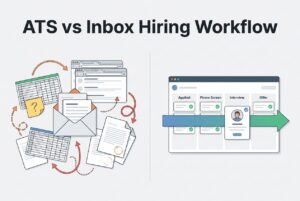
Let’s walk through both workflows, inbox/spreadsheets vs. an ATS. I’ll show you exactly where the manual approach breaks and give you a minimum viable setup if you decide to switch.
Where Does Inbox + Spreadsheet Hiring Break First When You’re Hiring Developers?
Manual tools fail in predictable places. Here’s where the damage shows up.
Version control falls apart immediately. One person updates the spreadsheet, but another doesn’t see it. Someone creates a “v2” copy. Interviews get scheduled based on stale information. The hiring manager is evaluating a candidate who was already rejected two days ago. Your “spreadsheet” is now three files in a shared drive with slightly different names.
Your inbox is a terrible database. Search by a candidate’s name and you get 40 threads. Notes and decisions get buried. If someone on your team leaves, their decision history for a candidate is gone with them. You can’t reliably answer, “What did we decide about this person, and why?”
Manual screening is mostly admin, not evaluation. You spend your time copying resumes into a doc, tagging rows in a sheet, and moving people from “applied” to “reviewed.” That’s not screening; it’s data entry. The actual evaluation, which requires judgment, gets rushed or skipped entirely.
Scheduling runs on guesswork and goodwill. Every interview requires 4–8 emails. The engineering lead replies late. The candidate picks a slot that no longer works. Someone misses the Zoom link. You reschedule. Developer candidates are fielding multiple offers, and slow scheduling is often what tips them toward another company.
Feedback is scattered and undocumented. Notes live in a DM with the hiring manager, a forwarded email, or someone’s memory. There’s no audit trail. When a decision gets questioned later (internally or otherwise), you can’t reconstruct the reasoning.
Each failure point is predictable. Together, they compound every time you open a new role or get a spike in applicants.
What Does an ATS Workflow Change in Practice?
An ATS or Applicant Tracking System isn’t about features. It’s about replacing a scattered set of tools with one system of record. It’s a single place where candidate data, decisions, communications, and status all live together and stay current.
The practical shift looks like this:
One candidate profile. The resume, application answers, interview notes, stage history, and every message sent or received are all attached to one record. No more searching across four different tools. Anyone on the hiring team can open it and know exactly where things stand.
A visual pipeline everyone shares. Instead of “check the spreadsheet,” there’s a board where every candidate’s current stage is visible in real time. The hiring manager sees it. The recruiter sees it. When a candidate moves from one stage to the next, everyone knows automatically.
Communication that doesn’t fall through. You get templated outreach, auto-acknowledgments, stage-triggered follow-ups, and reminders for interviewers who haven’t submitted feedback. The coordination work that lives in your head right now gets offloaded to the system.
Decisions stay attached to candidates. Comments, evaluation notes, and mentions all live on the candidate record. When you’re making a final call, you’re reviewing a complete history, not trying to reconstruct it from memory and stray emails.
This matters most when volume spikes, when multiple interviewers are involved, and when candidates are coming from more than one source. With low volume and a single decision-maker, it might be overhead you don’t need. But the moment you have two reviewers and 30 applicants, the lack of a shared system starts costing you real time.
A Side-by-Side Breakdown: The 6 Steps of Developer Hiring
The ATS workflow consistently reduces handoffs and rework across the entire funnel. Spreadsheets track things, but they don’t execute or enforce consistency.
| Step | Inbox/Spreadsheet Reality | ATS Workflow | Hidden Cost If You Stay Manual |
|---|---|---|---|
| Job intake & role requirements | Requirements are drafted in a doc or email, disconnected from screening or scoring. | Requirements are captured in the system and used to configure screening criteria. | Misalignment between what you said you wanted and what you actually screen for. |
| Job posting & sourcing | You post manually to each board, copying and pasting the job description each time. | You distribute to multiple boards in one action and import sourced profiles directly. | Repeated effort for every role; candidates from niche platforms (GitHub, StackOverflow) are missed. |
| Resume intake & deduplication | Resumes arrive across email, board portals, and referrals, requiring manual merging. | All resumes flow into a single candidate pool and duplicates are flagged automatically. | Duplicate outreach, missed candidates, and version confusion across sources. |
| Level 1 screening | Manual read-throughs and row-by-row tagging create inconsistent criteria. | Pre-screening questions filter mismatches. AI scoring prioritizes who to review first. | Time is spent on obviously unqualified candidates. Standards are inconsistent across reviewers. |
| Interview scheduling & coordination | Back-and-forth emails lead to missed links and rescheduled meetings. | Centralized scheduling with calendar sync lets candidates self-select from available times. | Candidate drop-off due to slow or frustrating scheduling. |
| Team feedback, decision, reporting | Feedback is in DMs/emails, and decisions are reconstructed from memory. | Feedback is submitted on the candidate record, logging a decision trail. Metrics are readily available. | No audit trail, you can’t identify bottlenecks, and inconsistent evaluation is hard to defend. |
The developer-specific pinch points are in rows 2, 4, and 5. Developer roles attract high-volume, often irrelevant applications, require actual technical evaluation (not just a resume scan), and involve busy engineering interviewers who are hard to coordinate. Manual tools don’t handle any of that gracefully.
The 10-Minute Self-Audit: Are You Tracking Candidates or Running a Workflow?
Answer yes or no to these five questions:
- Can anyone on the team see a candidate’s current status in under 10 seconds, without asking you?
- Can you pull up all notes and decisions for a candidate without searching your email?
- Do candidates receive timely status updates without you manually sending them?
- Does every interviewer submit structured feedback before the debrief meeting?
- Can you tell which sourcing channel is producing the best candidates right now?
If you said “no” to three or more, you’re paying the spreadsheet tax every week. It shows up as admin hours, delayed decisions, and candidates who ghosted because you were too slow to follow up.
How Do You Modernize Screening Without Adding More Candidate Friction?
The “resume + quick call” approach breaks down faster than most people admit. You repeat the same five questions on every call. Impressions vary based on who happens to be free that day. The engineering lead gets looped in too late and asks you to restart the search. It’s a time sink that produces inconsistent results.
For developer hiring, better Level 1 screening means structured, job-relevant evaluation, often asynchronous, with clear criteria defined before anyone reviews a single resume.
Two formats for two situations:
- Asynchronous screening (structured written questions, take-home tasks, or recorded video responses) works best for managing volume, handling different time zones, or reducing live calls in the first round. Candidates can respond on their own schedule.
- Synchronous screening (pair programming, live coding, or collaborative debugging) is best when you need to see how someone thinks in real time, especially for senior roles or when collaboration style is critical.
What “good” criteria actually looks like: Don’t just evaluate correctness. Look at maintainability, how the candidate documents their thinking, basic security awareness, and whether they deliver something finished within the stated time. These are job-relevant signals a resume can’t give you.
Candidate objections you’ll get and how to handle them:
- “This feels like free work.” Keep tasks bounded, clearly scoped, and visibly relevant to the actual role. A two-hour task with a real problem is defensible; an eight-hour take-home is not.
- “I don’t know how I’ll be evaluated.” Share the rubric. Candidates perform better and trust the process more when the criteria aren’t a mystery.
- “I never heard back after the assessment.” Close the loop. Even a brief note on the outcome improves how candidates perceive your company, and trust me, they talk.
This is where having the tools built-in really helps. For example, an ATS like CVViZ includes a live code editor and video interviewing directly in the hiring workflow. You can standardize your early technical evaluation without stitching together a separate video platform and coding tool, which reduces coordination overhead without removing human judgment.
How Much Time and Risk Are You Really Losing With Manual Hiring Ops?
The cost of manual hiring ops isn’t usually one big failure. It’s a compounding drag, made up of small delays and rework that stack up across every role you run.
Here are the categories to estimate honestly (don’t fabricate numbers, but actually think about your week):
Time sinks:
- Manual resume sorting and tagging: How long does it take to get from 60 applicants to a shortlist of 10?
- Copy-pasting between tools: How many places does candidate data live right now?
- Searching for current status: How often does someone ask “where are we with [candidate]?” and how long does it take to answer?
- Scheduling back-and-forth: How many emails does it take to lock in one interview?
Risk costs:
- You lose strong candidates to slow follow-up. Developer candidates are often interviewing at two or three places at once. A week of scheduling lag can cost you the offer.
- Inconsistent evaluation creates false positives and negatives. Without structured criteria, who gets hired depends partly on who was in the room and how their day was going.
- Missing decision history creates compliance and internal risk. If a candidate or colleague asks why someone was rejected, can you reconstruct the reasoning? If not, that’s a liability.
Here’s a rough framework: take your estimated weekly hours lost to manual hiring admin, multiply it by the blended hourly cost of the people doing it, then add the cost of a delayed hire milestone (like a sprint that slipped or a project pushed back). For most SMBs actively hiring developers, that math justifies a switch faster than any feature comparison.
What Does a “Minimum Viable ATS Workflow” Look Like for an SMB Hiring Developers?
You don’t need a 20-stage pipeline with six integrations. You need the minimum structure to eliminate your actual failure points.
Minimum pipeline stages:
Applied → Pre-Screened → Tech Screen → Hiring Manager Review → Interview Loop → Offer → Hired / Rejected
Seven stages. Clear meaning. Everyone knows where each candidate sits.
Minimum data rules:
- One record per candidate (no duplicates).
- The stage must be current (updated within 24 hours of any action).
- Every decision has a note, even if it’s just one sentence.
Minimum automations to set up first:
- Auto-acknowledgment when someone applies.
- Pre-screening questions to filter obvious mismatches before anyone reads a resume.
- An auto-reminder to interviewers who haven’t submitted feedback after 24 hours.
- A status update triggered when a candidate moves to a new stage.
These four automations alone eliminate the most common failures: missed follow-ups, unread feedback requests, and candidates left waiting with no communication.
Minimum screening standardization:
- A written rubric for Level 1 evaluation (even a simple one).
- Defined pass thresholds before you start reviewing, not after.
- Clear escalation rules: what makes someone worth an engineering team interview versus a rejection.
For screening specifically, one practical upgrade is replacing pure keyword filtering with contextual AI resume screening. Tools like CVViZ’s AI screening and relative resume ranking go beyond keyword matching. They surface candidates based on actual fit with the role and your hiring patterns, so you’re prioritizing the right 10 to review instead of reading through 60 to find them.
Adoption tip: Don’t try to boil the ocean. Start with one role, one hiring manager, and one end-to-end run. Review what broke, fix it, then expand.
Which Should You Choose Right Now: Stay With Spreadsheets, Switch to an ATS, or Run a Hybrid?
The right call depends on what’s actually breaking, not on wanting to feel more professional.
Spreadsheets are still fine if:
- You hire 1–2 developers per year.
- One person owns the entire process from start to finish.
- Inbound volume is low and mostly qualified.
- There’s no coordination needed across multiple interviewers.
If all four are true, an ATS is overhead you don’t need yet.
Switch now if you’re hitting any of these:
- Application volume spikes and manual review has become the bottleneck.
- More than one person is involved in screening or interviewing.
- You’ve had candidates drop off because of slow or disorganized follow-up.
- Screening outcomes are inconsistent across roles or reviewers.
- You can’t answer “where are we with this candidate?” in under 30 seconds.
The hybrid bridge: If you’re not ready to fully commit, at a minimum, stop storing truth in email threads. Force everything into one shared system, even a well-structured single spreadsheet, and treat email as communication only, not record-keeping. It won’t scale, but it reduces the worst of the chaos.
Low-disruption rollout when you do switch:
- Import your current active candidates.
- Define your stages and set up your templates.
- Run one new role end-to-end before expanding.
- Review three metrics at the end: time-to-screen, time-to-schedule, and candidate drop-off points.
On the sourcing side, a tool like CVViZ lets you post to multiple job boards in one action and platforms like LinkedIn, GitHub, and StackOverflow directly into a centralized pool. It even gives you email campaigns to re-engage strong candidates from past searches. That’s a huge upgrade from re-posting manually and keeping a spreadsheet of “candidates to circle back to.”
For scheduling and communication, CVViZ centralizes all email history and interview coordination against each candidate record. The thread fragmentation that causes follow-up failures gets replaced by one place everyone can check.
The decision isn’t really ATS vs. spreadsheets. It’s a simpler question: does your current workflow have enough failure points to justify two weeks of setup? If you’re hiring developers regularly and any of the triggers above sound familiar, it does.