You know the drill. A new role goes live, applications flood in, and suddenly half your week is gone. You’re reviewing resumes with zero relevance, repeating the same screening call for the fifth time, and trading calendar emails with a candidate while a competitor already has them in final rounds.
This isn’t a resources problem. It’s a systems problem. “AI recruiting software” gets thrown around as the fix, but most lists of AI features are too long, too broad, and built for enterprise HR teams with dedicated ops staff.
This article is different. It’s a short, prioritized checklist of five features that directly target the chaos points startup hiring operators hit first. My rule is simple: AI should automate work, not outsource judgment. Every feature here is viewed through that lens.
We’ll cover AI resume screening and ranking, multi-channel sourcing, automated Level 1 screening, scheduling, and centralized candidate tracking. I’ve also added a quick section on common misconceptions and some FAQs to help you avoid a bad purchase.
What Does “AI Recruiting Software” Mean for a Startup (Not an Enterprise)?
Let’s start with plain English. AI recruiting software refers to tools with AI features embedded in your workflows (think screening, sourcing, and scheduling) to reduce manual work and help your team prioritize better. It’s not a robot that hires people.
For a startup, the most important distinction is where the AI lives. An AI feature inside a unified applicant tracking system (ATS) is different from a standalone chatbot bolted onto your workflow. The standalone tools just add more tools. They don’t fix fragmentation, and fragmentation is what’s killing your process.
What should AI own? The repetitive, high-volume, pattern-based tasks. Things like ranking resumes, triggering follow-ups, parsing profile data, and sending reminders.
What must humans own? Final decisions, reading between the lines on a candidate’s fit, handling edge cases, and having the actual offer conversation.
You’ll feel the value fastest when volume spikes (that burst of applications right after a job goes live), when coordination gets overwhelming (four interviewers, three time zones), or when response times are slipping because candidates are going cold. Those are the moments AI buys back real hours.
Which 5 Features Should Be Your “Stop the Chaos” Checklist (and Why These)?
The right five aren’t the flashiest. They’re the ones that attack the biggest bottlenecks first.
- AI resume screening + ranking: Stop reviewing irrelevant applications and see your best candidates first.
- Multi-channel job posting + automated sourcing/import: Get your role in front of more people without adding six new logins to your morning.
- Automated Level 1 screening: Replace repetitive first-round calls with structured, asynchronous evaluation.
- Interview scheduling automation + coordination workflows: Stop calendar ping-pong from killing your pipeline.
- Centralized candidate tracking + communication + analytics: Turn your scattered spreadsheets and inboxes into a single source of truth.
The logic is simple. The first two increase the top of your funnel without adding noise. The next two create throughput in your pipeline. The last one prevents anything from falling through the cracks. Even a three-person team benefits from centralization. It just becomes non-negotiable once you’re hiring for more than two roles at once.
How Do AI Resume Screening and Relative Ranking Cut Resume Overload Without Missing Great Candidates?
Irrelevant applications are the first source of chaos. You post a backend role and get resumes from people listing “Microsoft Word” as a technical skill. Manually sorting 200 applications to find 8 worth a call is a terrible use of anyone’s time.
AI resume screening tackles this by going beyond simple keyword matching. Instead of just filtering for specific phrases, contextual screening (powered by NLP and machine learning) evaluates how a candidate’s whole experience maps to the role. It recognizes that “led API integrations for a fintech platform” is relevant to your senior developer role even if the exact keyword isn’t there.
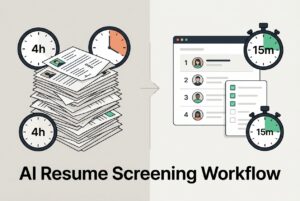
Relative ranking layers on top. Instead of a simple pass/fail, it orders your candidate pool by fit, so you know who to contact first. That’s the difference between a queue that takes four hours to clear and one you can triage in 45 minutes.
Once the system is calibrated, teams often cut their manual review time significantly, some by as much as 75%. CVViZ uses this approach: contextual AI screening combined with real-time relative ranking that learns from your hiring patterns, so rankings improve as you make decisions.
What to evaluate in any tool:
- Can you see why a candidate is ranked where they are? Basic transparency is non-negotiable.
- Does it learn from your feedback, or is it static?
- Does it handle messy formatting and duplicate profiles?
- Can you export shortlists to share with a hiring manager easily?
Two pitfalls to avoid:
- Over-filtering: Rigid must-have requirements will exclude great non-traditional candidates. Always keep a “maybe” bucket.
- Garbage in, garbage out: Vague job requirements produce weak rankings. The AI works from what you give it.
What a Good Screening Workflow Looks Like in a Lean Team
Make triage a daily habit. Review the top-ranked candidates each morning before other work pulls you away. Once a week, spend fifteen minutes with the hiring manager to recalibrate: what’s right, what’s off, and should a “nice to have” become a dealbreaker? Keep a separate bucket for non-traditional backgrounds. A human needs to make the call on those candidates, because some of them are exactly what you need.
How Do You Expand Reach Without Adding Tool Sprawl (Multi-Channel Posting + Automated Sourcing/Import)?
The chaotic way to source is posting on LinkedIn, then logging into Indeed, then remembering a niche board, all while trying to track applications across three different dashboards.
The better way is one action that distributes broadly. Multi-channel job posting (posting once and sending it to dozens of boards) matters most when you’re understaffed and the person doing recruiting is also doing four other jobs.
CVViZ posts to 20+ free job boards in one click and distributes to over 2,000 boards worldwide. For sourcing, it can pull candidate profiles from platforms like LinkedIn, GitHub, and StackOverflow into one centralized pool. So instead of copy-pasting profiles, everything lands in one place.
What to evaluate:
- How many boards, and is it truly one click, or are there manual steps?
- Can you track which channels produce qualified candidates, not just application volume?
- Can you import from the platforms where your target talent actually hangs out, and does it catch duplicates?
- Can you search that database later for a new role? (That’s candidate rediscovery, and it’s seriously underrated.)
Reality check: wider distribution means more applications, not necessarily better ones. You need that screening layer (Feature #1) working with this, plus a job description that actually weeds out the wrong candidates before they even apply. Volume without screening is just more chaos.
What Does “Automated Level 1 Screening” Actually Mean, and When Should You Use It?
L1 screening is about validating the basics. Is this person eligible? Do they meet the non-negotiables? Do they show early signs of being worth a longer conversation? The problem is, most teams do this with live 30-minute calls, repeated one by one for every candidate who clears the resume review.
That’s not a good use of a human being.
Automated L1 screening replaces that repetitive step with structured methods that gather early signals at scale:
- Pre-screening questions with knockout logic: Automatically filter out candidates who don’t meet hard requirements (like salary expectation, must-have qualification, visa status, or location). Score the rest on nice-to-haves.
- AI probing – AI conversations: After AI screens resumes for you, you may use text messages, SMS or WhatsApp to reach better-suited candidates and get to know more about them.
- Async video prompts: Ask candidates to record a short response to a few questions. The point isn’t to analyze personality from a video clip. It’s just to see how they explain themselves before you invest live time.
- Skills evaluation for technical roles: A live code editor or coding task at this stage can save you from scheduling a full technical panel with someone who can’t write a basic function.
CVViZ includes both video interviewing and an inbuilt live code editor.
What to evaluate:
- Can you standardize questions for each role to compare apples to apples?
- Can hiring managers review submissions quickly in one view?
- Is the candidate experience reasonable, with clear instructions and realistic time expectations?
A quick guardrail: L1 should help you prioritize, not auto-reject. A human should still review outputs before any candidate is fully dismissed. And be skeptical of any tool that claims its AI can judge personality or “cultural fit” from a video. Those claims are not well-supported and introduce real fairness risks.
How Do You Eliminate Scheduling Chaos (Time Zones, Panels, Reschedules, No-Shows)?
Calendar coordination is the hidden killer of candidate experience. A great candidate reaches the top of your list on Tuesday. By the time you’ve sorted out three interviewers’ availability across two time zones, it’s the following Monday. They’ve already accepted an offer somewhere else.
Good scheduling automation removes the back-and-forth. At a minimum, this means:
- Calendar sync: The tool sees actual availability, so no more “Does Thursday work?” emails.
- Candidate self-scheduling: They pick a slot from a real-time window. You don’t touch it.
- Time zone handling: The system shows candidates their local time. This sounds obvious but is consistently missed.
- Panel coordination: The tool finds the one slot that works for multiple interviewers automatically.
- Automated reminders: Pre-interview reminders go to both candidate and interviewers, reducing no-shows.
CVViZ supports hiring workflow automation tied to stage changes. When a candidate moves to the interview stage, notifications and next steps can trigger automatically.
What to evaluate:
- How does the system handle reschedules? Is it automatic or manual?
- Can hiring managers see what’s booked, pending, and stalled without asking you?
- Is there an audit trail when changes happen?
Faster scheduling isn’t just an efficiency win. It’s a competitive advantage. It directly protects your pipeline. Teams that move candidates through scheduling in 24 to 48 hours simply close more offers. When you’re a startup competing against bigger companies for talent, that speed is everything.
How Do You Keep Candidates, Communication, and Metrics in One Place (So Nothing Falls Through the Cracks)?
The before picture is chaos. Candidates are in four different job portal inboxes. Feedback is in a Slack thread someone forgot to pin. Stage updates live in an Excel file that only one person has. And a hiring manager is asking “where are we on the backend role?” for the third time this week.
The after picture is one central place. A single source of truth that shows you every candidate, their stage, who owns the next step, when they were last contacted, and what your funnel actually looks like from application to offer.
CVViZ provides a centralized candidate database with full-text semantic search, so you can find a specific profile in three seconds. Email sync, templates, and bulk emails all attach to the candidate record, so nothing lives only in someone’s inbox. When a new role opens, you can search your existing database for past applicants who might fit.
And I mean recruitment analytics that actually matter for a startup, not enterprise vanity metrics:
- Time to fill and time in stage (where are candidates getting stuck?)
- Source effectiveness (which boards actually produce candidates who get offers?)
- Funnel conversion rates from application to interview to offer.
CVViZ tracks these and generates exportable reports. They’re useful for making the case to leadership that a process needs to change, or for proving which sourcing investments are worth repeating. A minimum viable system is one place for candidates, messages, stages, and basic reporting. If you don’t have that, you’re doing extra work every day.
What Are the Most Common Misconceptions About AI Recruiting Features (and How Do You Avoid Bad Buys)?
- “AI recruiting means a chatbot on my careers page.” The biggest ROI in AI recruiting comes from screening, ranking, L1 automation, and scheduling. Not a bot answering FAQs. Chatbots are a feature; they aren’t a system.
- “More AI features = a better tool.” A tool with twenty AI features you don’t adopt is worse than a tool with five you actually use. Evaluate based on your specific bottlenecks, not the feature list.
- “AI eliminates bias.” It can introduce new bias if it’s trained on biased data. What actually helps are anonymization options, human review of edge cases, and transparent, documented decision criteria. No tool can promise bias-free hiring. Be very skeptical of that claim.
- “AI can replace recruiters.” It removes admin load. The judgment work, like reading a candidate’s potential, navigating a counteroffer, or closing someone on the fence, still requires a person. The value is freeing up your recruiter to do that work instead of reviewing irrelevant resumes all day.
FAQs
Do I need to replace our current ATS to use AI recruiting features?
Not necessarily. Some tools, including CVViZ, can function as an intelligent layer on top of your current system. The better question is whether your current ATS is actually solving your bottlenecks or just organizing the chaos. If it’s the latter, a purpose-built system is worth evaluating on its own.
Will AI screening accidentally reject unconventional but strong candidates?
It can, if you let it. The fix is calibration. Review your must-have versus nice-to-have criteria weekly with the hiring manager, and always keep a “maybe” bucket for non-traditional profiles. AI ranking is a prioritization tool, not a final filter. A human should review candidates before they’re passed over.
What’s the fastest feature to implement for immediate time savings?
It depends on your biggest bottleneck. If you’re drowning in resumes, AI screening and ranking pays off fastest. If you’re losing hours to coordination, scheduling automation is your fastest win. Most teams find that even basic email templates and automated follow-ups save hours within the first week.
How do we keep AI use fair and trustworthy?
Document your evaluation criteria before you turn on any AI feature. Know what you’re selecting for and why. Demand transparency from any tool (you should be able to see why a candidate was ranked where they were). Keep humans in the loop for all final decisions. And avoid any vendor claiming AI can accurately assess personality from a video. Those claims exceed what the technology can reliably deliver.