You’re probably here because your inbox is full of resumes that don’t match the job, your hiring process is a mess of spreadsheets and Slack threads, and scheduling one round of interviews takes way too much back-and-forth. Sound about right?
Let me be direct: the price you see on an ATS vendor’s website is rarely the price you’ll actually pay. The real number depends on how the model scales with your hiring (per user, per job, or flat fee) and what you’ll pay on top for setup, integrations, AI features , and support. Those extras can easily double or triple the headline price before you’ve posted a single job.
By the end of this guide, you’ll have a playbook. You’ll know which pricing model fits your hiring pattern, what hidden costs to budget for, and which questions to ask vendors before you sign anything. Think of your total ATS cost: subscription + setup + add-ons + scaling costs. Keep that in mind as we go.
What Do Small Businesses Typically Pay for an ATS?
SMB ATS pricing is all over the place, from free plans capped at one or two jobs to platforms that cost hundreds per user per month. The problem isn’t just the price; it’s that vendors are quoting different things. A platform listed at “$49/month” means something totally different if it’s per recruiter, per active job, or a flat fee for your whole team.
The biggest driver of your cost isn’t your company’s headcount. It’s your hiring volume, your workflow complexity (do you need automated screening and structured pipelines?), and how many people need access. A five-person startup hiring ten people twice a year has a completely different cost profile than a 40-person company that hires two people a month. Both are “small businesses,” but their needs are worlds apart.
A Simple Budget Band Cheat Sheet
Entry tier ($0–$50/month): Gives you core candidate tracking and basic pipelines, but usually with hard limits on active jobs (often just one to three) or users. You’ll get minimal workflow automation. This is fine for very occasional hiring but breaks down fast when things pick up.
Mid tier ($50–$200/month): You get more recruitment workflow automation, better collaboration features, wider job board distribution, and actual reporting. This is where most growing SMBs land when they’re hiring steadily. The limits are looser, but watch for key features like AI being locked behind higher tiers.
Advanced tier ($200–$600+/month): This tier is heavy on AI screening and matching, deeper analytics, robust integrations, and dedicated support. It’s often overkill for an early-stage SMB, but it can make sense when your hiring volume or team size explodes.
A quick warning: these ranges assume a small team. Per-user models can get expensive fast once you start adding hiring managers and interviewers to the system.
Which ATS Pricing Model Fits Your Hiring Pattern Best?
This is the decision that shapes your total cost more than any feature. Get this right, and your budget stays predictable. Get it wrong, and you’ll be overpaying for months. The best model is the one that scales with what you actually use, not what sounds cheapest today.
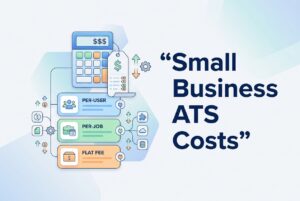
Per-user (seat-based): You pay for each recruiter or hiring manager with access. This is predictable if your hiring team is stable. The risk is what I call “seat creep.” Every hiring manager who wants to leave feedback technically needs a seat, and that cost adds up.
Per-job (per active posting): You pay based on how many roles you have open at once. This is great for sporadic hiring. It becomes painful during a hiring burst when you suddenly have eight open roles.
Per-employee: Your price is tied to your total employee count, not your hiring activity. This is common with HR platforms that bundle an ATS with other tools. For most SMBs, it’s a bad fit; you end up paying for your headcount even when you aren’t hiring.
Flat fee / tiered subscription: You get one price for a defined number of seats or features. This is the easiest model to budget for. The thing to watch for is the tier jump. Going from tier two to tier three might double your bill just because you added one more user or job.
Pricing Model Pros/Cons Table (SMB Lens)
| Model | Best when you have… | Watch-outs | Questions to ask |
|---|---|---|---|
| Per-user | A small, stable recruiting team and consistent hiring | Seat creep as hiring managers join; the definition of “user” varies | What counts as a billable seat? Are reviewers free? |
| Per-job | Sporadic hiring with few roles open at once | Spikes get expensive fast; may limit concurrent postings | How many active jobs are included? What’s the overage rate? |
| Per-employee | A tool that bundles HR and ATS, with low hiring frequency | You’re paying when you’re not hiring; tied to headcount | Is there a hiring-activity minimum before this saves money? |
| Flat fee / tiered | A need for a predictable budget and moderate hiring | Tier jumps can be steep; you’re locked into a plan | What triggers an upgrade? Can I add roles without jumping tiers? |
Here’s what will blow up your budget in each model. For per-user, it’s adding hiring managers. For per-job, it’s a sudden hiring burst. For per-employee, it’s company growth unrelated to hiring. And for flat fee, it’s crossing the threshold into the next, more expensive tier.
My practical advice? If your hiring team is small and consistent, per-user is manageable. If you hire in waves, per-job works until the waves get big. If you want zero surprises, find a flat-fee plan where the limits are well above what you expect.
What Hidden ATS Costs Should You Budget for (Beyond the Monthly Price)?
The price you see is the starting line, not the finish line. I’ve seen most small businesses get surprised by one or more of these within the first six months.
Implementation and setup: Some vendors charge onboarding fees that can range from a few hundred to a few thousand dollars. Others bury it in the first-year contract. Ask about it directly.
Data migration: If you have an existing candidate database to move, expect some pain. Vendors might offer help, but it could be a paid service or limited to a simple CSV import.
Support tiers: Many platforms put real support behind a paywall. You might get basic email support on the base plan but have to pay more for phone, live chat, or a faster response time.
AI and automation modules: This is the most common trap right now. AI screening, candidate matching, and workflow automation are often sold as expensive add-ons, not included in the base subscription. Before you assume, get a line-item breakdown.
Integrations: Connecting to job boards, background check platforms, your calendar integration with ATS, and your HRIS system may come with extra fees. Basic email and calendar sync are usually included, but deeper integrations often cost more.
Caps that act like fees: Watch for limits on active jobs, candidates, AI resume parsing, or API calls. These are designed to push you into a higher tier or hit you with overage charges, even if they aren’t listed as separate costs.
A note on open-source/perpetual licenses: “Free” software isn’t really free. It can mean a ton of internal IT time for setup, security, and maintenance. Calculate that fully loaded cost before you assume it’s the cheaper option.
When you evaluate a platform, look at what’s bundled versus what’s priced separately. For example, when reviewing CVViZ, you’d need to check if AI resume screening, hiring workflow automation, and job board distribution are in the base tier or gated behind a higher plan. That kind of checklist helps you compare vendors apples-to-apples.
“Quote Deconstruction” Checklist
Before you sign anything, use this checklist to dig into the fine print.
- Billing unit: Is the price per seat, per job, or per employee? Exactly who counts as a billable user?
- Caps and overages: What are the limits on active jobs, candidates, and resume parses? What happens if you exceed them?
- Base vs. add-on features: Get a line-item list. AI, advanced reporting, and video interviewing are often extra.
- Contract terms: Is it a monthly or annual plan? Do annual renewals include automatic price increases? What’s the cancellation policy?
How Can You Estimate Your 12-Month ATS Cost (With 3 SMB Scenarios)?
Stop guessing based on the pricing page. Build a quick model before you talk to sales. You only need four inputs.
Step 1: Estimate your average active jobs per month and your peak number for the year.
Step 2: List everyone who needs access (recruiters, hiring managers, interviewers) and map that to the vendor’s seat definition.
Step 3: List the modules you actually need, like AI resume screening, workflow automation, or reporting. Mark the ones that are likely add-ons.
Step 4: Apply the pricing model to each scenario below.
Scenario A – Steady hiring: You have two to three roles open consistently, with one or two recruiters. Hiring managers only need to review. Per-user pricing where reviewers are free works well here. A flat fee also fits if the tier threshold is four or more jobs.
Scenario B – Spiky hiring: You have almost no open roles most months, then a burst of six to eight for a launch or seasonal push. Per-user pricing holds steady during the quiet times. Per-job pricing will spike sharply during that burst. A flat-fee plan that supports your peak hiring is often the winner here.
Scenario C – Growth hiring: Your team is expanding. Two more hiring managers need access, and a second recruiter joins. With per-user pricing, that’s two or three new seats mid-contract. With a flat fee, it might trigger a big jump to the next tier. A per-job model is unaffected by these team changes.
The lesson is simple: the model that looks cheapest in Scenario A often looks the worst in Scenario B or C. Run all three before you commit.
How Do You Justify ATS Cost With ROI That Matters to a Small Business?
When you make the case to your team, skip the long feature list. The only math that moves decisions at a small business is simple: how many hours does this free up, and what does a slow hire cost us?
Start with your current process. How long does it take to screen applicants for one role? How much time is wasted on scheduling? Those hours represent a real cost you’re already paying in recruiter and founder time.
The second frame is the cost of delay. For most SMBs, an unfilled engineering, sales, or ops role has a direct, measurable impact on revenue or product timelines. An ATS that compresses your time-to-fill by even a few days can pay for itself many times over.
And don’t forget the candidate experience. Slow response times push great candidates toward faster-moving employers. A structured process reduces the number of people who drop out before you can even make an offer.
This is where AI ATS platforms like CVViZ connect to real ROI. AI resume screening cuts the manual review bottleneck. Workflow automation reduces coordination overhead. Tools like video interviewing with a live code editor (for dev roles) remove scheduling layers. These capabilities reduce the manual work your team is absorbing, and that’s the cost comparison that matters.
What to measure in the first 30–60 days: Time spent screening per role, time-to-first-response for candidates, and which sourcing channels are actually producing qualified applicants.
What Questions Should You Ask ATS Vendors to Uncover Real Pricing?
Take this list into your next vendor call. Don’t get off the phone until you have clear answers.
Pricing mechanics:
- What exactly counts as a “user”? Are hiring managers and interviewers with view-only access free?
- How many seats are included in this plan, and what does each additional seat cost?
- Can managers leave feedback without needing a paid seat?
Limits and overages:
- What are the caps on active job postings, candidates, and resume parses?
- What happens when I hit a cap? Does the system block me, or do I get an overage charge?
- Are there API call limits or email sending quotas I should know about?
Add-ons and inclusions:
- Is AI screening included, or is it a separate module?
- What about analytics, sourcing tools, background checks, and video interviewing?
- Can you send me a line-item breakdown of what’s in the base plan versus what costs extra?
Implementation:
- Is there a setup or onboarding fee?
- What does data migration assistance look like, and is it included in the price?
Support:
- What support channels are included (email, chat, phone)?
- What are the response time guarantees? Is there a premium support tier?
Contract:
- Is this monthly or annual? If it’s annual, what’s the policy on renewal price increases?
- How do I add or remove seats during the contract?
- What’s the process for downgrading or canceling?
Security/compliance:
- How is our candidate data stored and protected?
- What compliance frameworks do you support for handling applicant data?
How Do You Avoid Pricing Pain as You Scale From “Scrappy Hiring” to a Real Process?
Here’s where most small businesses get it wrong. They don’t overpay in month one. They overpay in month eight, when they’ve added three hiring managers, opened a burst of new roles, and are now locked into a pricing tier they never saw coming.
The common traps are giving system access to people who don’t need it, opening multiple jobs at once on a per-job plan, and getting dependent on an advanced feature only to find out it’s part of a much more expensive tier.
You can stay ahead of this. Define early on who genuinely needs a paid seat versus view-only access. Map your hiring goals for the next year against your pricing model. And get the overage policies in writing before you need them.
Before you commit to a platform, run a real workflow test, not just a sales demo. Post a real job, import some test resumes, and see how the AI ranking works. Trigger an automation. Send a templated email. Test the interview workflow from end to end. If you’re looking at CVViZ, that test would include its AI screening, workflow automation, and video interviewing tools. For teams not ready to rip and replace their current system, CVViZ’s capabilities can also layer on top as an intelligent screening component without a full swap.
Your Next Steps Checklist
- Pick the pricing model that fits your biggest constraint (seats, jobs, or budget).
- Build the three-scenario cost model (steady, spiky, growth) before your first sales call.
- Demand a full line-item quote, not just a plan overview.
- Run a real workflow test before signing an annual contract.
- Negotiate flexibility on adding seats and get a clear overage policy in writing.
The cheapest ATS at signup is rarely the lowest-cost option a year from now. Pick the model that fits how you actually hire, and you’ll thank yourself later.