When the hiring process is too slow, the fix is usually not “more software.” It is better routing of candidates and information. That is what recruitment automation software does well: it moves resumes, status updates, reminders, interviews, and feedback through a defined workflow while keeping judgment with people.
That distinction matters. If you automate the movement of candidates and information, you cut repetition without creating a black box. If you automate accountability, you usually get noise, confusion, and bad decisions faster. The practical goal is simple: fewer manual handoffs, fewer ownerless candidates, and fewer delays between each stage.
Growing teams feel the pain in the same places. Applications land in inboxes and job boards, recruiters re-enter data, hiring managers forget feedback, and candidates wait too long for a next step. In one recruiting benchmark, hiring teams conducted 42% more interviews per hire than in 2021 and average time to hire increased by 24%. In a separate roundup of candidate experience data, 35% of US job seekers said an employer failed to acknowledge their application, 65% said communication was not consistent, and 47% said poor communication could make them withdraw. That is not a screening problem alone. It is a workflow problem.
Why manual recruiting slows down
Manual recruiting breaks in the same five places: intake, qualification, ownership, coordination, and follow-up. A recruiter can move quickly inside one inbox, but hiring is rarely inside one inbox anymore.
Here is what usually happens:
- resumes arrive from job boards, email, referrals, and sourcing tools
- the same candidate gets entered more than once
- recruiters read every resume in arrival order
- qualified candidates sit in a shared queue with no owner
- interview scheduling becomes back-and-forth
- feedback lands late, if it lands at all
That is why teams often confuse activity with progress. More applications do not help if the team cannot sort, route, and review them on time. More tools do not help if none of them agree on the same candidate record.
Recruiting workflow automation solves the movement problem first. It does not replace the recruiter. It gives the recruiter a system that can carry routine work without turning every step into a manual chase.
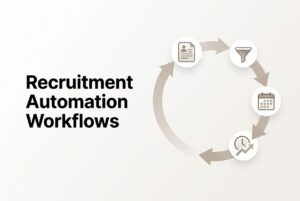
The Recruiting Velocity Control Loop
The cleanest way to think about recruitment automation software is as a control loop, not a feature list. CVViZ calls this the Recruiting Velocity Control Loop. It has five stages:
- Capture
Bring requisitions, applications, resumes, and source data into one system. - Qualify
Parse candidate data, apply job criteria, and rank likely fit. - Route
Assign ownership, update status, and send the record to the next reviewer. - Coordinate
Automate acknowledgments, scheduling, reminders, and feedback collection. - Learn and govern
Measure the funnel, rediscover prior candidates, manage consent and retention, and improve the rules.
Visual model
[Approved requisition]
        │
        ▼
┌────────────────┐   ┌────────────────┐   ┌────────────────┐   ┌────────────────┐
│ 1–2 CAPTURE    │ → │ 3 QUALIFY      │ → │ 4 ROUTE        │ → │ 6–8 COORDINATE │
│ post · parse   │   │ screen · rank  │   │ assign · stage │   │ email · book   │
│ deduplicate    │   │ prescreen      │   │ notify         │   │ remind · feedback│
└────────────────┘   └────────────────┘   └────────────────┘   └────────────────┘
                                          │
                                          ▼
                             [Human review and decision]
                                          │
                                          ▼
                             ┌──────────────────────────┐
                             │ LEARN & GOVERN           │
                             │ analytics · rediscovery  │
                             │ consent · audit          │
                             └──────────────────────────┘
The point of the loop is movement, not autopilot. Automation should make the next human step obvious, not disappear.
1. Distribute one job to multiple recruiting channels
Job distribution automation saves time by replacing repeated posting, logins, and source tracking with one approved job record. It also helps you measure which channels actually bring qualified candidates, not just clicks.
How it works
- Confirm the title, location, employment type, must-have criteria, and application questions.
- Choose a source mix: free boards, paid boards, social channels, vendors, and your career page.
- Publish once and route every application back to the same candidate database.
- Review qualified applicant yield by source.
What CVViZ supports
CVViZ posts jobs to 20-plus free job boards and distributes to 2,000-plus job boards worldwide for paid and free ads in one click. It supports paid and free portals, social media, vendors, career pages, and Google For Job Search indexing through a career page. It also captures source data, tracks activity, detects duplicates, and recommends job boards based on job profile, location, and industry.
Example
A software company posts one backend engineer role to a focused set of technical and general boards. The team watches which sources produce interviews, not just applications. When one channel delivers volume without qualified progression, they cut it.
Guardrail
Do not distribute everywhere automatically if the screening team cannot absorb the applications. More reach can also mean more noise.
2. Capture, parse, and deduplicate every application
If resumes live in inboxes and spreadsheets, every later workflow becomes less reliable. Application-intake automation is the foundation because it turns raw resumes into searchable candidate records.
How it works
- Create or match a candidate record.
- Parse resume data into structured fields.
- Detect likely duplicates and merge or send them to review.
- Attach source, consent state, notes, and activity history.
- Make the candidate searchable with full-text, Boolean search, and filters.
What CVViZ supports
CVViZ supports email resume import, Chrome-extension importing, LinkedIn importing, automatic candidate-data parsing, cloud resume storage, duplicate identification, full-text search, Boolean search, and filters. Parsed data can also be accessed through API or CSV/JSON extraction.
Example
The same candidate submits through a job board and later emails a resume to a recruiter. CVViZ can turn that into one record while preserving both source events.
Guardrail
Do not silently overwrite history when duplicates appear. Keep the original document and push uncertain matches to a human review queue.
3. Use contextual AI resume screening and ranking
AI resume screening speeds the first review by putting the strongest matches at the top. It should triage, not decide. The recruiter still owns the shortlist and the hiring team still owns the decision.
How it works
- Define must-have requirements, trainable skills, and disqualifiers.
- Separate hard requirements from preferred signals.
- Use clear result bands: likely qualified, review required, and does not meet minimum criteria.
- Route medium matches to a review queue.
- Sample lower-ranked candidates for false negatives.
- Record overrides so the rubric can improve.
What CVViZ supports
AI resume screening uses NLP and machine learning to screen resumes contextually, match candidates to jobs beyond keyword search, and rank candidates in real time based on requirements and hiring practices. It supports pre-criteria automation, shortlist routing, review queues, and recruiter notifications when ranking is complete.
Example
A recruiter opens a queue for a product support role and sees the strongest matches first, instead of reading every resume in arrival order. The middle band goes to review, not rejection.
Guardrail
Do not auto-reject everyone below an unvalidated score. That is not speed. That is just a faster mistake.
4. Route candidates to the right recruiter or hiring manager
Candidate routing is one of the easiest ways to remove dead time. Every candidate should have an owner and a next stage as soon as the relevant condition is known.
How it works
- route by requisition first
- use department, location, shift, language, or specialty when those fields are reliable
- assign one accountable owner
- keep collaborators separate
- hold missing data and duplicate records in an exception queue
- avoid circular rules that trigger the same update again
What CVViZ supports
CVViZ can assign candidates automatically based on job, department, or location. It can move candidates between stages, notify hiring managers, trigger assessment links, send rejection emails, and move people into a talent pool.
Example
Candidates for two locations route to different recruiters. A medium match goes to a shared technical review queue. A qualified candidate gets one owner assignment and one manager alert.
Guardrail
Do not notify every hiring manager about every applicant. That creates alert fatigue and hides the few candidates that actually need attention.
5. Automate structured Level 1 screening and assessments
A structured Level 1 screen saves time when every candidate gets the same job-related questions and the same evaluation path. Automation should standardize the first screen, not replace judgment on ambiguous cases.
How it works
- Use short, role-specific knockout questions.
- Explain what the screen measures and how candidates can request an accessible alternative.
- Set one completion window and one reminder.
- Route complete responses to a recruiter or hiring manager.
- Route incomplete or unclear responses to an exception queue.
- For technical roles, use a job-relevant exercise and review it with a human.
What CVViZ supports
CVViZ supports pre-screening questions, assessment links, Level 1 screening interviews, video interviewing, and a live coding environment for technical roles. Candidates do not need a CVViZ login for the online interview.
Example
A backend engineer gets a structured screen, then a video interview with a live code editor. The recruiter reviews the result rather than watching every early-stage call live.
Guardrail
Do not turn a short screen into an endless reminder campaign. One reminder is enough in most cases.
6. Automate interview scheduling and virtual interviews
Scheduling is usually where a qualified candidate starts to disappear. Interview scheduling automation removes the back-and-forth once a candidate has already cleared screening.
How it works
- Offer a bounded set of available slots.
- Collect timezone and meeting details.
- Confirm role, duration, participants, and format.
- Send the calendar invite.
- Send reminders.
- Record reschedule or no-show reasons.
- Route failed booking to a human coordinator.
What CVViZ supports
CVViZ offers a smart scheduling assistant that lets candidates and hiring managers choose a mutually agreeable slot without phone calls. It issues calendar invites and automatic interview reminder notifications before interviews. It also supports scheduling links such as Calendly in workflows, plus one-to-one and group video interviews.
Example
A candidate finishes screening for a developer role, books a slot, receives the invite, and joins the interview without needing a platform login.
Guardrail
Do not automate scheduling without a human fallback. If the slot cannot be booked cleanly, someone should own the exception.
7. Chase hiring-manager feedback with reminders and escalation
Feedback delays are one of the quietest causes of slow hiring. The right reminder workflow makes delay visible, assigns ownership, and escalates only when a review is actually overdue.
How it works
- define an SLA by role and stage
- send the first reminder to the accountable reviewer
- escalate only after the overdue condition
- stop reminders when feedback or a status change is recorded
- report overdue work by owner, role, and stage
What CVViZ supports
CVViZ supports reminders when resumes remain unreviewed, reminders after two days, escalation after multiple reminders, and recruiter notifications when hiring-manager feedback is delayed. It also supports task notifications, status updates, and activity history.
Example
A hiring manager has not reviewed a shortlist. The recruiter gets one reminder flow, then escalation if the stage remains open.
Guardrail
Do not blast an entire distribution list with the same reminder. That hides who actually owns the delay.
8. Automate candidate acknowledgments, bulk communication, and follow-up
Candidate communication is speed work. A timely message after application, screening, interview, or rejection prevents the process from feeling abandoned.
How it works
- Send an acknowledgment when an application arrives.
- Explain the next step or expected timing.
- Confirm interview details when a slot is booked.
- Send internal reminders separately from candidate updates.
- Send a respectful closeout message when the candidate is no longer under consideration.
- Keep a separate path for silver-medalist or talent-pool updates.
What CVViZ supports
CVViZ supports personalized email templates, sender details, job-specific messaging, bulk emails, automated follow-ups, email and calendar sync, and tracking of open and reply events. It also supports interview invitations, rejection emails, and talent-pool movement.
Example
A candidate applies, gets an acknowledgment, books an interview, and receives a clear confirmation with time, participants, and format. No one has to chase the basics.
Guardrail
A bulk email is not a personal conversation. Suppress duplicates, cap frequency, and keep a human path for questions.
9. Use analytics, candidate rediscovery, and compliance as a control loop
Analytics saves time only when it changes the next action. The real value is in spotting the bottleneck, finding prior candidates, and keeping retention and consent work from becoming a memory test.
How it works
- Measure the funnel by role, source, recruiter, and stage.
- Find the slowest stage.
- Search the existing candidate database before adding more reach.
- Re-engage silver-medalist candidates with a targeted campaign or personal outreach.
- Update the rubric, source mix, SLA, or workflow rule.
- Review retention and consent according to policy.
What CVViZ supports
CVViZ provides analytics for sourcing effectiveness, hiring-funnel performance, screening quality, recruiter productivity, candidate quality, and time-to-hire. It also supports candidate rediscovery through full-text and Boolean search, talent-pool movement, consent emails, communication and consent history, retention and deletion workflows, and audit-ready activity logs.
Example
A team sees that one stage is slowing down more than the rest. Instead of adding another job board, they search prior candidates, re-engage a strong silver medalist, and tighten the routing rule.
Guardrail
An ATS’s GDPR toolkit supports process control. It does not by itself make the employer legally compliant.
Which automations should you start with first?
Start with the workflows that remove repetitive work without making the decision harder.
| Automate first | Why it usually helps | Control |
|---|---|---|
| Application acknowledgment | Removes repetitive replies and prevents an intake gap | One message per event; suppress duplicates |
| Resume parsing and deduplication | Prevents re-entry and repeated review | Keep original documents and a review queue |
| Source capture | Makes channel performance measurable | Preserve original and secondary sources |
| Owner assignment | Eliminates unowned candidates | One accountable owner per stage |
| Scheduling links and calendar invites | Removes coordination messages after qualification | Keep a human fallback |
| Feedback reminders | Reduces idle time between stages | Use SLA and progressive escalation |
| Status-based next-step emails | Prevents candidates from being forgotten | Test templates and merge fields |
Keep a human decision point
Automation should not make final hiring decisions. Keep people responsible for job criteria, ambiguous matches, accommodations, candidate questions, technical judgment, sensitive rejection messages, and final offers.
A practical implementation playbook
The safest way to introduce recruiting workflow automation is in stages. Here are the ATS workflow automation essentials –
Phase 1: Map the current process
List every stage, source, inbox, spreadsheet, calendar, and manual handoff. Count duplicated, unowned, overdue, and next-step-missing candidates.
Phase 2: Define the automation contract
For each stage, write the trigger, condition, action, owner, SLA, exception path, message, and metric.
Phase 3: Pilot one role
Choose one high-volume, standardized role. Review the top-ranked queue and a sample of lower-ranked candidates. Record overrides and reasons.
Phase 4: Add coordination automation
Add scheduling links, calendar invites, feedback reminders, and stage-specific messages after intake and screening are stable.
Phase 5: Expand reach and rediscovery
Add more job boards and sourcing channels only after the team can measure qualified yield. Search the existing database before increasing distribution.
Phase 6: Monitor and govern
Review exception queues, candidate aging, ranking overrides, message failures, no-shows, source quality, and complaints. Revalidate rules when role criteria change.
How to measure whether automation worked
Do not report “hours saved” without a baseline. Measure the same role types before and after automation, and keep the definitions consistent.
| Metric | What to measure | Why it matters |
|---|---|---|
| Time to first review | Application timestamp to first meaningful human review | Shows whether intake and routing improved |
| Time to shortlist | First approved shortlist from the chosen start point | Tests screening speed directly |
| Time to hire | Start point through accepted offer or hire | Measures end-to-end speed |
| Time in stage | Entry to exit for each stage | Finds the bottleneck |
| Application-to-screen rate | Candidates reaching a screen divided by applications | Tests source and screening quality |
| Screen-to-interview rate | Interviews divided by completed screens | Tests qualification quality |
| Feedback SLA adherence | Reviews completed within the agreed window | Tests reminders and ownership |
| Scheduling touches | Manual coordination actions per booked interview | Tests scheduling automation |
| Candidate response time | Time from employer event to candidate-facing message | Links speed to experience |
| Source quality | Qualified applications, interviews, or hires per source | Prevents raw volume from becoming the goal |
| Recruiter hours per requisition | Active minutes across screening, calls, scheduling, and follow-up | Converts workflow results into labor impact |
| Automation exception rate | Records needing manual correction | Detects brittle rules |
| Ranking audit rate | Sampled lower-ranked candidates and false negatives found | Controls AI triage risk |
| Candidate withdrawal/no-show rate | Withdrawals or no-shows divided by invited candidates | Tests communication and scheduling quality |
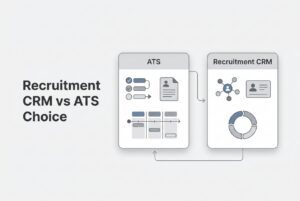
Where CVViZ fits
CVViZ is AI recruiting software built around ATS workflows. It combines contextual AI resume screening, relative ranking, multi-channel job posting, candidate sourcing, workflow automation, video interviewing, live coding for developers, recruitment analytics, resume parsing, email communication tools, search, and a recruitment CRM for agencies.
CVViZ also provides an integration layer that can add resume-screening intelligence on top of an existing ATS. That matters if your team wants to improve screening and routing without replacing everything on day one.
FAQ
What is recruitment automation software?
It is software that executes recruiting actions when events or conditions occur. That can include acknowledgments after application, candidate routing, scheduling, reminders, follow-up emails, and search or ranking across the candidate database. It is not the same as autonomous hiring.
Does recruitment automation replace recruiters?
No. Recruitment automation removes repetitive movement and coordination so recruiters can focus on job calibration, candidate conversations, ambiguous cases, and final decisions.
Which recruiting workflow should a small company automate first?
Start with application acknowledgment and centralized intake, then parsing and deduplication, owner assignment, scheduling, and feedback reminders. Add AI ranking after the criteria and exception handling are stable.
How is AI resume screening different from keyword search?
Keyword search looks for literal terms or Boolean conditions. Contextual AI screening looks at skills, experience, role relevance, and related evidence beyond exact term matching.
Can interview scheduling be automated without hurting candidate experience?
Yes, if the workflow offers real availability, confirms timezone and participants, sends a calendar invite, includes a reschedule path, and stops reminders after booking or withdrawal.
Does posting to more job boards make hiring faster?
Not automatically. More channels can increase reach, but they can also increase irrelevant applications. Measure qualified yield by source before adding more boards.
How do automated reminders avoid becoming annoying?
Use one owner, one SLA, one first reminder, and escalation only when overdue. Stop the flow when feedback or a status change is recorded.
How should a team know whether automation worked?
Measure time to first review, time to shortlist, time in stage, scheduling touches, feedback SLA adherence, source quality, recruiter hours per requisition, automation exceptions, and candidate response or withdrawal rates.
The bottom line
The best recruiting workflow automation does one thing well: it moves the right candidate, record, and decision to the next step without forcing the team to do the same admin work again and again. That is how you shorten delay without sacrificing judgment.
If the hiring process is too slow, start with intake, parsing, ownership, scheduling, reminders, and communication. Add AI screening and broad distribution only when the team can actually govern the output. That is the system. And frankly, it is the one most growing teams need first.