Picture a Tuesday morning. You have 140 new applications sitting in your inbox from the role you posted last week. Your hiring manager sent a Slack message at 8:47 AM asking for “a quick update on where things stand.” You have three candidate calls already blocked, and two of them are basically re-screens because you weren’t sure the first time. You haven’t even opened the application folder yet.
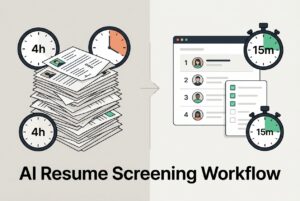
This is the 4-hour problem. It’s not about reading speed; it’s about working without a structure. Criteria live in your head. Resumes come from five different places. Every decision resets your mental context.
AI-assisted screening doesn’t remove you from the process. It restructures it. You define criteria once, upfront. AI applies them consistently across every single resume. You just validate the evidence and make the call. Humans stay accountable. They just move dramatically faster.
Here’s what we’ll cover: where the time actually goes today, what the new workflow looks like step-by-step, how to keep the process fair, and what to measure to prove it’s actually working.
Why Does Resume Review Take 4 Hours (and Still Feel Unreliable)?
The time sink isn’t what most people think. It’s not that resumes are dense or hard to read. The time goes to everything around the reading.
Here’s a realistic breakdown of where the hours disappear in the resume screening stage:
- Deduplication and logistics: Spotting the same candidate across LinkedIn, email, and a job board, then figuring out which version is the right one.
- Re-reading the job description: Because you can’t possibly hold every requirement in your head when you’re on resume #47.
- Mental gear-shifting: Moving between “screening mode” and “admin mode” every few minutes to check email, log notes, or update a spreadsheet.
- Building criteria mid-process: Realizing after 30 resumes that you’ve been applying different standards and now you have to go back.
- Maintaining the “maybe” pile: Which, let’s be honest, just becomes a pile you have to re-review later anyway.
The reliability problem makes the time problem worse. Reviewer one scans for a specific job title. Reviewer two prioritizes domain tenure. Neither is wrong, but they each produce a different shortlist. And neither can fully explain why they passed on a particular candidate.
Cognitive fatigue sets in. By resume 60, most recruiters are just pattern-matching on surface signals like company names they recognize, schools they know, or keywords they can spot at a glance. Good candidates with non-linear paths or unfamiliar resume formats get buried.
This creates a failure loop: high volume creates fatigue, fatigue forces shortcuts, shortcuts produce an inconsistent shortlist, the hiring manager pushes back, and you end up re-screening. The problem wasn’t the candidates. It was the process.
What Changes in the “After” Workflow When AI Handles the First Pass?
The shift isn’t “AI reads resumes so you don’t have to.” It’s more specific. You define criteria once before any resume is touched. The AI applies those criteria consistently across all applications. You then review the results in organized batches with the important context already surfaced.
| Before | After |
|---|---|
| Sequential reading, one resume at a time | Ranked list ready to review; highest-fit candidates surfaced first |
| Mental criteria built ad hoc while reading | Criteria defined upfront: domain experience, core skills, role scope, eligibility |
| Different thresholds applied by different reviewers | Same criteria applied consistently across every application |
| “Maybe” pile grows, decisions get deferred | Clear meets/doesn’t meet signal per criterion; defer is a deliberate choice, not a default |
| Notes scattered or skipped | Structured notes captured once, visible to hiring manager |
The mental model flips. Instead of asking “should I filter this person out?”, you’re asking “does this person’s evidence confirm the job signal?” This isn’t a subtle distinction. It changes how you read and how fast you move.
A realistic example criteria set for a non-technical role like an Account Executive might look like this:
- Must-haves: 3+ years in a quota-carrying sales role, SaaS or B2B domain experience, full-cycle sales motion (prospecting through close), ability to work in the target timezone.
- Nice-to-haves: Experience selling to mid-market, familiarity with CRM tools, relevant vertical (like HR tech or fintech).
With those defined in advance, every resume gets evaluated against the same bar. You’re reviewing evidence, not forming opinions from scratch.
And let’s be crystal clear on one point: AI proposes and flags. Humans decide. Every shortlist should be reviewable, and every override should be allowed.
What a 15-Minute Screening Block Looks Like (Step-by-Step)
Step 1: Open a ranked, organized list, not a raw inbox. Candidates are already ordered by how well they fit your criteria.
Step 2: Scan the top candidates. For each one, you’re checking per-criterion signals (meets / doesn’t meet / unclear), not reading every line.
Step 3: Spot-check the AI’s reasoning. Where in the resume did it find the signal? Does the evidence hold up? This takes about 20–40 seconds per candidate when the reasoning is clear.
Step 4: Shortlist and route. Move a candidate to a phone screen, hold for later, or decline, and trigger the next step (like an automated email or interview request).
Step 5: Capture notes once. They’re visible to anyone involved in the role, so you aren’t fielding the same “where are we on this?” message four times.
That’s it. The 4-hour task compresses because the prep work moved upstream into defining criteria, instead of happening in parallel with reading.
Is This Just Keyword Filtering, or Does It Find Better-Fit Candidates?
Keyword filtering is a simple binary gate: the word is there or it isn’t. In practice, that approach fails constantly.
Consider three examples I see all the time:
- “Account Executive” vs. “Business Development Representative.” The titles are different, but both roles may involve pipeline generation, discovery calls, and quota. A keyword filter flags one and misses the other. Contextual ranking reads the actual work described, not just the label.
- React experience that isn’t listed, but is implied. A candidate spent three years building front-end applications with Next.js and TypeScript. “React” doesn’t appear on their resume because for a developer, it’s assumed context. A binary filter sees no match. Contextual AI recognizes the stack relationship and ranks them accordingly.
- SaaS experience without the exact phrase. A candidate worked five years at a cloud software company selling subscription-based HR tools. They never wrote “SaaS” on their resume. The domain and customer segment are all there, just not in keyword form.
This is where AI for resume screening with relative resume ranking changes the game. Instead of a pass/fail gate, you get an ordered shortlist. Candidates are ranked in real time based on the signals in their actual experience, not just terminology matches. Tools like CVViZ use NLP to match candidates contextually, so a career switcher with relevant skills isn’t automatically tossed out because their title doesn’t match the job post.
But here’s the catch, and it matters: explainability. You must be able to see why someone ranked high. Which criteria did they meet? Where in the resume was the signal found? Without that, you’re trusting a black box, which creates both a bias risk and a major trust problem. Contextual ranking is only useful if a recruiter can audit it in seconds.
No AI screening tool is perfect or bias-free. But shifting from binary filtering to contextual prioritization seriously reduces false negatives: the good candidates who otherwise would have been missed entirely.
How Do You Prevent AI From Scaling Bias (and Keep Humans in Control)?
AI doesn’t create bias from thin air. It just amplifies the patterns already in your past hiring decisions. If your historical shortlists over-indexed on candidates from certain schools or backgrounds, a model trained on that data will continue those patterns. Faster, and at scale.
This is a risk management problem, not a philosophical one. Treat it that way.
Non-negotiables before you run AI on a single resume:
- Define objective criteria in writing before reviewing anyone.
- Require that the AI shows its reasoning, not just a score.
- Keep override authority with humans, and document every override.
- Schedule periodic audits to compare pass-through rates and watch for drift over time.
Operational tactics that reduce proxy bias:
- Remove name and school fields from the early-stage review where possible. These variables introduce bias without adding job-relevant signal.
- Use structured scorecards at every stage. “I liked them” is not a decision criterion.
- The guiding principle is “shared control”: AI suggests, humans decide. The failure mode to avoid is automation complacency, which is assuming the AI’s ranking is correct without reviewing the reasoning. A recruiter who just rubber-stamps AI outputs has removed themselves from the decision. That’s a quality risk and, depending on where you operate, a potential compliance issue.
Audits don’t have to be complicated. A monthly review of periodic audits of 20–30 decisions (both shortlisted and declined) against your criteria is enough to spot pattern problems before they grow. This will also help in identifying hiring bias, if any.
What Metrics Prove This Is Working (Beyond “It Feels Faster”)?
“Faster” is an anecdote, not a business case. If you want buy-in and a budget to keep improving, you need a simple pre/post measurement plan.
Speed metrics:
- Time-to-first-review (application received to first human decision)
- Time-to-shortlist (posting live to shortlist delivered to hiring manager)
- Recruiter hours spent per role on screening
Quality and progression metrics:
- Shortlist-to-interview conversion rate (what percentage of your shortlisted candidates get an interview?)
- Interview-to-offer ratio (a rough proxy for shortlist quality)
- Hiring manager rework rate (how often does the shortlist come back with “none of these are right?”)
Candidate experience metrics:
- Time-to-first-response (how long between application and any outreach?)
- Drop-off and no-show rates at early stages
Process health checks:
- Consistency of criteria application across roles
- Override frequency (a high rate might mean your criteria need a tune-up)
- Audit sample results
Recruitment analytics and reporting tools can make this trackable. CVViZ, for example, includes recruitment analytics that show time-to-fill trends and sourcing channel effectiveness. This helps you see not just if screening got faster, but whether the candidates are actually progressing.
One last thing here. Establish a baseline on 2–4 roles before you change the workflow. Without a “before” number, your “after” is just a guess.
How to Actually Implement This on Your Team (and What Breaks If You Don’t)
The tool is the easy part. The hard part is getting your hiring managers to trust a process they didn’t help design.
Phase 1 (Week 1): Pick one high-volume role with a clear profile. Write down the must-haves vs. nice-to-haves. Keep it to 5–7 criteria, max. Vague criteria like “good communicator” belong in the interview, not the screen.
Phase 2 (Weeks 2–3): Run AI-assisted screening in parallel with your old manual process. Compare the outputs. Where do the rankings disagree with your gut? That disagreement is data. Use it to recalibrate your criteria, not to dismiss the tool.
Phase 3: Formalize the override process. Decide who has final shortlist authority. Create a team norm where every override gets a one-line note explaining why. For audit purposes, if there’s no note, the override didn’t happen.
Workflow automation can handle a lot of the coordination. Rules and triggers, like automatically sending pre-screening questions or notifying a hiring manager about a new shortlist, reduce the manual chasing that fills your afternoon. CVViZ’s workflow automation handles this kind of thing, which keeps the process moving without adding overhead. It doesn’t replace your judgment; it just eliminates the logistics around it.
Common failure modes to watch for:
- Vague criteria: If you can’t apply it consistently, it’s a bad criterion. Fix this by writing a one-sentence definition for each one.
- No audit trail: Require documented reasoning at every stage change.
- Hiring manager pushback: Get their input in Phase 1, not after they reject your first shortlist.
How Do You Handle Privacy, Compliance, and Candidate Trust?
Candidates notice when hiring feels opaque. If they don’t know whether a human reviewed their application or what criteria were used, the experience feels arbitrary even when it isn’t. Transparency is an ethical obligation and a practical advantage.
Privacy basics to put into practice:
- Collect only what the role requires. A resume and a few screening questions are usually enough for the early stage.
- Use data security practices within ATS, such as role-based access controls. Not every team member needs to see every candidate’s full profile.
- Define and clearly communicate your data retention and deletion policy.
Candidate communication that builds trust:
- In your job posting or confirmation email, include a plain-language note: AI tools assist our recruiters; we use job-related criteria; a human reviews the results.
- Set realistic timeline expectations. “You’ll hear from us within 5 business days” is better than silence.
- Avoid black-box language like “our system will evaluate your application” without explaining what that means.
Handling common objections:
- “Will AI reject me automatically?” → Explain that AI helps prioritize, but a recruiter reviews results and makes the final decision.
- “What data do you keep?” → Explain your retention policy and any deletion rights that apply in their region.
Compliance requirements vary by geography (GDPR in Europe, various state laws in the US). Build your data practices with legal or HR ops input. Don’t assume a tool’s built-in features cover everything your specific context requires. CVViZ includes a GDPR compliance toolkit, but your internal policies still need to align.
What If Your Real Problem Is Volume, Not Just Screening?
AI screening is fast. But if your candidates are scattered across five inboxes, two job boards, and a LinkedIn folder, you’re just processing chaos faster.
The real problem is often upstream, in your sourcing structure. Here’s the sequence that makes the whole system work:
- Widen reach intelligently: Post to multiple job boards from one place, not one by one.
- Pull candidates into one pool: No more cross-referencing tabs.
- Deduplicate and normalize profiles: So you’re not reviewing the same person twice.
- Rank and shortlist quickly: This is where AI screening operates on one clean dataset.
- Keep communication tight: Use automated follow-ups so candidates don’t go cold.
CVViZ supports the first two steps directly. It offers multi-site job posting to over 20 free boards (and 2,000+ paid ones) and automated sourcing that pulls profiles from platforms like LinkedIn into a central pool. That upstream consolidation is what makes the AI screening step fast and reliable. Without it, you’re just adding a ranking layer on top of a fragmented process.
Your next 7 days:
- Pick 1–2 roles with the highest applicant volume.
- Write 5–7 objective screening criteria for them.
- Define what a “top” candidate means for each role (e.g., meets all must-haves plus two nice-to-haves).
- Set a first-response SLA: 24–48 hours from application to acknowledgment.
The goal isn’t fewer applicants. It’s faster, fairer decisions, with full visibility into why each one was made.