You post a role, the applications flood in, and after an hour of sifting through them, you have a stack of 20 resumes that look… fine. But you know the feeling. The hiring manager keeps saying, “These aren’t quite right,” your best recent hires are all coming from referrals, and you just got an email from a great candidate who says they applied but never heard back.
Odds are, your screening filter isn’t selecting for fit. It’s selecting for word overlap.
Keyword-based resume screening treats vocabulary as a proxy for capability. If a resume doesn’t have the exact terms from your job description, it gets filtered out, even when the candidate has clearly done the work. This isn’t a minor inefficiency. It’s a structural problem that silently discards qualified people before a human ever sees them.
This article will walk you through:
- Why keyword filters fail, and where they fail the hardest
- What contextual (semantic) screening actually does differently
- Where AI screening can still create new problems
- A practical path to improving your process without a full system overhaul
Why do keyword filters miss qualified candidates even when they look relevant on paper?
A keyword filter has one job: find resumes with certain words. The problem is, language is messy and people don’t talk like job descriptions.
Consider two candidates applying for a SaaS implementation role. One writes “SaaS onboarding specialist with 4 years of client implementation.” The other writes “enterprise customer success, end-to-end deployment.” It’s the same job and the same skills, just different vocabulary. A keyword filter looking for “implementation” passes the first candidate and trashes the second.
This gap shows up everywhere. “Program management” and “project management” are often used interchangeably, but a filter rarely treats them as equals. A candidate from a startup might call it “go-to-market execution”; an enterprise candidate calls it “product launch management.” Both mean roughly the same thing, but keyword logic doesn’t care.
Then you have the transferable skills problem. Strong candidates from adjacent industries (a finance analyst moving into operations, a teacher moving into L&D, a military logistics officer moving into supply chain) often use domain-specific language that doesn’t mirror the job description. They get filtered out before anyone can evaluate if the underlying competency actually transfers.
Equal-weight logic makes this even worse. Most keyword systems just count matches without context. A resume that mentions “Python” once in a line about a weekend project looks the same to the filter as a resume from someone who spent three years building production Python pipelines. One buzzword mention looks the same as three years of deep experience. The filter can’t tell the difference.
The most costly part of this is invisible. The false negatives, the qualified candidates who never surface, don’t show up in any report. You never see the person you excluded. You only see the shortlist you ended up with, and you measure it against nothing.
What is contextual (semantic) resume screening, in plain English?
Let’s cut through the jargon. “Semantic” just means it’s based on meaning. Instead of scanning for exact words, contextual screening tries to figure out what a person has actually done and whether that experience matches what the role really requires.
Here’s a simple mental model:
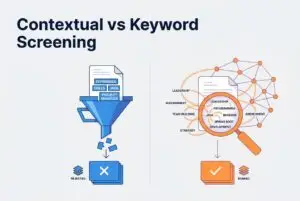
- Keyword screening asks, “Does this document contain these words?”
- Contextual screening asks, “Does this candidate appear to have done this work?”
To do that, it compares the intent of your job description against the evidence in the resume. The job description is broken down into true must-haves (like specific certifications or experience thresholds) versus preferred nice-to-haves. The resume is then analyzed for evidence of skills, responsibilities, and outcomes, even when the vocabulary doesn’t directly match the job post.
That’s how it handles synonyms. “Built ML pipelines” and “developed machine learning workflows” point to the same capability, and contextual systems recognize that. The same goes for job title variations (“Customer Success Manager” and “Implementation Manager” often describe similar work), domain jargon, and industry-specific acronyms.
The output is different, too. Instead of a binary pass/fail, you get a ranked list showing your top candidates and why each one ranked where they did. It highlights the requirements they appear to meet or fall short on. Now that’s a shortlist you can actually work with.
One important caveat: contextual matching isn’t magic. Its quality depends on how well you define the job requirements and how cleanly the resume data is extracted. Better inputs produce better outputs. Garbage in still produces garbage out. It’s just more sophisticated garbage.
Which real-world failure modes make keyword screening especially unreliable?
Beyond the synonym problem, resume screening breaks down in a few predictable ways. Here’s where to look for trouble in your own funnel.
Non-standard resume formats and parsing breakdowns. A candidate who built their resume in Canva or used a multi-column Figma template might look great visually, but it turns into a wall of jumbled text when parsed by an ATS. Icons get misread as characters and section headers get swallowed. The result is a screening system trying to match keywords against scrambled data. The matching can only be as good as the data it’s reading.
Job title variance across companies. The same role gets called different things everywhere. A “Customer Success Manager” at a SaaS startup is often doing the same job as an “Implementation Manager” at an enterprise company or a “Client Solutions Lead” at an agency. A filter built around one title silently excludes pools of equivalent experience.
Emerging skills and tools. Keyword libraries are a snapshot in time. If yours was built 18 months ago, it probably doesn’t include newer tools or frameworks that good candidates are using now. The candidate with Notion and Loom experience doesn’t fit a library that was written for Jira and Confluence.
Nuanced role subtypes. A product manager with a growth specialization and one with a platform specialization share a title and many keywords, but they’re doing meaningfully different work. Keyword overlap hides this mismatch and surfaces a technically “matched” candidate who isn’t a fit for the actual role.
Keyword stuffing. Some candidates have figured out that mirroring the job description beats showing real substance. A resume loaded with your exact terms but thin on actual experience can float to the top of a keyword filter. The inverse is also true: a thoughtfully written resume with natural language gets penalized for not being a carbon copy of your JD.
What to watch for in your own funnel (quick diagnostic)
A few warning signs that your screening is producing false negatives: your hiring manager regularly says “these aren’t the right profiles”; your best hires in the last year came mostly from referrals, not the job board; and candidates who applied through your ATS say they were rejected instantly or never heard back.
Signs that parsing is the hidden problem include blank fields in your ATS, missing employment dates, or experience sections that look jumbled. If the structured data looks wrong, the matching built on top of it will be wrong, too.
How does contextual screening actually work behind the scenes (and what outputs should you expect)?
Good contextual screening isn’t a magic button. It’s a pipeline. Understanding the steps helps you know what to look for in a tool and where things can go wrong.
Step 1 — Parse. Resumes come in as PDFs, Word docs, or raw text. Parsing extracts structured data like name, contact info, work history, and skills. The quality of this step directly determines the accuracy of everything that follows.
Step 2 — Normalize. The raw data that’s extracted is messy. “Sr. Software Eng.” needs to be interpreted as “Senior Software Engineer.” Date formats and skill descriptions vary. Normalization creates a consistent foundation for comparison.
Step 3 — Apply role-specific weighting. This is where contextual systems do something keyword filters can’t. Must-have criteria get heavier weight than nice-to-haves. Seniority signals change what matters; a required 5 years of experience means something different than preferred exposure to a specific tool. The weights should reflect the actual role, not a generic template.
Step 4 — Match and rank. Instead of an arbitrary threshold like “show me everyone with 3+ keyword matches,” contextual screening ranks candidates against the role and relative to each other. The top 10 are the 10 best fits in the pool, not just the 10 who happened to clear a keyword gate.
Step 5 — Explain. This is the non-negotiable. A contextual system should show you why a candidate ranked where they did, including which requirements they meet and what evidence in the resume drove the score. Without this, you have a black box you’re supposed to trust, which is a bad idea.
Some newer tools break this into separate components (extraction, evaluation, and summarization) which often makes it easier to understand the results. The implementation details matter less than the final output. Can you see the reasoning, or not?
Where can contextual/AI screening still go wrong (and how do you reduce risk)?
Contextual screening is a huge improvement over keyword logic, but it won’t solve all your hiring problems. Here’s where it can still go sideways.
Bias reinforcement. If a model learns from your historical hiring data, it can learn who you’ve hired before and optimize for more of the same. This is a problem if your past hires skew toward certain backgrounds or universities. Demographics don’t have to be explicit inputs for these patterns to be reinforced.
Overfitting to “previous hires.” Related to bias, a system tuned on past successful hires will reward similarity to those hires. That’s a problem when you’re trying to build more diverse teams or hire for a role that’s completely new to your company.
Jargon misreads. Even contextual AI can misinterpret domain-specific language, especially in highly specialized fields. A term that means one thing in fintech might mean something totally different in healthcare IT.
Explainability gap. A score of “87” tells you nothing useful. If a recruiter can’t see why a candidate ranked high or low, they can’t validate the output or catch errors. Opaque scores also create compliance risks if you ever need to explain your screening decisions.
Privacy and data controls. Before you adopt any AI screening tool, ask some direct questions. Who controls the data? How long is it retained? How are deletion requests handled? A proper GDPR toolkit (with support for access, erasure, and data portability) isn’t optional if you’re hiring in regulated markets.
The right posture is this: AI surfaces and ranks. Humans decide and validate. Be wary of any system that claims to remove the human from the loop.
What should you do first if your goal is fewer irrelevant resumes and fewer missed candidates?
The good news is you don’t need to rebuild everything at once. You can fix this in phases, starting with the highest-leverage changes.
Phase 1 — This week: clean up your criteria. Get honest about what’s a “must-have” versus a “nice-to-have” in your job description. Add two or three pre-screening questions that gate on true dealbreakers (like specific certifications, location, or minimum experience for regulated roles). This alone will reduce noise and give your screening logic clearer signals to work with.
Phase 2 — This month: upgrade how you rank. Replace keyword filtering with contextual ranking. This ensures recruiters review the most relevant candidates first, not just the ones who were best at mirroring your JD vocabulary. Remember to keep a human review step for the top candidates. Ranking is for prioritization, not final decisions.
Phase 3 — Next: reduce noise upstream. Casting a narrow net on one or two job boards often leads to irrelevant applicants. Broader multi-site distribution across free and niche platforms tends to improve applicant quality. Tools like CVViZ let you post to over 20 free job boards in one click and distribute to thousands more. This helps you reach better-fit candidates, while pre-screening questions and workflow automation filter applicants before they pile up. That said, no tool can guarantee quality from every channel. Better reach improves the odds, but it doesn’t replace good screening logic.
Phase 4: streamline Level 1 evaluation. Once ranking is working, the bottleneck often shifts to first-round calls. You can use structured video interviews, async assessments, or live coding evaluations for developer roles to reduce the time spent per candidate without losing valuable signal.
As for the build-vs-buy question, unless you have a dedicated ML team, building your own screening pipeline is almost never worth it. Adopt a tool, calibrate it for your roles, and iterate.
Quick checklist: what to evaluate in resume screening software (non-negotiables)
When you’re evaluating tools, require these five things before committing:
- Contextual matching + relative ranking (not just keyword search or arbitrary threshold scoring)
- Parsing reliability (can it handle PDFs, Word docs, and designed formats without losing key info?)
- Explainability (does it show you why a candidate was ranked a certain way?)
- Workflow integration (pipeline stages, collaboration features, candidate communication)
- Data controls (role-based access, audit trails, and privacy support like GDPR-style erasure and data retention policies)
If a vendor can’t give you a clear answer on how their ranking works and how candidate data is protected, you have your answer.
How can an AI-powered ATS help in practice without “replacing your process”?
The right system doesn’t take over your hiring. It takes the grunt work off your plate so you can focus on the decisions that require human judgment.
Here’s what that looks like in practice with AI powered ATS like CVViZ.
When a job goes live, resumes arrive from multiple sources. CVViZ’s AI resume screening uses NLP and machine learning to match candidates contextually, evaluating meaning and not just term overlap. It ranks them in real time so recruiters see the most relevant profiles first. You review the top slice, not the whole pile.
Before that ranking is reliable, the underlying data needs to be clean. The AI resume parser and parsing API handle extraction and normalization across formats, from PDFs to Word docs. Duplicate detection flags candidates who appear more than once, and key candidate info is exportable to Excel or CSV. This is the plumbing that makes contextual matching work.
Your existing database is also a goldmine. Elastic full-text and boolean search lets you rediscover past applicants. This is your “silver medalist” pool: strong candidates from prior roles who didn’t get an offer. Running a new role against that database is often faster and cheaper than starting from scratch with job board ads.
Workflow automation handles the repetitive parts, from auto-emails when applications arrive to notifications when a candidate advances. Centralized email tools with templates, bulk sends, and open tracking keep candidate communication from getting lost in someone’s personal inbox.
For Level 1 evaluation, video interviewing reduces scheduling friction. For developer roles, the built-in live code editor brings technical screening into the same workflow. Finally, recruitment analytics give you a clear read on time-to-fill and which channels are actually working, so you can stop spending money on the ones that aren’t.
None of this replaces your hiring team. It removes the noise so they can do the work that matters.
What’s the simplest way to explain this to a hiring manager who trusts keywords?
Not everyone on your team will get why this change is worth the effort right away. Here are three talking points you can bring into your next conversation:
“We’re missing good people and we don’t even know it.” Explain that keyword filters are blunt instruments. They toss out great candidates just because they used a different word for the same skill. Those people don’t show up in a report; they just disappear.
“This gives us a ranked shortlist with evidence, not just a pass/fail.” Instead of a simple gate, we get a prioritized list that explains why someone is a good fit. This makes the hiring manager’s review faster and the logic is easy to validate.
“It helps us prioritize who to talk to first. It doesn’t make decisions for us.” The system suggests who to look at first. We still review, we still interview, and we still make the final call. The only difference is we’re spending our time on the right candidates instead of scrolling through noise.
A practical way to prove this is to run a small pilot. Use contextual ranking alongside your current process for two or three roles. Compare the shortlist quality and the hiring manager’s feedback. This is a low-risk way to calibrate the system and get real data to back up the change internally.