You opened Zoho Recruit hoping to finally get your hiring under control. Three weeks later, you’re still fighting with settings, waiting for support to reply, and wondering why screening candidates feels just as painful as it did with spreadsheets.
That’s not a skill problem. That’s a tool-fit problem.
This article isn’t here to argue that Zoho Recruit is a bad tool. But for small businesses and newly funded startups, the right Applicant Tracking System (ATS) isn’t the one with the longest feature list. It’s the one that reduces hiring chaos the fastest. If Zoho’s complexity, slow support, or add-on pricing is costing you time and candidates, switching to a more focused tool is a smart business decision. Here are five alternatives worth looking at in 2026.
Why Look for a Zoho Recruit Alternative in the First Place?
Zoho Recruit is a capable platform, especially if you’re already in the Zoho ecosystem. But “capable” and “fast to adopt” are two very different things. Most small to medium-sized businesses (SMBs) run into friction in three places. The interface feels like it was built for a much bigger company. Support response times don’t match the urgency of a critical hire. Or the price starts to creep up with unexpected add-ons for things that should be standard.
Which Problems Are “Annoying” vs. True Deal-Breakers?
Look, every tool has its quirks. Minor UI issues or a slightly clunky resume upload are things you can live with.
The deal-breakers are different. I used to think any system was better than a spreadsheet, but I was wrong. A clunky, unused ATS that your team hates is actually worse. If screening still takes forever, candidates are falling through the cracks, and your team won’t even log in after two weeks, it’s a deal-breaker. If you’re paying more than you expected for core features, it’s a deal-breaker. If that sounds familiar, it’s time to switch.
What to Clarify About Your Hiring Before You Compare Tools
Before you start looking at alternatives, you need to answer three questions about your own company. How many roles are you filling per quarter? Are they repeatable high-volume roles or varied one-offs? And who actually needs to use the ATS, just you or your hiring managers, too? A five-person startup filling two roles a year has very different needs than a 50-person company hiring 20 people a quarter. Know who you are first.
How to Evaluate Alternatives so You Don’t Repeat the Pain
Most buyers make the same mistake. They get distracted by long feature lists. Don’t do that.
Instead, focus on how fast a tool can solve your specific problems. Use this evaluation framework to cut through the noise.
Onboarding & Training: What “Fast Adoption” Actually Looks Like
Fast adoption means a recruiter can post a job, move a candidate, and send an email on day one. Without needing a support ticket. When you talk to vendors, ask them: How many steps does setup take? Are there pre-built pipeline templates? Is there a guided onboarding flow, or am I just getting a link to a knowledge base?
A huge red flag is any vendor telling a small team that “implementation takes 4–6 weeks.” A green flag is a structured onboarding that gets you to a live job post within 48 hours.
Total Cost of Ownership (TCO): Where ATS Pricing Surprises Happen
The price on the website is rarely the real price. Before you sign anything, run this checklist with the sales rep:
- Per-user fees: What happens to the price when hiring managers need to view candidates?
- Job board integrations: Are they included or is each one an extra cost?
- Automation limits: Are workflow rules limited on the plan you’re considering?
- Support: Is live support included or is it a paid upgrade?
- Data migration: Will you charge us a fee to import our candidate database?
- API access: Is that only for enterprise plans?
Two tools priced at $100 a month can end up having very different real-world costs. Do the math.
AI Recruiting: How to Evaluate Accuracy, Bias, and Compliance
AI resume screening can be a lifesaver, but it can also be a liability if it reinforces bias. Before you trust any AI scoring feature, ask these questions:
- What signals does the AI use? Simple keyword density is outdated. You want contextual matching that understands skills in relation to the job.
- Can you show me why a candidate was ranked this way? Explainability is critical for both recruiter trust and compliance.
- What protected attributes does the model ignore? It must be blind to age, gender, location proxies, and name patterns.
- Can we correct it? As your hiring needs change, the model needs to adapt.
A tool like CVViZ, for example, uses NLP and machine learning for contextual screening. This lets it rank candidates based on your specific job requirements and hiring patterns, which goes far beyond simple keyword filtering. Ask any vendor to do this: “Show me a ranked output and explain why candidate number three is a better fit than candidate number ten.”
Mobile Recruiting: What Matters Beyond “It Has an App”
The real question isn’t whether there’s an app, it’s what a recruiter can do on the app. Can you review a resume and move a candidate to the next stage? Can you fire off a quick message? Can you approve or decline someone? If the app is read-only, it’s just a notification system. That’s a meaningful difference when you’re trying to check on a candidate between meetings.
If mobile is a priority for your team, use a mobile-friendly ATS checklist to confirm the product supports real actions (not just alerts).
Scalability: What Breaks First When You Double Your Hiring
For most small companies, the first thing to break is search. Once your database has over 2,000 candidates, finding that great person from a past search becomes impossible without powerful filters. The second thing to break is automation. Manual rules that worked for one job don’t work when you’re running five at once. Ask vendors how their search performs with larger databases and what reporting looks like across multiple active roles.
Integrations: Does It Connect to Your Actual Workflow?
“It integrates” often just means “it has a Zapier connection.” For a busy SMB, that’s not good enough. The integrations that matter are the ones your team uses every minute of the day, like email and calendar. A deep, native integration means your recruiting emails sync automatically and you can schedule interviews without ever leaving your inbox. Ask them: Is the Google Workspace or Microsoft 365 integration native? Does it support two-way sync?
If you’re trying to map this out, an ATS integration guide can help you spot where data flow breaks and which connections should be native.
DEI & Blind Hiring: Can the Tool Help Reduce Unconscious Bias?
Modern recruiting requires tools that actively help reduce bias. This might mean blind resume reviews that hide names, photos, and graduation dates, or it could be integrated analytics to monitor pipeline diversity. When evaluating, ask vendors whether they offer anonymized screening features or whether you can track diversity metrics across different pipeline stages. Even simple features here are a good sign that a vendor is building for how we hire today.
Top 5 Zoho Recruit Alternatives in 2026 (SMB-Focused Picks)
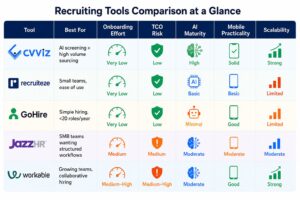
Quick Comparison Table
| Tool | Best For | Onboarding Effort | TCO Risk | AI Maturity | Mobile Practicality | Scalability |
|---|---|---|---|---|---|---|
| CVViZ | AI screening + high volume sourcing | Very Low | Low | High | Solid | Strong |
| Recruiteze | Small teams, ease of use | Very Low | Low | Basic | Basic | Limited |
| GoHire | Simple hiring, <20 roles/year | Very Low | Low | Minimal | Good | Limited |
| JazzHR | SMB teams wanting structured workflows | Medium | Medium | Moderate | Moderate | Moderate |
| Workable | Growing teams, collaborative hiring | Medium–High | Medium–High | Moderate | Good | Strong |
Alternative #1: CVViZ
Best for: Recruiting teams and startups that are drowning in applicants. They need smart AI screening and wide sourcing, but can’t afford an enterprise price tag.
CVViZ is an AI-powered ATS built to solve the core inefficiency of SMB recruiting: too many irrelevant resumes and sourcing that’s stuck on one or two job boards. Its AI resume screening uses NLP and machine learning to match contextually, ranking candidates in real time.
For sourcing, CVViZ posts to over 20 free job boards with one click and distributes to a network of more than 2,000 boards globally. The “Find On Web / Social Hire” feature helps you pull candidate profiles from places like LinkedIn, GitHub, and Behance into one unified pipeline.
You may read more on comparison here – Zoho Recruit Vs CVViZ
Limitation to verify on demo: This is the best fit for teams where AI-assisted screening is a top priority. If you’re manually filling two roles a year, the feature depth might be more than you need.
Alternative #2: Recruiteze
Best for: Very small teams (1–5 people) that need a clean, low-friction ATS with minimal setup.
Recruiteze is a straightforward applicant tracking system. If your main problem is “we have no system at all” and you don’t need deep AI features, it’s worth a look.
Limitation to verify on demo: The AI and automation capabilities are basic. Make sure you confirm what’s included in your plan versus what costs extra.
Alternative #3: GoHire
Best for: Early-stage startups filling fewer than 20 roles a year who want a simple, candidate-friendly experience.
GoHire is all about simplicity: post a job, track applicants, and communicate. The setup is fast, and the interface is clean enough for non-recruiters to use without any training.
Limitation to verify on demo: If you need heavy workflow customization or high-volume sourcing, you’ll outgrow GoHire quickly. It’s a great first ATS, not a long-term scaling solution.
Alternative #4: JazzHR
Best for: SMB teams that want a traditional recruiting platform with structured workflows and solid job board integrations.
JazzHR covers all the basic needs: pipeline management, job posting, interview scheduling, and offer management. It’s a strong choice if your team values predictable workflows over cutting-edge AI.
Limitation to verify on demo: The AI capabilities are only moderate. Be sure to run the TCO checklist, as pricing can climb with add-ons.
Alternative #5: Workable
Best for: Teams scaling into a growth stage who need better collaborative hiring tools and are ready for a more feature-rich platform.
Workable is a step up in both capability and cost. It handles collaborative hiring well, with structured workflows for managers, interviewers, and recruiters. The sourcing and AI features are also more developed than simpler options.
Limitation to verify on demo: It can be overkill (and overpriced) for a team filling five roles a year. You can always start simpler and migrate to a tool like Workable when you need the extra horsepower.
How to Pick Your Best-Fit Option in 5 Minutes
- Filling 20+ roles/year or drowning in applicants? → CVViZ or Workable
- Small team, no dedicated recruiter, just need basic tracking? → GoHire or Recruiteze
- Want structured workflows from an established platform? → JazzHR
- Moving toward hiring with multiple stakeholders? → CVViZ or Workable
How Do These Tools Compare on Onboarding, Support, and Day-1 Usability?
Adoption failure is the number one reason ATS switches fail. It almost always comes down to the quality of the onboarding and how responsive the support team is.
Onboarding Questions to Ask Every Vendor
- “What do the first 7 days look like for a new customer?”
- “Is implementation self-serve, guided by a specialist, or just a pile of documents?”
- “How long does data migration usually take?”
- “Who sets up our user permissions, you or us?”
- “What happens if we get stuck in the first week?”
Any answer that relies too heavily on “our documentation” without a human backup is a yellow flag for a small business.
What “Good Support” Means for SMBs (and How to Test It)
Don’t just take their word for it on the sales call. Before you buy, email their support team with a technical question and see how long it takes to get a real answer. Good support for an SMB means real humans in your timezone, responses in under two hours, and a named contact to help you get started.
What Measurable Outcomes Should You Expect After Switching?
Let’s be clear: switching your ATS is a business decision. So you need to define what “better” looks like before you make the move.
KPIs to Track: Screening Time, Time-to-Fill, Source Quality
Start by tracking four simple metrics:
- Time-to-screen: How long does it take from application to first recruiter response?
- Time-to-fill: How many days pass from opening a job to getting an accepted offer?
- Candidate response rate: What percentage of your outreach gets a reply?
- Source quality: Which job boards or channels are giving you candidates who actually make it to the final round?
You have to establish your current baselines. Without them, you can’t prove the new tool actually improved anything.
If you want a deeper list of benchmarks and definitions, track recruiting KPIs consistently so you can compare performance before and after the switch.
30-Day Rollout Plan to Capture Quick Wins
- Days 1–7: Post one job to all boards. Configure your pipeline stages. Set up one automated email sequence.
- Days 8–14: Review the AI screening output and calibrate it. Are the top-ranked candidates the ones you would have picked manually?
- Days 15–21: Add pre-screening questions to filter candidates automatically. Compare your screening time to your baseline.
- Days 22–30: Pull a sourcing report. Figure out which job boards delivered quality candidates and which were a waste of time.
This is where a tool with good automation, like CVViZ, can make a big impact early on. You can configure rules for triggers like resume receipt or stage changes, and the one-click job board distribution makes the first week much faster.
Vendor Demo Checklist: Questions to Uncover Hidden Costs and Risks
Take this list into every demo call.
Pricing & Contract Questions
- “Walk me through what’s included versus what’s an add-on.”
- “Does the price change if I add hiring managers as view-only collaborators?”
- “Are there limits on active jobs, automation rules, or total candidates?”
- “What are the contract and cancellation terms?”
- “Is there a fee for migrating our data?”
AI & Compliance Questions
- “What data does your AI use to rank candidates? What does it exclude?”
- “Can you show me the explanation for why a candidate was ranked a certain way?”
- “Has your AI been audited for bias by a third party?”
- “Do you offer features for blind screening or DEI analytics?”
- “How do you support GDPR compliance and data deletion requests?”
On a point like GDPR, you need a vendor who actively supports data rights. For instance, CVViZ includes a GDPR compliance toolkit and acts as a data processor, which is the level of documentation you should expect.
If you need to align your team on what to look for in modern screening, it helps to understand the core AI recruiting technologies vendors reference in demos.
Mobile & Integration Questions
- “Can our recruiters move candidates between stages from the mobile app?”
- “Can our hiring managers leave feedback from their phones?”
- “Is the calendar and email sync native for Google Workspace and Microsoft 365?”
- “Which integrations are native and which require Zapier?”
- “What’s required to use the API? Is it self-serve or do I need a developer?”
Frequently Asked Questions
Which Zoho Recruit alternative is best for a newly funded SaaS startup hiring fast?
If you’re dealing with high applicant volume, need quick candidate sourcing, and need AI screening, start with CVViZ. If you prefer more traditional, structured workflows and don’t need heavy AI, look at JazzHR.
How can I compare ATS pricing when they all have different plans and add-ons?
Create a simple Total Cost of Ownership (TCO) model. List your expected number of users, jobs, and key integrations, and make each vendor quote you against that specific list. This will reveal the real price.
How do I evaluate AI resume screening for accuracy and bias?
Ask the vendor to show you a ranked output for a sample job and explain the reasoning. Confirm what data the AI uses and what protected attributes it is designed to ignore.
What should onboarding look like for an SMB?
A well-designed ATS for a small business should get you to a live job post within a couple of days. Full team adoption with basic automation should be done within 30 days.
What mobile recruiting features actually matter for small teams?
The ability to take action. You need to be able to review a candidate, move them to the next stage, or send a message from your phone. Read-only apps don’t solve real workflow problems.
Will switching my ATS actually improve my hiring? How do I measure it?
Yes, but only if you measure it. Track metrics like time-to-fill and time-to-screen on your current system. Then, compare those numbers 30 and 60 days after you switch to prove the ROI.
Pick Your Top 2 and Book Demos
You don’t need to evaluate all five of these tools. Pick two from the list that best match your hiring volume and team, and book demos this week. Bring the questions from this article to every single call.
If AI-powered screening and broad sourcing match your needs, put CVViZ on your shortlist. This is especially true if you’re scaling from a few roles a year to a higher volume of hiring.
The right ATS won’t solve hiring on its own. But the wrong one will absolutely slow you down for months. Make your pick based on adoption speed, real cost, and how the tool actually fits your team’s workflow.