CVViZ covers a recruiting workflow, not just resume ranking. That distinction matters for a lean talent acquisition team. Resume screening helps prioritize who to review first, but it does not bring candidates into the pipeline, collect interviewer feedback, or show where hiring slows down. CVViZ is built for the full workflow, while recruiters still set the rules and make the decisions.
What CVViZ covers beyond resume screening
CVViZ covers more than AI resume screening. It supports job posting, candidate sourcing, applicant tracking, workflow automation, interview scheduling, evaluation, communication, and recruitment analytics. That makes it useful when the problem is not only “who looks relevant?” but also “how do we move people through hiring without drowning in admin?”
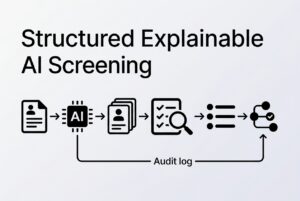
Here is the clean way to think about it. Screening ranks applicants. Sourcing brings people in. The ATS keeps the process organized. Automation handles repeat tasks. Interviews and scorecards standardize evaluation. Analytics show where work gets stuck.
For a mid-market TA team, that matters because the real bottleneck is usually not one step. It is the handoff between steps. A candidate might be sourced well, but then sit in email. Or they might be screened quickly, but never get scheduled. CVViZ is designed to keep those pieces in one flow.
Attract and source: how candidates enter the pipeline
CVViZ helps you publish jobs and bring candidates in from more than one place. It supports a career page, distribution to eligible job boards, and direct sourcing paths for candidates who have not applied yet. It also supports importing profiles and resumes into a centralized pool.
This is where candidate sourcing starts to matter as a process, not a feature. A job posted once can reach external channels, while recruiters can also search for people directly. CVViZ supports People Search, Find on web, a job-specific GitHub search, imports, and discovery from an existing candidate database. Those are different routes, and they serve different use cases.
For example, a hard-to-fill engineering role may need more than applications. A recruiter can source from GitHub, import selected profiles, and compare them with direct applicants in the same job. That gives the team a broader pipeline without pretending every channel works the same way.
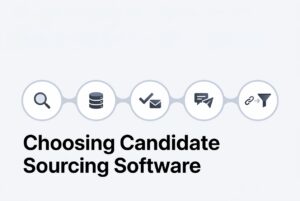
Candidate sourcing in CVViZ
Candidate sourcing in CVViZ means finding people and bringing them into consideration, even if they did not apply to the open job. It includes sourcing from the web, supported platforms, imports, and the existing resume database. It is not the same thing as job-board distribution, and it is not the same thing as AI screening.
CVViZ provides a few practical sourcing paths. People Search lets a recruiter search, open a profile, and import that person into the job. Find on web gives access to source tabs for resume files, LinkedIn, GitHub, Behance, and Stack Overflow. Find on GitHub supports searches by query, location, language, repositories, and followers. Discover candidates applies AI matching to the existing database for a target job.
That mix is useful because different roles need different entry points. Some jobs need fresh inbound applicants. Others need silver medalists, prior applicants, or direct outreach targets. CVViZ lets recruiters use the route that fits the role instead of treating sourcing as one universal search.
A small but important detail: candidate records can be associated with more than one job, and notes, tags, and activity can carry over. That helps teams reuse work instead of rebuilding it every time. Just keep source tagging disciplined, because some import paths do not receive an explicit sourced tag in the frontend.

Job distribution and career pages
CVViZ also helps you get jobs in front of candidates. It supports a career page, job distribution to eligible boards, and public application capture so candidates can enter the workflow cleanly.
The career page is not just a branded landing page. CVViZ lets an administrator configure company information, page address, About and Perks text, visuals, language, and an optional talent-pool section. It also offers several ways to expose the page, including a full-page embed, a direct link, a jobs-list widget, and a “drop your resume” talent-pool option.
Job distribution works alongside that page. CVViZ supports posting to more than 20 free job boards and distributing to more than 2,000 boards worldwide for paid and free ads in one click. The practical caveat is simple: board availability depends on employer eligibility, geography, and board policy. So, the right question is not “Can it post everywhere?” but “Which channels fit this role?”
One more thing matters here. A career page does not automatically guarantee Google for Jobs visibility. If you want search traffic, make the listing public, use a specific role title, and verify how it appears in search. Distribution is a channel choice, not a visibility promise.
How automation works in CVViZ
CVViZ automation is built around a simple rule model: trigger, condition, action. That structure makes it easier to handle repeat work without turning hiring into a black box.
A trigger can be a new application, screening completion, or a candidate stage change. Conditions can narrow the rule to a job, status, score, grade, or screening result. Actions can include email, notification, status change, follow-up task, or scheduling link. Because the system supports multiple actions, one trigger can do several useful things at once.
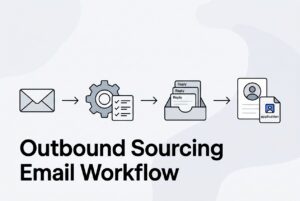
That is where the day-to-day efficiency comes from. You can send an application acknowledgment, alert a recruiter after screening, remind someone to review shared resumes, or assign an offer follow-up task after a stage change. You can also build email campaigns, track open and click activity, and use SMS or WhatsApp for candidate communication.
For a lean TA team, the point is not to automate judgment. The point is to remove routine work that slows people down. A sensible setup might be: application received, acknowledgment sent, recruiter task created, screening reviewed, and then a scheduling link sent once the candidate reaches the right stage.
Workflow automation and candidate communication
Workflow automation in CVViZ is useful because it keeps communication tied to real hiring events. That means the team does not have to remember every follow-up, and candidates do not wait in silence.
The system supports emails, notifications, status changes, follow-up tasks, reminders, and scheduling links. It also supports pre-screening answer-based automation, which lets teams use application responses to route candidates or adjust status based on rules they define. On the communication side, CVViZ includes email sync, templates, bulk emails, email campaigns, reminders, open and click tracking, and candidate history.
That combination matters in practice. A recruiter can send a confirmation email the moment an application arrives. A hiring manager can get a reminder when a candidate is ready for review. A follow-up task can appear when an offer stage changes. None of that should replace human review for consequential decisions, but it does keep the process moving.
CVViZ also supports AI-assisted conversations that ask role-specific follow-up questions and help qualified candidates reach the next scheduling step. Again, the recruiter stays in charge. The system helps collect information and move the workflow forward.
Interviews, scheduling, and evaluations
CVViZ supports interview scheduling, video interviews, and structured evaluation. That is important because interviews are often where hiring processes lose speed and consistency.
The scheduling setup lets a team publish availability, set meeting length, add buffers, define meeting location or URL behavior, and create a public booking link. With connected Google or Outlook calendars, candidates can see available slots in their time zone and book themselves. CVViZ also provides interview scheduler and calendar event flows for one-to-one interviews, plus email invitations.
For interview execution, CVViZ offers video interviews without requiring the candidate to log in. It also includes a live code editor for developer interviews. That is useful when you want a practical technical check without adding more scheduling friction.
Evaluation is handled separately through scorecards. A job can use Basic feedback, which includes an overall rating and remarks, or Detailed feedback, which uses technical-skill and soft-skill criteria plus an overall assessment. CVViZ recommends using specific criteria rather than vague labels. That keeps the feedback usable and easier to compare.
Recruitment analytics that help a TA leader act
CVViZ provides recruitment analytics so you can see what is happening inside the hiring process instead of guessing. The reporting covers jobs, candidates, source activity, and workflow movement, with export options for analysis and sharing.
That matters because a talent acquisition leader needs more than counts. You need to know where candidates enter, where they stall, which sources bring progress, and how busy the team really is. CVViZ’s reporting supports that kind of inspection.
Here is the practical reading of the data:
| Question | What to inspect | What to watch out for |
|---|---|---|
| Where are candidates coming from? | Applicants and hires by source | Bad tagging can distort source comparisons |
| Where does hiring slow down? | Stage counts and elapsed time | Stage definitions must be consistent |
| Which channels work best? | Source performance and progression | Volume alone does not equal quality |
| Are recruiters overloaded? | Open jobs, reviews, overdue tasks | Activity counts do not show decision quality |
The right way to use recruitment analytics is to define the metrics first, then inspect the movement. That gives you a clearer picture of bottlenecks and a better way to report to leadership.
What to know about the searchable database
CVViZ includes a searchable resume database, which is a major advantage when you want to reuse prior work. It supports full-text search, Boolean search, filters, tags, notes, and structured resume information. In plain terms, that means you can find a previous finalist without starting from zero.
CVViZ also supports AI talent rediscovery, which can surface potentially relevant past applicants for a new opening. That is valuable for silver medalists and prior candidates who were close, but not hired, the last time around. The recruiter still needs to review current fit, availability, and contact permissions.
The pricing page also advertises access to 800 million profiles. Treat that as a vendor-stated access figure, not a guarantee of searchable or contactable records for every use case. The useful point is narrower: CVViZ gives a team a searchable pool, so it can reuse candidate history instead of losing it in spreadsheets or inboxes.
Is CVViZ only for screening?
No. CVViZ is broader than screening. It combines sourcing, job distribution, career pages, ATS workflow, automation, interviews, communication, and recruitment analytics in one system.
That is the real distinction for a TA leader. Screening helps you rank candidates. CVViZ helps you run the process around them. If your current pain is only “we need better resume ranking,” then you are solving part of the problem. If your pain is “we lose candidates, spend too much time on admin, and cannot see where hiring stalls,” then you need a fuller workflow.
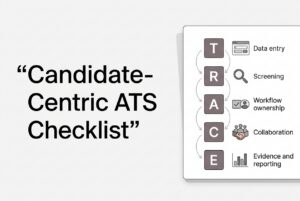
The best way to evaluate CVViZ is to map it against your hiring flow. Ask whether it helps you attract candidates, capture applicants, qualify them, engage them, schedule interviews, evaluate them, and measure what happened. If it does, you are looking at more than a screener.
FAQ
Does CVViZ support candidate sourcing from external platforms?
Yes. CVViZ supports sourcing from the web, supported job and social platforms, imports, and the existing candidate database. It includes People Search, Find on web, and job-specific GitHub sourcing.
Can candidates book their own interviews?
Yes. CVViZ supports public self-scheduling through connected calendar availability, so candidates can pick a time from the options you publish.
Does CVViZ offer recruitment analytics?
Yes. CVViZ provides reports for jobs, candidates, sources, and workflow activity, along with export options.
Can CVViZ help with past applicants?
Yes. CVViZ supports searchable database access and AI talent rediscovery, which makes it easier to revisit prior candidates for new roles.
Does a CVViZ career page automatically guarantee Google for Jobs visibility?
No. You can build and publish a career page, but search visibility still depends on how the page is configured and how it appears externally.